Design and Development

What Vue.js Does Better Than React

Mohit Chaudhary
November 17, 2023
8 min read
What Vue.js Does Better Than React

Exploring Vue.js: A React Engineer’s Perspective

Introduction

As a seasoned React engineer with five years of experience, my journey into the world of UI frameworks has been predominantly through React. I have a deep appreciation for React and have found it to be an excellent tool for building user interfaces. However, the dynamic landscape of front-end development led me to explore other contenders in the field, and one framework that caught my attention is Vue.js.

In this comprehensive exploration, we will delve into various aspects of Vue.js, comparing it with React and highlighting key differences. From philosophical distinctions to practical features, this deep dive aims to provide insights into how Vue.js operates and, more importantly, how it can enhance the life of a UI engineer.

Different Philosophies

The foundational disparity between Vue.js and React lies in their self-descriptions and marketing approaches. React positions itself as “a JavaScript library for building user interfaces,” while Vue.js identifies as a “progressive JavaScript framework.” This seemingly subtle distinction sets the tone for the fundamental differences in how each framework approaches UI development.

Understanding this contrast is crucial as it lays the groundwork for the subsequent exploration of their respective features and functionalities. React, being a library, follows a leaner approach, focusing on specific tasks and excelling in them, while Vue.js, as a framework, offers a more comprehensive and exhaustive set of tools.

Single File Components

Components are the building blocks of both Vue.js and React, yet their implementation differs. Vue.js introduces the concept of “Single File Components,” providing an integrated approach to handling UI (HTML), behavior (JavaScript), and appearance (CSS) in a single file. The simplicity of Vue.js’ Single File Components is evident in its concise structure:

html
<template>
<p>{{ greeting }} World!</p>
</template>
<script>
module.exports = {
data() {
return {
greeting: ‘Hello’,
};
},
};
</script><style scoped>
p {
font-size: 2em;
text-align: center;
}
</style>

React, on the other hand, separates UI and behavior by default, requiring additional libraries like Emotion or Styled Components for styling. While React’s community offers rich solutions, Vue.js provides built-in support for styling, simplifying the development process.

Officially Supported Related Libraries

Large UI applications often demand additional functionalities, such as routing and state management. Vue.js addresses these needs with officially supported libraries—Vue Router for routing and Vuex for state management. The explicit mention and integration of these libraries within the Vue.js ecosystem provide a structured approach for engineers, instilling confidence in the longevity and reliability of these solutions.

In contrast, React’s community-driven ecosystem offers various solutions, but the absence of officially supported libraries may pose challenges for newcomers in choosing the right tools. Vue.js’ approach exemplifies a strategic commitment to providing robust solutions that align seamlessly with the core framework.

Style Guide

Vue.js distinguishes itself with a comprehensive style guide that not only answers common questions but also establishes best practices and guidelines for writing maintainable and approachable applications. Maintained and supported by Vue.js itself, this style guide serves as a valuable resource for developers, streamlining the development process and fostering consistency across projects.

The absence of an officially supported style guide in the React ecosystem is notable. Integrating such a guide could enhance the development experience for React engineers, offering a centralized reference for best practices and community-vetted patterns.

Class and Style Bindings

Vue.js elevates the developer experience by seamlessly integrating styling into its components. The built-in support for class bindings and inline styles simplifies the handling of styles within Vue.js templates. React, while versatile, requires external libraries like classNames for similar functionality. Vue.js’ approach, directly from the documentation, demonstrates the elegance of incorporating styles:

html
<div
class="static"
:class="{ active: isActive, 'text-danger': hasError }"
>
</div>

This inherent support for styling in Vue.js showcases the advantages of a framework that controls its template syntax.

Slots

Vue.js introduces the concept of slots to handle the rendering of multiple arbitrary children within a component. This approach provides clarity and flexibility, allowing developers to denote where content should be placed inside a component. Vue.js’ use of slots, inspired by the Web Components spec draft, simplifies the structuring of components and offers a cleaner API:

html
<base-layout>
<template #header>
<h1>Here might be a page title</h1>
</template>
<template #default>
<p>A paragraph for the main content.</p>
<p>And another one.</p>
</template><template #footer>
<p>Here’s some contact info</p>
</template>
</base-layout>

This approach contrasts with React’s reliance on props for rendering children, demonstrating Vue.js’ commitment to providing shorthand for common tasks.

Directive Modifiers

Vue.js introduces Directive Modifiers, a feature that enhances the flexibility and readability of directives within templates. Directives, identified by the v- prefix, gain additional functionality through modifiers, simplifying common tasks associated with reactive DOM manipulations. For instance, Vue.js offers modifiers for event handlers, providing a concise syntax:

html
<a @click.stop="doThis"></a>

React, in contrast, would typically require the use of helper functions or custom components to achieve similar functionality. Vue.js’ directive modifiers offer a clean and developer-friendly way to handle common tasks associated with directives.

Form Input Bindings

The v-model directive in Vue.js introduces a noteworthy characteristic when binding data to form input elements. Vue.js internally manages different properties and events for various input elements, abstracting away the intricacies of data synchronization. A comparison between React and Vue.js in handling form input bindings reveals the simplicity of Vue.js:

html
<!-- React -->
<input type="input" value={message} onChange={onChange} />
<!– Vue.js –>
<input type=“input” v-model=“message” />

Vue.js’ approach simplifies the code, allowing developers to focus on the logic rather than the nuances of data synchronization.

Custom Directives

Vue.js empowers developers with the ability to create custom directives, offering a level of abstraction beyond components. While components remain the primary form of code reuse and abstraction, custom directives, such as Vue.js’ v-focus directive for auto-focusing an input element on mount, showcase the flexibility of Vue.js:

javascript
const app = Vue.createApp({})
app.directive('focus', {
mounted(el) {
el.focus()
}
})
<input v-focus />

In contrast, React might require a custom component for a similar task, showcasing Vue.js’ ability to provide lightweight solutions for specific use cases.

Written in TypeScript

A notable aspect of Vue.js is its recent rewrite in TypeScript, making TypeScript support a first-class feature within the framework. While the choice of the underlying language might not drastically impact a developer’s experience, having a framework written in TypeScript can enhance the overall TypeScript support and integration.

Video

For those interested in a more visual exploration of these thoughts, I’ve expanded on this content in video form. Feel free to watch the video for a deeper dive into the comparisons and insights.

Closing Thoughts

While this exploration sheds light on the strengths of Vue.js and its potential influence on React, it is essential to emphasize that the goal is not to abandon React but to recognize and appreciate the unique features of Vue.js. As a React enthusiast, I find the library-centric nature of React enjoyable and efficient.

However, there is room for improvement and inspiration. React could benefit from adopting certain aspects of Vue.js, such as the implementation of an officially supported style guide. This exploration aims to broaden perspectives, sparking conversations within the developer community and fostering continuous improvement in UI frameworks.

In conclusion, Vue.js has certainly introduced me to intriguing approaches and features that enhance the development experience. As the world of front-end development continues to evolve, cross-pollination of ideas between frameworks is a positive catalyst for innovation and improvement.

You May Also Like

How UI/UX Impacts Conversion Rates
Design and Development

How UI/UX Impacts Conversion Rates

Learn how strategic UI/UX design can significantly improve your website’s conversion rates…

Read More
The Importance of Prototyping in UX Design: A Simple Guide to the Best Tools
Design and Development

The Importance of Prototyping in UX Design: A Simple Guide to the Best Tools

Prototyping is one of the most exciting and essential parts of the UX design process. Think of it…

Read More
How to Choose the Best Web Development Company in Delhi for Your Business?
Design and Development

How to Choose the Best Web Development Company in Delhi for Your Business?

Web development services are vital for the growth of any business. In this fast-paced digital world, web development…

Read More

Ready to Transform Your Business with AI?

Explore how our AI-first solutions can help your business grow and innovate.

Design and Development

Should I Store This Data in Vuex – When Should I use Vuex?

Mohit Chaudhary
November 17, 2023
8 min read
Should I Store This Data in Vuex – When Should I use Vuex?

Navigating State Management in Vue.js: When and Why to Use Vuex

Introduction

When delving into the realm of Vuex, a common dilemma arises among developers – what data should be stored in Vuex? The initial inclination often leads to the “Let’s Store Everything in Vuex” phase, only to be met with the realization that this approach might not be the panacea for state management in Vue.js applications. This article aims to provide a comprehensive exploration of when Vuex is a fitting solution and when alternative approaches may be more appropriate.

1. Understanding Vuex Integration

Out of the box, Vue.js offers a robust mechanism for handling state through reactive data properties and the ability to pass properties to child components. For simpler applications or those incorporating Vue.js as a supplementary magic touch, Vuex may not be necessary.

javascript
// Example of local state in a Vue component
export default {
name: 'MyComponent',
data() {
return {
someValue: 'Hello World',
};
},
}

2. When to Use Vuex

For large-scale single-page applications, scenarios may arise where the same data is needed in disparate sections of the application. This is where Vuex, as a centralized state management tool, proves advantageous.

Reasons for Storing Data in Vuex

2.1 Data Accessibility Across Components

The primary use case for Vuex is when data needs to be accessed by multiple independent components, not directly related to each other. Examples include user settings that configure the application’s appearance or date format.

2.2 Centralized API/Data Fetching Logic

In intricate applications, such as a To-Do app with varied categories, Vuex allows fetching data once and accessing it across components distributed across different routes.

2.3 Persisting Application State

Vue.js plugins like vuex-persistedstate facilitate easy state persistence in the browser, enabling advanced use cases, including offline functionality.

3. Reasons Not to Store Data in Vuex

Once committed to using Vuex for state management, every new component prompts a decision on whether to store its state in Vuex. However, it’s crucial to acknowledge situations where Vuex may not be the optimal solution.

Downsides of Using Vuex

3.1 Complexity

While simpler than some alternatives, Vuex introduces additional complexity compared to managing local component state directly. Evaluate if the benefits of centralized state management justify this complexity.

3.2 Overhead

Using Vuex in a component introduces architectural overhead. Default to local component state and opt for Vuex only when specific reasons arise.

4. Alternatives to Vuex

In scenarios where Vuex might not be the optimal solution, several alternatives exist, each tailored to specific use cases.

4.1 Passing Down Props

The simplest solution is often the best. If passing data from a parent to a child component via props is feasible, it is a recommended approach.

4.2 Provide/Inject

Vue.js provides the less-known provide/inject feature, useful for passing data from a parent component to one or more child components not directly descended from the parent.

4.3 Context Provider Pattern

Vue 3 introduces an upgraded Provide/Inject mechanism, allowing the creation of Context Providers, enabling state sharing between components without the overhead of Vuex.

4.4 Simple Vuex Alternative: Pinia

For those seeking a lightweight global state management solution, Pinia serves as a capable and less heavyweight alternative to Vuex.

4.5 Caching Server-Side Data

Utilizing Apollo or swrv, developers can implement caching mechanisms for server-side data, enhancing performance and reducing unnecessary API calls.

4.6 Portals

PortalVue, seemingly unrelated to state management, can offer direct access to a component’s state in certain situations, providing an alternative to centralized stores.

4.7 GraphQL & Apollo

For applications already leveraging GraphQL and Apollo, utilizing the local state feature of Apollo can serve as a viable option for state management.

5. Decision Flow Chart

To facilitate decision-making on whether to store data in Vuex, a flow chart provides a structured approach to evaluating the necessity of centralized state management.

Vuex

Vuex

Conclusion

In the diverse landscape of software development, there is no one-size-fits-all solution. Situational awareness is key, and while some techniques may excel in specific contexts, they might not universally apply. Embrace a mindset open to exploring both new and established approaches, recognizing that the learning process is iterative, and code can always be refactored for improvement.

You May Also Like

How UI/UX Impacts Conversion Rates
Design and Development

How UI/UX Impacts Conversion Rates

Learn how strategic UI/UX design can significantly improve your website’s conversion rates…

Read More
The Importance of Prototyping in UX Design: A Simple Guide to the Best Tools
Design and Development

The Importance of Prototyping in UX Design: A Simple Guide to the Best Tools

Prototyping is one of the most exciting and essential parts of the UX design process. Think of it…

Read More
How to Choose the Best Web Development Company in Delhi for Your Business?
Design and Development

How to Choose the Best Web Development Company in Delhi for Your Business?

Web development services are vital for the growth of any business. In this fast-paced digital world, web development…

Read More

Ready to Transform Your Business with AI?

Explore how our AI-first solutions can help your business grow and innovate.

Design and Development

Trying Vue as a React Developer: A Quick Introduction

Mohit Chaudhary
November 16, 2023
8 min read
Trying Vue as a React Developer: A Quick Introduction

Exploring the Shift: Vue vs. React in Modern Front-End Development

Introduction

Over the past decade, JavaScript has stood tall as the preferred language for front-end web development. In this dynamic landscape, React has emerged as the dominant framework, consistently holding the top position since 2016, as revealed by the State of JS survey. However, a subtle yet noteworthy trend has been unfolding—Vue is steadily gaining ground, offering a compelling alternative to React. In this article, we delve into the reasons behind this shift, comparing Vue and React across various aspects to empower developers in making informed choices.

The Rise of Vue: A Brief History

Vue, crafted by Evan You in 2014, draws inspiration from AngularJS and React. What sets Vue apart is its independent evolution, free from the influence of large corporations like Google and Facebook. This autonomy has allowed Vue to incorporate diverse influences, providing a unique approach to front-end development.

Unveiling Project Structures and Syntax

Project Structure

The foundational structure of Vue and React projects shares similarities, utilizing HTML, JavaScript, and application entry files. Both rely on an HTML entry file (index.html), a JavaScript entry file (main.js), and an application entry file (App.vue in Vue or App.jsx in React). This structure ensures seamless integration of plugins and tools without disrupting application logic.

markdown
├── index.html
├── package.json
├── src
│ ├── App.vue
│ └── main.js
└── vite.config.js
Syntax Variations

While both frameworks adopt virtual DOM for efficient DOM manipulations, differences emerge in their syntax. Vue embraces directives influenced by AngularJS, featuring operations like for loops (v-for), conditionals (v-else-if), and event handling (v-on). React, in contrast, leverages JSX, allowing developers to employ familiar JavaScript syntax for tasks like for loops and event handlers.

jsx

import React, { useState } from 'react';

function Example() {
const [count, setCount] = useState(0);

return (
<div>
<h2>Click the button, you know you want to</h2>

<button onClick={() => setCount(count + 1)}>
count is: {count}
</button>
</div>
);
}

Vue opts for a clearer separation of concerns within a single file component, breaking down into script, template, and style sections—a structure resembling the trio of languages used in web development: JavaScript, HTML, and CSS.

html
<script setup>
import { ref } from 'vue'
const count = ref(0)
</script>
<template>
<h2>Click the button, you know you want to</h2><button type=“button” @click=“count++”>
count is: {{ count }}
</button>
</template><style>
#app {
font-family: Avenir, Helvetica, Arial, sans-serif;
text-align: center;
margin-top: 3rem;
}
</style>

Navigating a ‘Hello World’ Vue Project

To grasp the nuances of Vue in action, let’s embark on a tour of a simple Vue project and draw comparisons with a React counterpart.

Project Dependencies

In a Vue project, dependencies differ, with vue as a project dependency and two development dependencies: vite and @vitejs/plugin-vue. In contrast, a React project typically includes react and react-dom.

json
{
"name": "vite-vue-starter",
"dependencies": {
"vue": "^3.2.33"
},
"devDependencies": {
"@vitejs/plugin-vue": "^2.3.2",
"vite": "^2.9.8"
}
}
Project Structure

The file structure for both Vue and React projects remains similar, showcasing the adaptability of tools like Vite across frameworks.

markdown
vite.config.js
index.html
src
│ main.js (or main.jsx in React)
│ App.vue (or App.jsx in React)
components
│ HelloWorld.vue (or HelloWorld.jsx in React)
Configuration Files

In the Vite configuration file, the framework specificity is explicitly declared, signaling to Vite that it is a Vue project.

javascript

// vite.config.js

import { defineConfig } from ‘vite’
import vue from ‘@vitejs/plugin-vue’

export default defineConfig({
plugins: [vue()]
})

HTML Entry Point

The entry HTML file in Vue mirrors its React counterpart, loading the entire application within a div.

html

<!-- index.html -->

<!DOCTYPE html>

<html lang=“en”>
<head>
<!– Head content –>
</head>

<body>
<div id=“app”></div>
<script type=“module” src=“/src/main.js”></script>
</body>
</html>

Root Component

In both Vue and React, the root component file, main.js (or main.jsx), imports the top-level application component (App.vue or App.jsx) and mounts it to the specified DOM element.

javascript

// src/main.js (or main.jsx in React)

import { createApp } from ‘vue’
import App from ‘./App.vue’

createApp(App).mount(‘#app’)

jsx

// Equivalent React main.jsx file

import React from ‘react’
import ReactDOM from ‘react-dom’
import App from ‘./App’

ReactDOM.render(<App />, document.getElementById(‘app’))

Application Component

The main application component file (App.vue or App.jsx) encapsulates the logic, template, and styling, adhering to the respective framework’s conventions.

html

<!-- src/App.vue -->

<script setup>
import HelloWorld from ‘./components/HelloWorld.vue’
</script>

<template>
<HelloWorld msg=“Hello World” />
</template>

<style>
#app {
font-family: Avenir, Helvetica, Arial, sans-serif;
text-align: center;
margin-top: 3rem;
}
</style>

jsx

// Equivalent React App.jsx file

import HelloWorld from ‘./components/HelloWorld.jsx’

function App() {
return (
<div>
<HelloWorld />
</div>

)
}

export default App

Hello World Component

The Hello World component file (HelloWorld.vue or HelloWorld.jsx) showcases the framework-specific syntax and structure.

html

<!-- src/components/HelloWorld.vue -->

<script setup>
import { ref } from ‘vue’

defineProps({
msg: String,
})

const count = ref(0)
</script>

<template>
<!– Template content –>
</template>

<style scoped>
/* Scoped styles */
</style>

jsx

// Equivalent React HelloWorld.jsx file

/* React component structure */

The Fusion

The collaboration of these components results in a complete Vue application, visually reflecting the essence of Vue’s clean separation of concerns and concise syntax.

Screenshot of a Hello World Vue application. The text reads "Hello Vue 3 + Vite" with links below to documentation, as well as a button with a click counter set to 0.

Unveiling Vue Meta-Frameworks

Similar to React’s meta-frameworks like Next.js and Gatsby, Vue boasts its own meta-frameworks—Nuxt.js and Gridsome. Nuxt.js, drawing inspiration from Next.js, offers features such as SSR, API routes, serverless function integration, and third-party modules. These meta-frameworks bring additional capabilities, including static site generation, server-side rendering, and authentication, catering to diverse developer requirements.

Comparing Vue project structure and syntax. Let's start with the overall project structure. One way that React and Vue are similar, is their use ...

Comparing Vue project structure and syntax. Let’s start with the overall project structure. One way that React and Vue are similar, is their use …

Keeping Pace with Evolution

In conclusion, the shift from React to Vue represents a nuanced exploration of front-end development. Despite variations in syntax and project structures, transitioning between the two frameworks remains feasible for developers. Vue’s concise syntax and clean separation of concerns offer an appealing alternative. Both ecosystems, while distinct, empower developers to build robust applications with a diverse set of tools and libraries. As we navigate the evolving landscape of front-end development, staying informed about the strengths and nuances of Vue and React ensures developers can seamlessly adapt to the demands of modern web development.

Subscribe to the Optimized Dev Newsletter to stay abreast of the latest tools, frameworks, and insights that enhance your web development journey.

You May Also Like

How UI/UX Impacts Conversion Rates
Design and Development

How UI/UX Impacts Conversion Rates

Learn how strategic UI/UX design can significantly improve your website’s conversion rates…

Read More
The Importance of Prototyping in UX Design: A Simple Guide to the Best Tools
Design and Development

The Importance of Prototyping in UX Design: A Simple Guide to the Best Tools

Prototyping is one of the most exciting and essential parts of the UX design process. Think of it…

Read More
How to Choose the Best Web Development Company in Delhi for Your Business?
Design and Development

How to Choose the Best Web Development Company in Delhi for Your Business?

Web development services are vital for the growth of any business. In this fast-paced digital world, web development…

Read More

Ready to Transform Your Business with AI?

Explore how our AI-first solutions can help your business grow and innovate.

Design and Development

Vue vs. React — Comparison. What is the best choice for 2023?

Mohit Chaudhary
November 16, 2023
8 min read
Vue vs. React — Comparison. What is the best choice for 2023?

A Comprehensive Comparison of Vue.js and React.js: Choosing the Right Framework for Your Project

Table of Contents:
  1. Introduction
  2. Meet the Contestants: Vue vs. React
  3. Popularity Contest: Vue vs. React
  4. Performance Showdown: Vue vs. React
  5. Size Matters: Analyzing the Footprint of Vue and React
  6. Platform Play: Desktop and Mobile Development in Vue and React
  7. Flexibility in Action: Vue vs. React
  8. Community Power: Support for Vue and React
  9. Framework Face-Off: React.js Overview
    • 9.1 Advantages of React
    • 9.2 Disadvantages of React
  10. Framework Face-Off: Vue.js Overview
    • 10.1 Advantages of Vue.js
    • 10.2 Disadvantages of Vue.js
  11. Choosing Between Vue and React: What Should I Consider?
  12. Real-world Projects Developed in React Native by Fulcrum
  13. Conclusion

Introduction:

Choosing the right JavaScript framework is a pivotal decision for developers, akin to the mesmerizing contemplation of fire and water. In the realm of web development, the debate between Vue.js and React.js rages on. This article aims to delve into an honest comparison between these contenders, aiding you in making an informed decision for your 2022 projects. Through statistical insights, performance analyses, and a touch of personal opinion, we unravel the intricacies of Vue vs. React.

Vue vs. React

Vue vs. React

2. Meet the Contestants: Vue vs. React

Despite acknowledging JavaScript’s flaws, it remains the preferred language for 64.96% of professional developers. Vue and React emerge as key players in the JavaScript framework arena, as reported by the State of Frontend 2022 survey. Now, let’s scrutinize each contender individually.

3. Popularity Contest: Vue vs. React

To gauge popularity, we turn to various metrics. Stack Overflow Developer Survey statistics, Google Trends, npm trends, and GitHub Stars all paint a picture. While React leads in GitHub Stars, Vue gains ground in terms of developer interest. However, the business lens reveals over 200 React job vacancies compared to Vue’s 40, signaling a robust industry preference for React.


Vue vs. React

Vue vs. React

4. Performance Showdown: Vue vs. React

Examining performance is crucial, with Vue and React employing the virtual DOM for efficiency. Vue slightly outperforms React, boasting better stability and speed. The subtle performance difference, measured in milliseconds, underscores the similarity in their performance prowess.

5. Size Matters: Analyzing the Footprint of Vue and React

Size, a critical metric, sees Vue’s compact 80 KB against React’s 100 KB. React’s need for third-party libraries, like for routing, contributes to its larger size. Despite this, both frameworks remain well-suited for developing small applications.

Vue vs. React

Vue vs. React

6. Platform Play: Desktop and Mobile Development in Vue and React

React’s React Native simplifies native iOS and Android app development. Vue, on the other hand, leans on projects like Weex and NativeScript-Vue. While React Native prevails, Vue’s alternative approaches cater to diverse needs.

7. Flexibility in Action: Vue vs. React

React’s core provides basic functionality, relying on additional libraries for routing, state management, and more. Vue, in contrast, offers a richer set of standard tools, eliminating the need for as many third-party libraries. This contrast exemplifies the differing philosophies behind these frameworks.

8. Community Power: Support for Vue and React

React, nurtured by Facebook, boasts a vast community ensuring continuous development and support. Vue, born from an individual’s vision, thrives on a passionate developer community. The contrast highlights the corporate backing behind React and the community-driven nature of Vue.

9. Framework Face-Off: React.js Overview

9.1 Advantages of React:
  • Convenient usage with cross-platform capabilities.
  • Trusted technology from Facebook, ensuring reliability.
  • A massive community fostering knowledge sharing.
  • Stable versioning for backward compatibility.
  • Active use of TypeScript for enhanced development.
  • Short lead time for prototype applications.
  • Seamless cross-platform development for iOS and Android.
9.2 Disadvantages of React:
  • Criticisms of insufficient documentation.
  • Dependency on additional libraries for extended functionality.
  • Challenges in compiling an entire framework based on React.
  • Flexibility may lead to decision-making complexities.
  • JSX syntax can hinder effective library use.
  • Applications tend to be heavier, affecting performance.
  • Difficulty in adapting for all Android devices.
  • Minor performance decrease due to intermediate libraries.
Vue vs. React

Vue vs. React

10. Framework Face-Off: Vue.js Overview

10.1 Advantages of Vue.js:
  • Compact runtime library with good documentation.
  • Familiar structure based on JavaScript, HTML, and CSS.
  • Modular structure for flexible problem-solving.
  • High-speed operations with virtual DOM implementation.
  • Vue-CLI providing various tools and project templates.
  • Single file components for easy integration.
  • International user-friendly features.
10.2 Disadvantages of Vue.js:
  • Growing but not as widespread a community.
  • Lack of support from major tech players.
  • Predominantly popular in China, limiting content availability.
  • Component approach falls short compared to React.
Vue vs. React

Vue vs. React

11. Choosing Between Vue and React: What Should I Consider?

As the battle intensifies, the choice depends on project requirements. From development time and size considerations to community support and flexibility, weigh the factors that matter most to your specific project. React’s industry backing may sway larger projects, while Vue’s simplicity may attract those prioritizing rapid development.

12. Real-world Projects Developed in React Native by Fulcrum

Explore real-world applications developed by Fulcrum using React Native, including Kör, Buff, and Hyfa. These projects showcase the diverse capabilities of React Native in creating educational platforms, loyalty systems for gamers, and cross-platform applications.

13. Conclusion

In the Vue vs. React saga, each framework presents its strengths and weaknesses. The decision ultimately hinges on your project’s unique needs. React’s industry dominance, backed by international companies, contrasts with Vue’s simplicity and community-driven ethos. As of 2021, React holds a leading position, yet the choice remains subjective and project-specific. Share your perspective in the comments and contribute to the ongoing debate. Choose wisely, and may your coding journey be as seamless as the framework you select.

You May Also Like

How UI/UX Impacts Conversion Rates
Design and Development

How UI/UX Impacts Conversion Rates

Learn how strategic UI/UX design can significantly improve your website’s conversion rates…

Read More
The Importance of Prototyping in UX Design: A Simple Guide to the Best Tools
Design and Development

The Importance of Prototyping in UX Design: A Simple Guide to the Best Tools

Prototyping is one of the most exciting and essential parts of the UX design process. Think of it…

Read More
How to Choose the Best Web Development Company in Delhi for Your Business?
Design and Development

How to Choose the Best Web Development Company in Delhi for Your Business?

Web development services are vital for the growth of any business. In this fast-paced digital world, web development…

Read More

Ready to Transform Your Business with AI?

Explore how our AI-first solutions can help your business grow and innovate.

Design and Development

Angular vs Vue: Which Framework to Choose in 2023?

Mohit Chaudhary
November 16, 2023
8 min read
Angular vs Vue: Which Framework to Choose in 2023?

Exploring Frontend Frameworks: Angular vs. Vue

Evolution of Frontend Frameworks: A Decade in Review

The rapid evolution of frontend frameworks over the past decade has been nothing short of revolutionary. As CTOs embark on new projects, the crucial decision of selecting the right frontend technology lingers. This comprehensive exploration aims to provide valuable insights into two powerful Javascript frameworks—Angular and Vue. This guide is crafted for smart UI frontend developers seeking guidance on the framework that aligns with their project goals.

Table of Contents

  1. Overview of Frameworks
    • 1.1 What is Angular?
    • 1.2 What is Vue?
  2. Market Usage Statistics
    • 2.1 Angular Statistics
    • 2.2 Vue Statistics
  3. Pros and Cons
    • 3.1 Pros of Angular
    • 3.2 Cons of Angular
    • 3.3 Pros of Vue
    • 3.4 Cons of Vue
  4. Use Cases
    • 4.1 Use Cases of Angular
    • 4.2 Use Cases of Vue
  5. Popular Applications
    • 5.1 Popular Apps Built with Angular
    • 5.2 Popular Apps Built with Vue
  6. Performance Comparison
    • 6.1 Angular’s Performance Features
    • 6.2 Vue’s Performance Features
  7. Application Architecture
    • 7.1 Angular’s Architecture
    • 7.2 Vue’s Architecture
  8. Ease of Testing
    • 8.1 Testing Angular Apps
    • 8.2 Testing Vue Apps
  9. Scalability
    • 9.1 Angular’s Scalability
    • 9.2 Vue’s Scalability
  10. Suitability for Building Complex Apps
    • 10.1 Angular for Complex Apps
    • 10.2 Vue for Complex Apps
  11. Security
    • 11.1 Security in Angular
    • 11.2 Security in Vue
  12. User Experience
    • 12.1 Angular’s User Experience
    • 12.2 Vue’s User Experience
  13. Rapid Development
    • 13.1 Angular’s Contribution to Rapid Development
    • 13.2 Vue’s Rapid Development Pace
  14. Application Size
    • 14.1 Angular’s Application Size
    • 14.2 Vue’s Application Size
  15. Code Maintainability
    • 15.1 Code Maintainability in Angular
    • 15.2 Code Maintainability in Vue
  16. Learning Curve
    • 16.1 Learning Curve of Angular
    • 16.2 Learning Curve of Vue
  17. Hiring Developers
    • 17.1 Hiring Angular Developers
    • 17.2 Hiring Vue Developers
  18. Conclusion
    • 18.1 Angular’s Evolution and Future Prospects
    • 18.2 Vue’s Technical Prowess and Future Outlook
    • 18.3 Decision-Making Factors: Team Size, Experience, and Reliability

1. Overview of Frameworks

1.1 What is Angular?

Angular, a typescript-based Javascript framework, empowers businesses to construct scalable web applications. Launched in 2016, it offers a standalone front-end framework with built-in tools and libraries, promoting code reusability across diverse platforms. With dynamic UI binding and two-way data binding, Angular stands as a comprehensive solution for modern web development.

1.2 What is Vue?

Vue, on the other hand, is a lightweight and flexible Javascript framework designed for building modern single-page applications (SPAs) and front-end web apps. Created in 2014, Vue is celebrated for its versatility and progressive nature, allowing developers to modify application code without impacting core features. Its high decoupling and customizable modules make it an attractive choice for UI development.

Angular vs Vue

Angular vs Vue

2. Market Usage Statistics

2.1 Angular Statistics

Angular boasts a usage rate of over 0.4% among all websites, particularly favored by high-traffic sites. With 80k stars, 21k forks, and contributions from 1,542-plus developers on GitHub, Angular holds a solid presence, being the framework of choice for 22.96% of developers globally.

2.2 Vue Statistics

Vue powers over 1,940,742 successful websites globally, with 94.3% utilizing Vue v2. The Vue community, marked by 194k stars and 31.6k forked projects, showcases Vue’s steady growth, albeit with a market share below 0.8%.

3. Pros and Cons

3.1 Pros of Angular

  1. Advantage of TypeScript: Offers superior navigation, refactoring services, and autocomplete, enhancing code reliability for enterprise-scale applications.
  2. Google Support: Long-term support from Google with detailed documentation and possibilities for framework expansion.
  3. High Performance: Ensures high performance with features like hierarchical dependency injection, Ivy renderer, AOT compiler, and Angular Universal support.
  4. Recommendation of Updates: Angular CLI provides timely recommendations for dependencies, loaders, and plugins.
  5. Third-party Integrations: Facilitates easy integration of third-party applications, providing flexibility and tools for development.
  6. Customizable Framework: Allows easy integration of elements and modules from other frameworks, supporting code reuse and manageability.

3.2 Cons of Angular

  1. Complexity: Despite a component-based architecture, Angular can become verbose, managing components and repetitive tasks.
  2. Angular Versions: Migration from AngularJS to Angular can be challenging, and learning each version contributes to a steeper learning curve.
  3. Heavily Weighted Framework: Simple applications may become bloated due to requirements of boilerplate codes, abstractions, and bundled features.

3.3 Pros of Vue

  1. Progressive: Allows gradual integration or migration without disrupting ongoing development.
  2. Conventional: Simplifies boilerplate code, enabling faster application development.
  3. Effective Size: Lightweight and optimized, Vue applications remain fast and efficient with each new version.
  4. Functional Extension: Offers additive API features for flexible and extensive component logic composition.
  5. Future Ready: Known for a strong production environment, making updates and maintenance easier by default.

3.4 Cons of Vue

  1. Community: Language limitations in the community, particularly discussions predominantly in Chinese, can hinder learning and resource sharing for English-speaking developers.
  2. Code Reactivity: Two-way binding can lead to rendering chunks triggered by DOM, impacting performance.
  3. Support: Considered a young framework, Vue’s smaller community might struggle to handle issues in large-scale projects.
  4. Flexibility Risk: Excessive flexibility may lead to project over-complication, errors, and irregularities.
  5. Resource Limitation: Despite a wide ecosystem, Vue may lack compatibility with common external tools and frameworks.

4. Use Cases

4.1 Use Cases of Angular

Angular is apt for:

  • Video streaming applications
  • eCommerce applications
  • Real-time data applications
  • User-generated content portals
  • Content-based websites
  • Progressive web applications
  • Native mobile applications
  • Single-page applications (SPAs)

4.2 Use Cases of Vue

Vue excels in:

  • Interactive web interfaces
  • Dynamic user interfaces
  • Real-time applications
  • Content management systems (CMS)
  • Small to medium-sized web applications
  • Single-page applications (SPAs)
  • Frontend applications for enterprise systems

5. Popular Applications

5.1 Popular Apps Built with Angular

  1. Google Cloud Platform
  2. IBM Cloud Pak for Applications
  3. Microsoft Office Online
  4. Adobe Reader
  5. Xbox
  6. PayPal
  7. Weather.com
  8. YouTube TV

5.2 Popular Apps Built with Vue

  1. Alibaba
  2. Xiaomi
  3. Nintendo
  4. EuroNews
  5. 9GAG
  6. WizzAir
  7. Grammarly
  8. Laravel Spark

6. Performance Comparison

6.1 Angular’s Performance Features

  • Ahead-of-Time (AOT) Compilation: Boosts performance by translating TypeScript and HTML into efficient JavaScript during build time.
  • Ivy Renderer: Enhances runtime performance by reducing bundle sizes and speeding up component rendering.
  • Change Detection: Utilizes zone.js for efficient and automatic change detection, minimizing unnecessary DOM manipulations.

6.2 Vue’s Performance Features

  • Virtual DOM: Enhances rendering efficiency by updating the virtual DOM and applying changes selectively to the actual DOM.
  • Reactiveness: Implements a fine-grained reactivity system for optimized component updates.
  • Transition System: Provides a built-in transition system for smooth animations and enhanced user experience.

7. Application Architecture

7.1 Angular’s Architecture

Angular follows a component-based architecture, where the application is divided into reusable components, each managing a specific part of the UI. Dependency injection ensures loose coupling between components, simplifying testing and maintenance. The use of services allows data sharing between components.

7.2 Vue’s Architecture

Vue also adopts a component-based architecture, promoting reusability and maintainability. The framework’s simplicity allows developers to create isolated components with their logic and templates. Vue’s reactivity system ensures that changes in state automatically trigger updates in the UI, simplifying application development.

8. Ease of Testing

8.1 Testing Angular Apps

Angular’s built-in dependency injection and modular architecture facilitate easy testing. Tools like Jasmine and Karma are commonly used for unit testing, while Protractor is preferred for end-to-end testing. The framework encourages a test-driven development (TDD) approach with robust support for various testing scenarios.

8.2 Testing Vue Apps

Vue’s simplicity and modular structure make testing straightforward. Popular testing libraries like Jest and Vue Test Utils simplify unit and component testing. The framework’s reactivity system aids in testing component behavior, and Vue Test Utils provides utilities for writing comprehensive test cases.

9. Scalability

9.1 Angular’s Scalability

Angular is well-suited for large-scale applications, thanks to its modular architecture, dependency injection, and TypeScript. The framework’s ability to manage complex state and components ensures scalability. Moreover, Angular Universal allows server-side rendering for improved performance.

9.2 Vue’s Scalability

Vue is considered scalable for medium to large-sized applications. Its component-based architecture promotes scalability, and the framework allows developers to structure the application as needed. However, Vue may require additional state management tools for large-scale projects, such as Vuex.

10. Suitability for Building Complex Apps

10.1 Angular for Complex Apps

Angular is a robust choice for complex applications due to its structured architecture, TypeScript support, and extensive tooling. The framework’s modularity and dependency injection make it suitable for large projects with multiple components and complex business logic.

10.2 Vue for Complex Apps

Vue is capable of handling complex applications, but its suitability may depend on the specific project requirements. Vue’s simplicity and flexibility can be advantageous, but large-scale projects may require additional state management solutions like Vuex. Vue’s progressive nature allows developers to introduce complexity gradually.

11. Security

11.1 Security in Angular

Angular has built-in security features, including strict contextual escaping, content security policy (CSP) support, and automatic sanitization of user input. Additionally, Angular’s use of TypeScript enhances security by catching potential errors during development.

11.2 Security in Vue

Vue provides security features such as template-based declarative rendering, preventing common security vulnerabilities. However, developers must be cautious with user input handling to avoid potential security risks. Vue’s documentation emphasizes best practices for secure application development.

12. User Experience

12.1 Angular’s User Experience

Angular offers a comprehensive set of tools and features to enhance user experience. Its two-way data binding and real-time updates contribute to a seamless and interactive UI. The framework’s extensive documentation and community support further aid developers in creating engaging user interfaces.

12.2 Vue’s User Experience

Vue focuses on delivering a smooth and intuitive user experience. Its reactivity system ensures that changes in data automatically reflect in the UI, providing a responsive interface. Vue’s simplicity allows for quick development of interactive and user-friendly applications.

13. Rapid Development

13.1 Angular’s Contribution to Rapid Development

Angular’s extensive tooling, CLI, and built-in features contribute to rapid development. The framework’s support for TypeScript enables developers to catch errors early, and the Angular CLI streamlines tasks such as scaffolding, testing, and deployment. However, the learning curve may impact initial development speed.

13.2 Vue’s Rapid Development Pace

Vue’s simplicity and ease of integration contribute to rapid development. The framework’s progressive nature allows developers to adopt features gradually, and its flexible design reduces boilerplate code. Vue’s CLI simplifies project setup and development tasks, promoting a faster development pace.

14. Application Size

14.1 Angular’s Application Size

Angular applications can be larger in size compared to Vue due to its feature-rich nature and the inclusion of dependencies. However, Angular’s tree-shaking capabilities help reduce the final bundle size by eliminating unused code during the build process.

14.2 Vue’s Application Size

Vue applications are generally smaller in size compared to Angular. Vue’s modular design and ability to selectively import features contribute to a more lightweight application. The framework’s focus on optimization ensures efficient bundling and minimized application size.

15. Code Maintainability

15.1 Code Maintainability in Angular

Angular’s component-based architecture and TypeScript support contribute to code maintainability. The use of services for data sharing and the modular structure allow for easier code organization. Additionally, Angular’s strong typing reduces the likelihood of runtime errors.

15.2 Code Maintainability in Vue

Vue’s simplicity and component-based structure enhance code maintainability. The framework’s reactivity system simplifies state management, and the ability to encapsulate logic within components promotes clean and organized code. Vue’s flexibility allows for easy modifications and updates.

16. Learning Curve

16.1 Learning Curve of Angular

Angular has a steeper learning curve compared to Vue, primarily due to its extensive features, TypeScript integration, and complex syntax. Developers may need time to grasp concepts such as dependency injection, decorators, and the Angular CLI. However, the structured documentation assists in the learning process.

You May Also Like

How UI/UX Impacts Conversion Rates
Design and Development

How UI/UX Impacts Conversion Rates

Learn how strategic UI/UX design can significantly improve your website’s conversion rates…

Read More
The Importance of Prototyping in UX Design: A Simple Guide to the Best Tools
Design and Development

The Importance of Prototyping in UX Design: A Simple Guide to the Best Tools

Prototyping is one of the most exciting and essential parts of the UX design process. Think of it…

Read More
How to Choose the Best Web Development Company in Delhi for Your Business?
Design and Development

How to Choose the Best Web Development Company in Delhi for Your Business?

Web development services are vital for the growth of any business. In this fast-paced digital world, web development…

Read More

Ready to Transform Your Business with AI?

Explore how our AI-first solutions can help your business grow and innovate.

Design and Development

When not to use Vue.JS and when is it a must?

Mohit Chaudhary
November 16, 2023
8 min read
When not to use Vue.JS and when is it a must?

Unleashing the Power of Vue.js: A Comprehensive Guide to Front-End Development

Introduction

Vue.js stands out as a versatile and sophisticated front-end framework, providing developers with a flexible and elegant API for building robust infrastructure. In addition to its capability to seamlessly handle animations and transitions, Vue.js empowers developers to create captivating user experiences. This article delves into the intricacies of Vue.js, exploring its applications, benefits, and the scenarios where it shines the brightest.

The Animation Advantage

Vue.js proves to be an exceptional framework for crafting single-page applications and websites, particularly excelling in interactive and animated elements. Version 2.0 of Vue.js introduces enhanced transition flexibility, enabling easy integration with third-party libraries and simplifying the development of intricate animations. The framework offers built-in transition group and transition components, leveraging both JavaScript hooks and CSS for creating seamless and engaging user experiences.

Seamless Integration for Multiple Apps

One of Vue.js’s remarkable strengths lies in its effortless integration capabilities. Developers can seamlessly integrate Vue.js with server-rendered apps, making it an ideal choice for constructing single-page applications. Integration with existing server pages, facilitated by frameworks like Express, Rails, or Laravel, enhances interactivity. This integration enables the creation of client validation forms and content fetching through Vue.js, providing a smooth user experience.

Building Comprehensive Single-Page Applications

When the goal is to construct comprehensive single-page applications from scratch, Vue.js emerges as the go-to framework. With built-in support for Webpack integration and a host of modern features such as tree-shaking, bundling, and code-splitting, Vue.js streamlines the development process. Integrating Vue.js into existing pages requires loading it in the required script tag and incorporating it into the JavaScript file, where professionals providing JavaScript development services can seamlessly add data, HTML templates, and components.

Prototyping Made Easy

Vue.js offers a user-friendly approach, allowing individuals to create prototypes without advanced technical skills. Developers can write components using JavaScript, HTML, and CSS, while the HTML templates provided by Vue.js simplify code readability and construction. This makes Vue.js development suitable for designers and developers with limited experience, providing an easy setup for application development through the Vue command-line interface.

Reactivity System for Easy View Changes

Reflecting changes in user views can be challenging, but Vue.js addresses this issue with its reactivity system. Particularly useful for small apps where complex management solutions may be excessive, Vue.js simplifies the process of tracking changes through user inputs. This feature enhances the framework’s adaptability and usability in various development scenarios.

Delivering MVP Efficiently

Vue.js facilitates rapid and efficient coding for design and API, allowing users to set up project environments in a day. This efficiency is particularly noticeable when compared to larger frameworks like Angular, which may require more time for setup. Additionally, Vue.js promotes development efficiency by enabling the reuse of components, eliminating the need for reinventing the wheel with each project initiation. Unlike React, Vue.js streamlines the setup process, enhancing the operational efficiency of JavaScript development experts.

Choosing Vue.js Wisely

While Vue.js offers numerous advantages, there are situations where it may not be the optimal choice. Developers who prefer a singular approach to building components may find Vue.js less appealing due to its flexibility in feature selection. Additionally, the typescript support of Vue.js poses challenges, with improvements expected in the upcoming Vue 3.0 release. Developers seeking robust TypeScript support for their projects might consider alternative frameworks.

Job Opportunities and Growth

Despite its strengths, Vue.js faces challenges in terms of job opportunities. The dominance of React developers in the market has led to a lower demand for Vue.js programmers. While the learning curve for Vue.js is relatively smooth, growth opportunities may be limited. However, the tide is turning as companies increasingly recognize the value of developers with JavaScript experience, making them well-equipped to handle Vue.js-based projects.

Conclusion

In conclusion, Vue.js emerges as a powerful front-end framework with a myriad of applications. From handling animations and transitions to seamlessly integrating with diverse applications, Vue.js offers a robust solution for developers. While it may not be the perfect fit for every scenario, Vue.js continues to gain traction and carve its niche in the competitive landscape of front-end development. As the industry evolves, Vue.js stands poised to play a pivotal role in shaping the future of user-centric and interactive web applications.

You May Also Like

How UI/UX Impacts Conversion Rates
Design and Development

How UI/UX Impacts Conversion Rates

Learn how strategic UI/UX design can significantly improve your website’s conversion rates…

Read More
The Importance of Prototyping in UX Design: A Simple Guide to the Best Tools
Design and Development

The Importance of Prototyping in UX Design: A Simple Guide to the Best Tools

Prototyping is one of the most exciting and essential parts of the UX design process. Think of it…

Read More
How to Choose the Best Web Development Company in Delhi for Your Business?
Design and Development

How to Choose the Best Web Development Company in Delhi for Your Business?

Web development services are vital for the growth of any business. In this fast-paced digital world, web development…

Read More

Ready to Transform Your Business with AI?

Explore how our AI-first solutions can help your business grow and innovate.

Design and Development

Vue.js Review: Pros & Cons, Comparison

Mohit Chaudhary
November 16, 2023
8 min read
Vue.js Review: Pros & Cons, Comparison

Unveiling the Power of Vue.js: A Comprehensive Guide for Front-end Developers

Introduction

As a Front-end developer, choosing the right JavaScript (JS) framework is a critical decision that can significantly impact your development journey. The fear of investing time in outdated technologies or irrelevant tools often looms large. In this comprehensive guide, we will delve into the reasons why Vue.js stands out among the top JS frameworks, offering a low barrier to entry, a robust ecosystem, and accelerated development processes.

Genesis of Vue.js

The inception of Vue.js dates back to 2014 when a Google engineer was tasked with prototyping interfaces swiftly. Despite the prevalence of Angular and the emergence of React, existing tools fell short of meeting the project’s requirements. This led to the creation of Vue.js, now recognized as one of the top three JS frameworks.

Vue.js: The Framework of Choice

1. Low Barrier to Entry Vue.js distinguishes itself with a minimal entry barrier. Developers with a basic stack of Front-end technologies, such as JS, HTML, and CSS, can seamlessly transition to Vue.js. Unlike Angular, there’s no need to delve into TypeScript, and unlike React, there’s no discomfort from a lack of ES6+ knowledge. Vue.js strikes a balance between React and Angular, incorporating the best practices from both frameworks, resulting in an easy, fast, and flexible tool.

2. Three Blocks of a Vue Component A Vue component comprises three essential blocks: template, script, and style. The template represents the layout, allowing the use of HTML preprocessors for faster development. The style block contains CSS, supporting preprocessors like SASS and Less. The script block houses JS code, utilizing standard JS, ES, or TypeScript, offering flexibility and ease of integration.

3. Reasons to Choose Vue.js Vue.js caters to developers with a minimal Front-end technology stack. Its clear structure minimizes code support time and enhances functionality. The ecosystem, although smaller than React’s, ensures compatibility and easy integration of major packages like Vuex and VueRouter. Extensive documentation, available in eight languages, provides detailed examples and video training courses, making it accessible to a global audience.

4. Versatility Beyond Browsers Vue.js extends its reach beyond browsers, catering to simple landscapes and full Content Management Systems (CMS). The framework accommodates various project requirements, recommending Single Page Application (SPA) format for simpler projects and Server-Side Rendering (SSR) for larger-scale applications. Nuxt.js and Quasar framework facilitate SSR implementation and enable the development of Progressive Web Apps (PWAs).

5. Accelerating Development with Reactivity Vue.js accelerates development through its reactivity mechanism, tracking changes in initialized data. Unlike React and Angular, Vue simplifies mutations of variables, especially arrays and objects. The two-way data anchoring mechanism ensures efficient code manipulation, making Vue.js developer-friendly and efficient.

6. Component Approach for Reusability The component approach in Vue.js involves a master copy as the entry point, breaking down the project into smaller, reusable components. This approach offers flexibility, reusability, and ease of maintenance. Vue.js inheritance through slots facilitates the creation of advanced modules based on abstract components, streamlining development and reducing errors.

Vue.js vs. Angular.js vs. React.js: A Statistical Comparison

Thanks to resources like stateofjs.com, we can analyze how Vue.js competes with other frameworks. While React.js dominates the user base, Vue.js has witnessed a significant 20% increase in user satisfaction over the last three years. The framework’s repository, boasting over 146,000 stars on GitHub, reflects its growing popularity and developer approval.

Vue.js in Action: Noteworthy Projects

Vue.js is making strides in the web development world, with notable projects like GitLab, Wizzair, FontAwesome, and Laravel adopting it for diverse functionalities. From code version control to managing flight bookings, Vue.js showcases its versatility and reliability in real-world applications.

Conclusion

In conclusion, Vue.js emerges as a dynamically evolving and aggressively developing framework. Developers who experience Vue.js often become devoted enthusiasts due to its simplicity, flexibility, and robust features. As we anticipate the release of Vue.js 3.0, expected to bring more surprises, it is crucial to analyze project requirements before choosing a tech stack. Whether you are a seasoned developer or just starting, Vue.js offers a compelling framework for Front-end development.

Seeking Expert Guidance

Choosing the right tech stack for your project requires careful analysis. If you need assistance in making informed decisions or want to kick off and implement your project with our expert team, reach out for a project estimate and discovery. We are here to guide you through the ever-evolving landscape of web development.

You May Also Like

How UI/UX Impacts Conversion Rates
Design and Development

How UI/UX Impacts Conversion Rates

Learn how strategic UI/UX design can significantly improve your website’s conversion rates…

Read More
The Importance of Prototyping in UX Design: A Simple Guide to the Best Tools
Design and Development

The Importance of Prototyping in UX Design: A Simple Guide to the Best Tools

Prototyping is one of the most exciting and essential parts of the UX design process. Think of it…

Read More
How to Choose the Best Web Development Company in Delhi for Your Business?
Design and Development

How to Choose the Best Web Development Company in Delhi for Your Business?

Web development services are vital for the growth of any business. In this fast-paced digital world, web development…

Read More

Ready to Transform Your Business with AI?

Explore how our AI-first solutions can help your business grow and innovate.

Design and Development

Vue.js Best Practices: Tips and Tricks for Optimizing Your Code

Mohit Chaudhary
November 16, 2023
8 min read
Vue.js Best Practices: Tips and Tricks for Optimizing Your Code

Mastering Vue.js: Optimizing Projects for High-Quality, Efficient Code

Introduction to Vue.js

Vue.js, a powerful JavaScript framework for building web applications, is renowned for its performance and flexibility. However, ensuring your code is efficient and maintainable is crucial. In this comprehensive guide, we will explore various techniques to optimize Vue.js projects, regardless of your experience level.

Tips and Tricks for Optimizing Vue Code

1. Harness the Power of Vue Devtool Extension

Installing the Vue.js devtools browser extension is a key step in identifying and rectifying performance issues. This tool offers insights into the component tree, data state, and reactive dependencies, aiding in tracking application performance. With features like component inspection and timeline profiling, Vue devtools provide an invaluable resource for code optimization.

2. Embrace Pascal Case in Templates

Utilizing Pascal case for component names in Vue templates enhances code readability. This convention distinguishes components from regular HTML tags, contributing to a more understandable and organized codebase. Although not mandatory, adhering to this convention simplifies collaboration among developers and promotes a consistent coding style.

3. Lazy Loading Vue Components

Boost your application’s initial load time by adopting lazy loading for Vue components. Loading components asynchronously, only when necessary, enhances performance and reduces memory usage. This approach is particularly beneficial for large applications, allowing you to manage code in smaller, more manageable chunks.

4. Form Validation with Vue

Ensure error-free user interactions and enhance application security by validating Vue forms. Client-side validation not only improves user experience but also reduces unnecessary server requests, alleviating the server load. Explore libraries like Vee-validate, Vuelidate, Validator.js, and Vue-formulate for efficient form validation.

5. Protect Your Vue Routes

Enhance both security and performance by safeguarding Vue routes. Restricting access to specific routes based on user permissions minimizes unauthorized access and reduces server requests. Implementing authentication or authorization mechanisms further fortifies your application against security breaches.

6. Lazy Load Vue Routes

Similar to lazy loading components, lazy loading routes enhances overall application performance. Loading route-specific code chunks only when users navigate to those pages results in a faster initial page load. This optimization technique significantly contributes to a smoother user experience.

7. Scope Component Styles

Prevent style conflicts by scoping component styles. When styles are confined to specific components, the chances of conflicts with similarly named elements in other parts of the application are minimized. Utilize the scoped attribute for styles within single-file components, improving code readability and browser application of styles.

8. Opt for Multi-Word Component Names

Choosing multi-word component names over single-word names enhances code clarity and maintainability. Aligning with HTML’s single-word element structure, multi-word component names facilitate error prevention and readability, benefiting current and future development.

9. Utilize the Key Attribute with V-for

Integrate the key attribute when using V-for in Vue.js to optimize list rendering. This attribute assists Vue.js in efficiently tracking changes in lists, positively impacting application performance. Ensure each element in the list has a unique identifier to maximize the effectiveness of the key attribute.

10. Implement Code Splitting

Divide your code into manageable portions through code splitting. This approach, particularly beneficial for large applications with numerous routes or components, minimizes the number of JavaScript requests during the initial app load. Loading only the required code for a specific route or component enhances overall efficiency.

11. Embrace Lightweight Libraries

Prioritize lightweight libraries to avoid bloating your application. Evaluate the size of external libraries before integration, especially in smaller applications. For instance, Pinia, a lightweight state management library weighing approximately 1.5kb, provides efficient state management without compromising performance.

Conclusion

Mastering Vue.js optimization techniques is crucial for delivering high-quality, efficient code that ensures a seamless user experience. By implementing the tips and best practices outlined in this guide, you’ll not only enhance the performance of your Vue.js projects but also fortify them against potential security threats. For further insights and detailed documentation, refer to the Vue.js official documentation. Elevate your Vue.js development by incorporating these optimization strategies into your workflow.

You May Also Like

How UI/UX Impacts Conversion Rates
Design and Development

How UI/UX Impacts Conversion Rates

Learn how strategic UI/UX design can significantly improve your website’s conversion rates…

Read More
The Importance of Prototyping in UX Design: A Simple Guide to the Best Tools
Design and Development

The Importance of Prototyping in UX Design: A Simple Guide to the Best Tools

Prototyping is one of the most exciting and essential parts of the UX design process. Think of it…

Read More
How to Choose the Best Web Development Company in Delhi for Your Business?
Design and Development

How to Choose the Best Web Development Company in Delhi for Your Business?

Web development services are vital for the growth of any business. In this fast-paced digital world, web development…

Read More

Ready to Transform Your Business with AI?

Explore how our AI-first solutions can help your business grow and innovate.

Design and Development

Benefits of Using Vue.js

Mohit Chaudhary
November 16, 2023
8 min read
Benefits of Using Vue.js

Exploring Vue.js: A Comprehensive Guide to the Progressive JavaScript Framework

1. Introduction to Vue.js

Vue.js stands as a progressive framework for JavaScript, designed to construct web interfaces and single-page applications. Its versatility extends to both desktop and mobile application development, notably with the Electron framework. Renowned companies such as Adobe, Behance, Alibaba, Gitlab, and Xiaomi have embraced Vue.js, highlighting its significance in the tech landscape.

2. Architectural Foundations

The nomenclature, “Vue,” phonetically aligns with “view” in English, symbolizing its connection to the traditional Model-View-Controller (MVC) architecture. While Vue.js predominantly focuses on the view layer, it remains adaptable to alternative architectural approaches, including the Component-Based Architecture (CBA) reminiscent of React.

3. Core Features of Vue.js

3.1 Virtual DOM

Vue.js employs the concept of a Virtual DOM, a clone of the primary DOM element that efficiently absorbs and processes changes before updating the real DOM. This innovative approach enhances cost-effectiveness and expedites the modification process.

3.2 Data Binding

The framework facilitates seamless manipulation and assignment of values to HTML attributes through Data Binding. The v-bind directive empowers developers to alter styles and assign classes effortlessly.

3.3 CSS Transitions and Animations

Vue.js simplifies the application of transitions to HTML elements, enabling developers to create dynamic effects when elements are added, updated, or removed from the DOM. Its built-in transition component streamlines the integration of third-party animation libraries.

3.4 Template

Vue.js offers HTML-based templates, binding the DOM with instance data. The templates, when compiled into Virtual DOM Render functions, provide flexibility for web developers to interchange between templates and render functions.

4. Advantages of Utilizing Vue.js

4.1 Simplicity

Vue.js adheres to a principle of achieving optimal results with minimal effort, making it ideal for concise coding. Its efficiency with components, encapsulating HTML, CSS, and JavaScript in a single file, contributes to its simplicity.

4.2 Integration

Vue.js seamlessly integrates with other frameworks like React, offering developers the flexibility to customize projects according to specific requirements. Its compatibility with various web applications enhances its popularity in the current market.

4.3 User-Friendly

Recognized for its gentle learning curve, Vue.js requires only fundamental knowledge of JavaScript, HTML, and CSS. This contrasts with Angular or React, where additional programming languages are necessary. Browser plugins for Firefox and Chrome further expedite the learning process.

4.4 Customization

Vue.js empowers developers with accessible functions, allowing for easy customization. Each segment can possess distinct functions, facilitating tailored applications based on individual requirements.

4.5 Few Restrictions

The framework imposes fewer restrictions, offering greater flexibility in project completion. With a focus on the ‘View’ part and a modular approach, Vue.js enables programmers to solve problems through diverse methods.

4.6 Documentation

Vue.js boasts comprehensive documentation, a crucial asset for any framework. Constant updates and improvements, coupled with an extensive API overview, make it one of the most detailed documentation resources available.

4.7 Community Support

The robust community support for Vue.js is evident in prompt query resolutions on official platforms and GitHub. The consistent release cycles of updated information demonstrate the commitment to community growth.

5. Drawbacks of Vue.js

5.1 Future Contenders

The relatively small development community raises concerns about potential competition from emerging frameworks. The absence of active research may impact the continued evolution of Vue.js.

5.2 Language Barriers

The prevalence of coding in the Chinese language could pose a challenge for non-native speakers. While there is substantial support for the Chinese development community, other language speakers may encounter difficulties.

5.3 Lack of Plugins

As Vue.js is still in development, essential plugin support may be lacking. Developers may need to resort to other languages for assistance, and the rapid evolution of Vue.js could lead to outdated online resources.

6. Vue.js in Action

Vue.js gained prominence in 2016 when Laravel adopted it for its projects. Research indicates its effectiveness in small and medium product development. The framework’s unique features, coupled with its pros and cons, underscore its position as a formidable tool for web development interfaces.

7. Conclusion

In conclusion, Vue.js emerges as a powerful and adaptable framework, offering a rich set of features while maintaining user-friendly principles. As with any technology, understanding both its strengths and weaknesses is crucial for making informed decisions in the dynamic landscape of web development. The ongoing support from its community and continuous improvements in documentation contribute to Vue.js’s sustainability and growth in the ever-evolving tech ecosystem.

You May Also Like

How UI/UX Impacts Conversion Rates
Design and Development

How UI/UX Impacts Conversion Rates

Learn how strategic UI/UX design can significantly improve your website’s conversion rates…

Read More
The Importance of Prototyping in UX Design: A Simple Guide to the Best Tools
Design and Development

The Importance of Prototyping in UX Design: A Simple Guide to the Best Tools

Prototyping is one of the most exciting and essential parts of the UX design process. Think of it…

Read More
How to Choose the Best Web Development Company in Delhi for Your Business?
Design and Development

How to Choose the Best Web Development Company in Delhi for Your Business?

Web development services are vital for the growth of any business. In this fast-paced digital world, web development…

Read More

Ready to Transform Your Business with AI?

Explore how our AI-first solutions can help your business grow and innovate.

Design and Development

10 Reasons Why Vue.js Is So Popular in 2024

Mohit Chaudhary
November 16, 2023
8 min read
10 Reasons Why Vue.js Is So Popular in 2024

Unveiling the Prowess of Vue.js: A Comprehensive Exploration

Introduction to Vue.js

Vue.js, a versatile and user-friendly JavaScript framework, has rapidly gained acclaim among developers for its ease of learning and flexibility in constructing interfaces and single-page applications. Garnering an impressive 197k stars on Github, Vue.js stands as a formidable contender, poised to potentially surpass React as the preferred JavaScript technology.

As a software development company, we hold a deep appreciation for Vue.js, attributing its appeal to the ability it provides in swiftly constructing applications due to its lightweight nature and progressive design. In this in-depth exploration, we delve into the intricacies of Vue.js, unraveling the reasons behind its widespread popularity among developers and project owners.
Why Vue.js Is So Popular in 2024

Why Vue.js Is So Popular in 2024


Unraveling Vue.js: A Deeper Dive

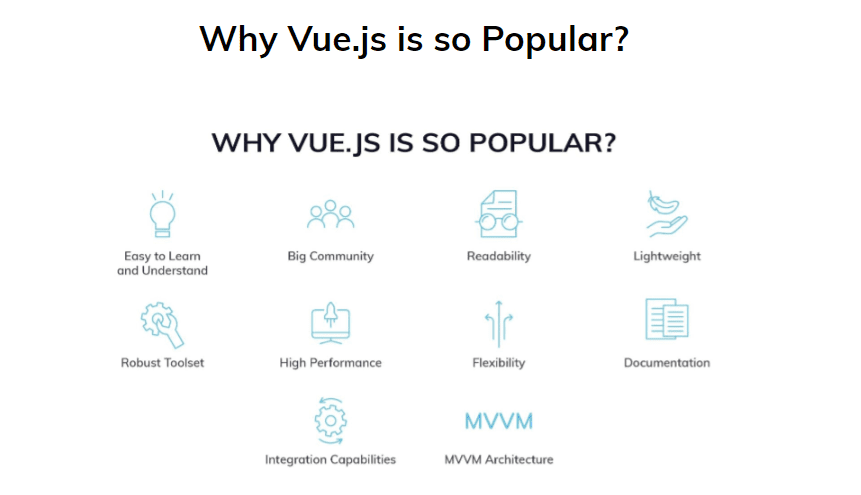
1. Easy to Learn and Understand

Vue.js owes a significant portion of its popularity to its inherent simplicity. Developers can embark on Vue.js with a fundamental knowledge of JavaScript, HTML, and CSS. Utilizing single-file documents containing various code types, such as JS, CSS, and HTML, Vue empowers developers to achieve robust functionality with minimal code, rivaling heavier frameworks like React and Angular.

2. Big Community

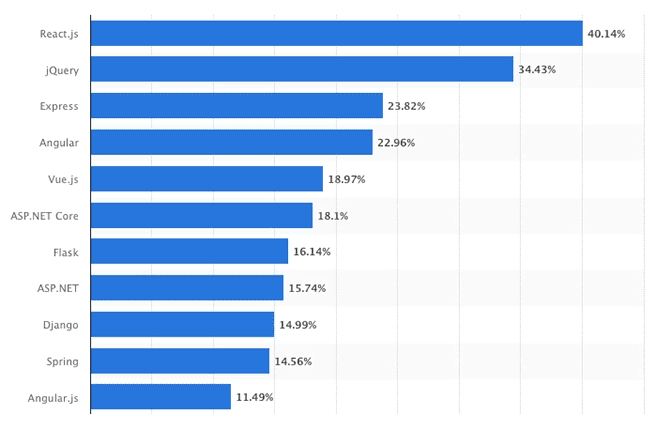
Unlike its counterparts, Vue relies solely on donations from sponsors and its open-source community. Statistics from surveys conducted by Statista and Stack Overflow in 2023 highlight Vue.js’s growing popularity, underscoring the vibrant engagement of its community. NPM trends further showcase the steady ascent of Vue, making it a compelling choice for developers.
Why Vue.js Is So Popular in 2024

Why Vue.js Is So Popular in 2024

3. Readability

Vue’s component-based architecture bestows advantages in terms of component reusability, code readability, and streamlined unit testing. With components stored in separate files, Vue makes it accessible, maintainable, and easy to fix, fostering a development environment conducive to efficient coding practices.

4. Lightweight

Vue distinguishes itself as a lightweight framework, with its minified and compressed runtime weighing approximately 20 KB. Vue 3, the latest version, is estimated to have a bundle weighing only 10 KB. This lightweight nature expedites the download and installation process, positively impacting user experience and SEO optimization.

5. Robust Toolset

Despite its relative youth, Vue boasts a powerful toolset, including a state manager, browser debugging tools, Babel support, unit testing capabilities, a server renderer, and more. This comprehensive toolkit equips developers with the necessary resources for efficient and effective application development.

6. High Performance

Vue stands out as one of the fastest frameworks for web interface development, delivering precise user experiences in both UIs and single-page applications. Notably, Vue exhibits faster launch times in mobile applications compared to React and Angular, further enhancing its appeal.

7. Flexibility

Vue.js is renowned for its flexibility, enabling developers to write and run applications directly from a browser. Its versatility in handling complex apps through bundling, routing, ES6, JSX, and components positions Vue as a preferred choice for cross-platform app development across diverse environments.

8. Model-View-ViewModel (MVVM) Architecture

Vue adopts the MVVM architecture, focusing primarily on the ViewModel layer. This architectural choice enhances the user interface by simplifying event-driven programming. The separation of the user interface from the app logic facilitates seamless updates and changes without necessitating a complete app redesign.

9. Integral Capabilities

Vue’s dependence on JavaScript empowers developers to write templates with enhanced flexibility. This characteristic enables smooth transitions to other frameworks, such as React or Angular, if required.

10. Documentation

Vue sets itself apart with meticulously crafted documentation, available in eight languages. The comprehensive documentation includes detailed code usage examples, complemented by video courses catering to a range of proficiency levels, from beginners to advanced users.

Diverse Applications of Vue.js

While Vue.js was initially designed for one-page applications and web pages, its application extends to various domains:

1. Prototypes

Vue.js originated from Evan You’s frustration with Angular while working on prototypes at Google. Its simplicity allows even designers with minimal experience to rapidly prototype using Vue.js.

2. UI Projects

Vue’s requirement of only HTML, CSS, and JS, coupled with a strong focus on UI, makes it an ideal choice for UI-centric projects.

3. Existing Applications

Vue seamlessly integrates into existing applications, making it a valuable tool for adding functionality. Its compatibility with various back-end technologies, such as Ruby on Rails, Django, and Express.js, further enhances its versatility.

4. Mobile Apps

While Vue is designed for web apps, its application extends beyond browsers. Vue supports the development of mobile apps, whether through Ionic Vue for cross-platform solutions or for native iOS, Android, and Progressive Web Apps (PWAs).

Core Attributes of Vue.js Framework

1. Virtual DOM (Documented Object Model)

Vue’s rendering system relies on a virtual representation of the actual DOM, following in the footsteps of React. This approach allows developers to programmatically create, test, and compose UI structures in a declarative manner, minimizing the need for direct DOM manipulation.

2. Data Binding

Vue’s two-way binding and Virtual DOM contribute to minimal coding efforts for developers. Changes in the Model or View layer automatically propagate throughout the application, ensuring consistent data across various components.

3. Templates

Vue’s HTML-based template syntax enables declarative binding of the rendered DOM to the underlying component instance’s data. The templates, when compiled, result in highly optimized JS code, coupled with a reactivity system that minimizes unnecessary re-renders and DOM manipulations.

4. Computed Properties

Vue.js introduces computed properties, offering a structured means for developers to create, manipulate, and display data within components. These properties facilitate tasks such as data filtering, calculations, conditional rendering, and interactions with getters.

5. Tooling and Libraries

Vue’s ecosystem is enriched with a variety of tools and libraries, enhancing the development process. Noteworthy entries include Vue CLI, Nuxt, Vuetify, VuePress, Vuex, Quasar, and Gridsome.

6. Animation and Transition

Vue provides components such as <Transition> and <TransitionGroup> to manage enter/leave and list transitions. The framework supports various animation techniques, including class-based animations, state-driven animations, and animations driven by watchers.

When to Embrace Vue.js

1. Animation and Interactive Elements

Vue’s robust data-binding makes it an excellent choice for handling animations, interactive elements, and graphics. Its flexible API and seamless transition between views offer diverse possibilities for creating captivating animations with built-in modules based on CSS animation.

2. Integration with Numerous Apps

Vue.js seamlessly integrates with both single-page and multi-page applications, making it an attractive option for projects with existing architectures.

3. Publishing an MVP

Vue.js streamlines the process of publishing a Minimum Viable Product (MVP) owing to its reusable components and templates, facilitating rapid development cycles.

Exemplary Applications and Websites Built with Vue.js

Vue.js has left an indelible mark on the web landscape, with a staggering 1,936,822 live sites utilizing its capabilities. Some notable examples include [provide a few examples here]. A comprehensive list of websites built with Vue can be explored on Github.

In Conclusion

In conclusion, Vue.js emerges as a powerhouse in the realm of frontend development, offering a plethora of advantages. While particularly well-suited for lightweight projects, its versatility shines through in various applications. Developers seeking a nimble, efficient, and developer-friendly framework will find Vue.js to be an invaluable asset. However, for large and complex websites, React may still hold the edge. If you find yourself at a crossroads in selecting the ideal tech stack for your project, or if you seek an experienced partner for development, design, and maintenance, feel free to reach out to us at inVerita. With over six years of diverse experience across industries and project scales, from startups to Fortune 500 companies, we stand ready to bring your vision to life.

You May Also Like

How UI/UX Impacts Conversion Rates
Design and Development

How UI/UX Impacts Conversion Rates

Learn how strategic UI/UX design can significantly improve your website’s conversion rates…

Read More
The Importance of Prototyping in UX Design: A Simple Guide to the Best Tools
Design and Development

The Importance of Prototyping in UX Design: A Simple Guide to the Best Tools

Prototyping is one of the most exciting and essential parts of the UX design process. Think of it…

Read More
How to Choose the Best Web Development Company in Delhi for Your Business?
Design and Development

How to Choose the Best Web Development Company in Delhi for Your Business?

Web development services are vital for the growth of any business. In this fast-paced digital world, web development…

Read More

Ready to Transform Your Business with AI?

Explore how our AI-first solutions can help your business grow and innovate.

Edit with