AI integration services connect AI models and tools to a business's existing systems, data pipelines, and day-to-day workflows, not just a standalone demo. MuleSoft's research found enterprises manage an average of 1,061 applications, but only 29% are actually integrated with each other — a real, measured gap. Foreignerds builds the integration layer a capable AI model actually needs to reach real, current business data, not a disconnected pilot.
Tell us what needs to talk to what — a real person replies within 1 business day, not an autoresponder.
Most "AI integration" is a custom-built connector for one system — expensive to build and expensive again the moment you add a second system. Our free Integration Scope maps exactly which of your systems can connect, how, and what standard (like MCP) makes it durable instead of disposable.
20 minutes. Zero cost. A real answer either way.
Get My Free Scope →Connecting software systems together isn't new — API integration has existed for decades. What's new is connecting AI models specifically to tools and data in a way that's secure, governed, and doesn't require rebuilding the connection from scratch every time you swap models or add a system. That specific problem barely existed before late 2024. The scale of the underlying problem is real and measurable. MuleSoft's research found the average enterprise runs 1,061 separate applications, with only 29% actually integrated with each other — meaning the majority of most businesses' own systems operate in silos an AI model simply can't reach without someone building a custom bridge. Before a real standard existed, every single one of those bridges had to be built, tested, and maintained separately, for every model and every tool combination.
In November 2024, Anthropic released the Model Context Protocol (MCP) as an open standard — a common way for AI applications to connect to external tools and data, instead of a custom integration for every single model-and-tool pairing. The comparison people use is genuinely apt: it's closer to a USB-C port than a specific cable — one connection standard that works across compatible devices, rather than a different proprietary cable for every device you own.
Adoption has moved unusually fast for a technical standard this young. Within about 18 months, OpenAI, Google, Microsoft, IBM, and Amazon had all adopted MCP alongside Anthropic, and by mid-2026, 28% of Fortune 500 companies were running MCP servers in production, with real, named deployments — Cisco for networking and collaboration systems, PayPal for payment processing and fraud detection, and Raiffeisen Bank reporting a 40% improvement in risk assessment workflows after MCP-integrated AI deployment.
It's worth being precise about adoption numbers here, since figures vary by source. Stacklok's 2026 State of MCP in Software survey — a more carefully controlled sample of senior technical leaders — found 41-45% of software-industry respondents had MCP in some form of production, a more conservative and better-sourced figure than broader claims of 78% enterprise-wide adoption circulating elsewhere. Either way, this went from an experimental release to serious enterprise infrastructure in under two years — genuinely fast, even accounting for the more careful number.
There are now over 500 MCP servers tracked across public registries, covering databases, GitHub, Slack, browser automation, and dozens of other categories — a genuinely large, fast-growing ecosystem barely two years old. But it's worth being direct about a real quality problem inside that growth: many popular community-built MCP servers, including some widely-used GitHub, PostgreSQL, and Slack integrations, have already been archived and are no longer actively maintained. Star counts and popularity from the protocol's early hype don't reliably indicate whether a server is safe or current today.
This matters practically, not just technically. Standard, responsible practice is to never give an AI client production database write access, and to review the actual source code of any server touching sensitive data before installing it — not assume popularity implies safety. Part of real integration work is exactly this vetting: choosing actively maintained servers from the official MCP Registry, and building custom servers in-house for anything touching genuinely sensitive systems.
If you only need AI to answer questions in a chat window with no connection to your actual data or tools, most AI platforms already offer that natively — you don't need custom integration work for it. Integration becomes necessary the moment you need AI to actually read from or act on your real systems: your CRM, your internal database, your ticketing system, your calendar.
Custom integration work starts making sense when: you need AI to pull real, current data from an internal system, you want the same AI capability to work consistently across multiple tools rather than living in one isolated chat window, you're already using several AI tools that don't share context with each other, or you want a durable, standards-based connection rather than a fragile custom script that breaks with the next update.
This applies whether you hire us or another agency. Ask every agency these questions before signing anything:
Building standards-based MCP servers that expose your internal tools, databases, and APIs to AI applications — defining exactly which functions get exposed versus kept private, setting up authentication and secure transport, and documenting the server so it's maintainable by your team afterward, not a black box only we understand.
Bridging AI models to older internal systems that were never designed with AI access in mind — building a wrapper layer where a direct API doesn't exist, validating that the bridge behaves correctly under real load, without requiring a disruptive rebuild of the underlying legacy system itself.
Connecting AI to several of your real systems at once — CRM, calendar, support tools — designing how the AI decides which system to query for a given request, handling cases where systems return conflicting information, and testing the combined workflow against real multi-step scenarios.
Scoping exactly what data and actions an AI system can reach — defining read versus write permissions per system, setting up approval steps for higher-risk actions, logging what the AI actually accessed and did for real auditability, and reviewing those permissions periodically.
Tell us what you're working with in one line — we'll take it from there.
This is a composite, illustrative example, not a specific client.
Say a mid-sized company wants an AI assistant that can check real order status, look up customer history, and update a support ticket, all from one conversation — currently, staff switch between three separate systems to do this manually. Week 1 scopes which systems have the access points needed and whether existing APIs are usable or need a wrapper. Weeks 2-4 build an MCP server exposing exactly those three systems, scoped narrowly to only the actions actually needed — read order status, read customer history, update ticket status — not blanket access to every function those systems support. The result works the same way regardless of which AI model sits on top of it, since the connection follows an open standard rather than a proprietary link to one specific provider's model.
The same standard applied whether the project connects one internal tool or a dozen enterprise systems.
Mapping which systems need connecting, what access they actually require, and whether a standards-based approach like MCP fits.
Development of the integration layer with security and access scoping built in from the start, not added afterward.
Ongoing — Maintain & Extend. Adding new systems or capabilities as needs grow, without rebuilding the entire integration from scratch each time.
Enterprise deployment guidance from providers already deep in MCP rollouts points to a consistent set of early friction points, worth knowing before starting rather than discovering mid-project. Technical complexity in mapping MCP tools to internal systems is the most commonly reported obstacle, followed closely by change management friction across IT, security, and the actual business users who'll rely on the integration day to day — a reminder that this is as much an organizational rollout as a technical one.
The recommended approach mirrors what mature integration work has always required, just applied to a newer protocol: set governance protocols and security controls early rather than retrofitting them later, align stakeholders across departments before building rather than after, and roll out in phases with a real review after each stage.
One concrete advantage of building on the MCP standard rather than a proprietary custom connector: a properly built MCP server works identically across every compatible AI client — Claude Desktop, Cursor, Windsurf, and others — without modification. The same server you build to connect your CRM to one AI assistant works the same way if your team later adopts a different tool, or runs multiple tools side by side. This is the practical, day-to-day payoff of the "standard" framing: your integration investment survives tool changes that would otherwise force a costly rebuild.
Without a shared standard, every new system or model change means starting over — exactly the fragmentation problem open standards like MCP exist to solve.
An AI system with unrestricted access to every function of a connected tool is a real security exposure — scope access to exactly what's needed.
Connecting AI to a system is the plumbing; deciding what the AI actually does autonomously with that access is a separate, more careful design decision.
Most businesses have far more disconnected systems than they realize — a real integration audit often surfaces opportunities nobody had mapped.
Not sure if you're already making one of these?
That's Exactly What the Free Assessment Uncovers →Connecting AI to risk and compliance systems with careful governance — the exact pattern behind Raiffeisen Bank's reported 40% risk-assessment improvement.
AI connected to real ticketing, CRM, and order systems so responses are grounded in actual account data, not generic scripts.
AI connected to scheduling and records systems for administrative efficiency, with strict access scoping around anything clinical.
AI connected across internal tools to reduce the manual work of checking multiple systems to answer one operational question.
Four honest signals — if two or more sound like you, integration work is worth scoping.
The real categories involved — not a build recipe, just enough to ask any agency the right questions.
Selected per project based on the task — not a fixed default stack.
Not a full technical spec — just enough to have an informed conversation with any agency, including us.
Still unsure what applies to your business?
That's Exactly What the Free Scope Is For →None of these are permanent — they're signs to confirm the real opportunity with a free scope before committing budget.
Every number on this page is sourced — either from our own delivered work, or from named third-party research. Nothing here is invented to sound more impressive.
No pressure. The assessment and the first call are both free, with zero obligation.
15-20 minutes. Not an hour-long pitch. Here's exactly what we cover:
Not an hour-long pitch.
Your actual systems and integration needs, not a generic pitch.
On what's actually feasible.
We don't list a price here for the same reason across every page: a number before real scoping is a guess. Connecting one internal tool and integrating AI across a dozen enterprise systems are very different projects.
The same standard used across every engagement.
Answer a few quick questions and we'll walk into the call already understanding what you need — not starting from scratch.
From AI voice outreach platforms to custom software and full-funnel marketing programs — every case study comes with numbers you can verify.
⟷ Drag to explore, or auto-scrolls — 100+ case studies live here
65% Lower Review Time — per medical-record case
View Case Study →
80+ AI Security Assessments — organizations assessed
View Case Study →
3M+ Deal Opportunities Processed — inbound brand-deal opportunities
View Case Study →
70% Lower Proposal Preparation Time — 80+ hours to under 24 hours
View Case Study →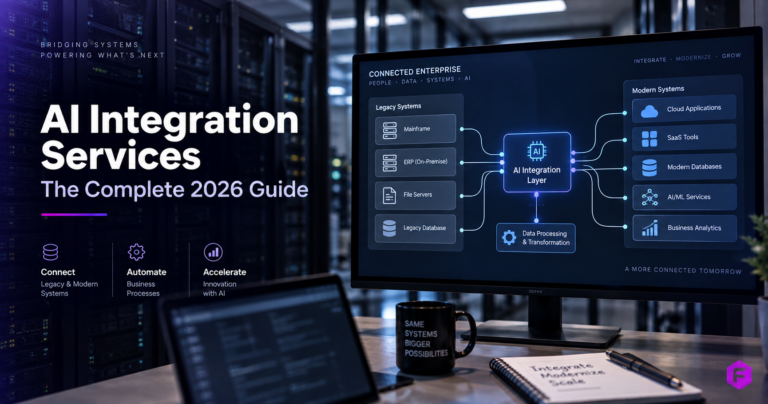
The Model Context Protocol, released by Anthropic as an open standard in November 2024, defines a common way for AI applications to connect to external tools and data — one integration built to this standard can work across compatible AI models.
MCP is worth using specifically because it's an open, widely-adopted standard rather than a proprietary one-off connector — your integration keeps working even if you switch AI models later.
Governance and access scoping are built into any real integration project from the start — the AI gets access to exactly what's needed for its specific task, never blanket access by default.
We only publish verifiable results, never invented statistics — ask on the call for the one most relevant to your situation.
Most focused integrations take 3-5 weeks, depending on how many systems are involved and whether existing APIs are usable as-is or need wrapper work first.
Very common, and rarely a dead end. Legacy systems can usually be bridged without a disruptive rebuild of the underlying system.
Yes — that's often the actual point. Connecting AI across several real systems at once is generally where integration delivers meaningfully more value.
Integration is the connection layer — giving AI genuine access to your real systems. An agent is what actually uses that access to complete tasks autonomously once it exists.
It depends heavily on how many systems are involved, their technical complexity, and how much legacy wrapper work is needed.
You do, fully — confirmed clearly in writing before the project starts.
We tell you directly during scoping, before any commitment — not every legacy system has a viable, safe access point.
The standard itself scales down fine — a smaller business connecting AI to two or three real systems benefits from the same durability and security principles as a large enterprise.
Building a fully custom, one-off connector for each individual tool instead of using an open standard — which means starting over the moment a new system gets added.
Claim the free Integration Scope, or book a strategy call directly if you already know what you need.