
Author: James Carter

AI Visibility Audit: What It Should Include and How to Compare Agencies That Offer One

Several agencies and software vendors now offer a free AI visibility audit, and they are not the same product. Some are self-serve tools that return a preview in seconds. Some are manual reviews run by a strategist. Some are checklists built around a local business. Foreignerds offers one too, and we describe it below. Because the offers differ so much in scope, speed, and who they suit, the most useful thing we can do is explain what a good audit should measure and how to compare the ones you find.

An AI visibility audit tests whether AI answer engines such as ChatGPT, Claude, Perplexity, Google AI Overviews, and Microsoft Copilot mention, cite, and describe your business accurately when someone asks a question you would want to answer. It is different from a traditional search engine optimization audit, which checks how you rank in a list of links. A site can rank well on Google and still be absent from the answers people read in an AI assistant.

What a free AI visibility audit is, and what it is not

An audit is a snapshot. It records how AI systems treat your business for a defined set of questions at a defined moment. It is useful for finding gaps, prioritizing work, and setting a baseline. It is not a ranking guarantee, and it is not a substitute for ongoing measurement.

Free audits are also a way for a provider to start a conversation. That is a fair exchange, provided you know what you are receiving. Before you request one, it helps to know what the findings should contain and whether you keep them regardless of whether you hire the provider.

One caution applies to any audit, free or paid. AI answers can differ from one run to the next and from one platform to the next. A single screenshot of one prompt is weak evidence. A credible audit uses a set of prompts, tests each platform separately, and reports patterns.

What a useful audit should measure

Whatever the provider, a useful audit covers a handful of things.

Citations and mentions. A citation is a link to your site inside an AI answer. A mention is your business name appearing without a link. They are different signals, and a business can have one without the other.

Share of voice against competitors. Knowing that you appear is less useful than knowing who appears instead of you for the same question.

Accuracy. AI systems sometimes state wrong facts about a business, such as outdated services, incorrect locations, or invented details. An audit should check what is being said, not only whether you are named.

Content structure. Pages that answer questions clearly, with direct answers, headings, and lists, are easier for AI systems to extract from. An audit should review the pages that matter most to revenue.

Structured data. Schema markup helps machines understand who you are and what you offer, so gaps here are worth listing.

Third-party footprint. Reviews, directories, press coverage, and community discussion shape what AI systems say about you. This is often the most overlooked part, and the research below explains why it matters.

Why each platform has to be tested separately

If one provider tells you that you are visible in AI search, ask which platforms they tested. The evidence suggests platforms behave differently enough that a single result does not transfer.

Averi’s benchmark report, citing a Profound analysis of 680 million citations collected between August 2024 and June 2025, states that only 11% of domains are cited by both ChatGPT and Perplexity. That is a domain-level figure across the whole citation landscape, not a statement about your own brand, and different studies define overlap differently. The direction is consistent, though: the two platforms draw on different sources.

Ahrefs found a similar divergence from another angle. In an analysis of 15,000 long-tail queries published on August 11, 2025, only 12% of URLs cited by ChatGPT, Gemini, and Copilot also ranked in Google’s top 10 for the same prompt. Perplexity was the exception, with 28.6% overlap. Ranking on Google is not the same as being cited in an AI answer.

Slate HQ’s 90-day study of six B2B software brands shows the same spread at brand level. For one email security client, brand-owned citation share ranged from 4.5% on ChatGPT to 10.2% on Google AI Mode. That is a single client’s result and not an average, but the gap between platforms for the same brand is the point.

The practical consequence is simple. An audit that tests only one platform, or blends all platforms into a single score, hides the variation you most need to see.

Why third-party sources belong in the audit

A research paper by Chen, Wang, Chen, and Koudas, submitted in September 2025, classified the sources AI systems cite as earned media, brand-owned, or social. In its consumer electronics tests, about 93.6% of ChatGPT’s citations and 93.7% of Claude’s came from earned media, meaning third-party sources. Perplexity and Gemini drew a smaller share from earned media and more from brand-owned and social sources. The paper is a preprint and covers consumer product queries, so it does not guarantee the same mix for a services business.

Slate HQ’s study adds context: it found that 76.3% of citations across its tracked brands went to domains that were neither the brand nor its direct competitors. Together, these findings mean an audit that reviews only your own website misses a large part of the picture. What others publish about you matters, which is why generative engine optimization work reaches beyond your own site, and an audit should say where you appear, where you do not, and which third-party sources AI systems already trust in your category.

Three kinds of free audit you will find

Descriptions below come from each provider’s own website at the time of writing. Offers change, so confirm the details before you request one.

Self-serve tools. Ahrefs offers a free AI visibility checker that needs no signup. It queries ChatGPT, Gemini, Perplexity, Copilot, and Google AI Overviews and returns total mentions, a platform breakdown, top associated topics, and top cited domains. The free version is a limited preview, with results capped at five items per section, and historical tracking and competitor benchmarking sit in a paid product. It is a quick way to see whether you register at all.

Manual agency audits. DerivateX runs a free audit by hand through a senior strategist, covering ChatGPT, Perplexity, Gemini, Claude, Google AI Overviews, and AI Mode. It says results arrive within 48 business hours of confirming fit, and that findings remain with you whether or not you hire the agency. It states the audit suits B2B software companies with roughly $5 million to $50 million in annual recurring revenue and is not suited to e-commerce, local, or consumer businesses.

Business-type checklists. LocalFi offers a free audit built around local search signals. It reviews website structure, service pages, location pages, Google Business Profile, content clarity, entity signals, reputation markers, and search presence across ChatGPT, Gemini, Perplexity, and Google AI Overviews. It describes timing as dependent on the website and scope.

These are different tools for different jobs. A quick self-serve check tells you whether to worry. A manual audit tells you what is being said and who is being recommended instead. A local checklist focuses on the signals local searchers rely on.

What the Foreignerds free AI Visibility Audit covers

Our free AI Visibility Audit tests five platforms individually: ChatGPT, Claude, Google AI Overviews and AI Mode, Perplexity, and Microsoft Copilot. It measures seven things: citation rate, brand mention rate, AI share of voice against named competitors, sentiment and accuracy of what AI says about you, content extractability, structured data coverage, and third-party brand footprint.

The deliverables are an overall visibility score benchmarked against three to five competitors, a custom test set of 20 to 30 buyer prompts, a platform-by-platform breakdown, a check for inaccurate statements, a schema and structured data gap report, a prioritized 90-day action plan ranked by revenue impact, and a live dashboard for tracking citation rate and share of voice over time.

It runs over four weeks. In week one we set the baseline and map the prompts. In week two we audit five to ten of your highest-priority revenue pages. In week three we review schema, entity consistency, and third-party footprint. In week four we deliver the report and a live walkthrough. It is free with no obligation.

The trade-off is time against depth. Four weeks is slower than a tool that answers in seconds or a review that returns in two days. It covers more dimensions than a quick preview, and it is built around your own buyer questions and competitors. Which fits depends on how much detail you need and how soon.

How to compare offers

Whichever provider you consider, these questions separate a useful audit from a sales form.

Who chooses the prompts? Strong prompts come from real buyer questions in your market, not generic ones.

How many platforms are tested, and are they reported separately? Blended scores hide the differences described above.

Are competitors benchmarked? Visibility is relative.

Does the audit check accuracy? Being mentioned incorrectly can be worse than not being mentioned.

Does it look beyond your website? Third-party footprint should be part of the review.

What do you keep? Confirm that you receive the findings without a commitment.

Who runs it, and how long does it take? Automated, manual, and hybrid audits differ in speed and judgment.

Is there a sample or a clear description of the report? If a provider cannot describe what you will receive, treat that as a warning.

Where this leaves you

A free AI visibility audit is a reasonable first step if you treat it as a baseline. Pick one that tests platforms separately, uses your own buyer questions, benchmarks competitors, checks accuracy, and looks past your own site. Then use the results to decide where to invest, whether that is content structure, third-party coverage, or wider generative engine optimization and answer engine optimization work. Repeat the check on a schedule, because the answers change.

Frequently Asked Questions

1. Which agencies offer a free AI visibility audit?
Answer: Several do, along with software vendors. They differ in scope: some are self-serve tools, some are manual reviews, and some are aimed at specific business types. Foreignerds offers a free AI Visibility Audit covering five platforms and seven measures over four weeks.

2. What does an AI visibility audit measure?
Answer: A useful audit measures citations, brand mentions, share of voice against competitors, accuracy of what AI says about you, content structure, structured data, and your third-party footprint.

3. How is it different from an SEO audit?
Answer: A traditional search engine optimization audit checks how you rank and perform in search results. An AI visibility audit checks whether AI systems mention, cite, and accurately describe you in their answers, which makes it a core input to answer engine optimization.

4. Why test each AI platform separately?
Answer: Platforms cite different sources. One study found only 11% of domains were cited by both ChatGPT and Perplexity, so a result on one platform does not predict another.

5. Is a free audit really free?
Answer: Offers vary, so confirm what you keep and whether there is any obligation. Foreignerds’ audit is free with no obligation.

6. How often should I repeat an audit?
Answer: AI answers change, so a periodic check against your original baseline is sensible. A quarterly review is a reasonable starting cadence, and a tracking dashboard can help between audits.

If you want to see how ChatGPT, Claude, Perplexity, and Google describe your business today, request your free AI Visibility Audit from Foreignerds.
PPC & Paid Media: The Complete Guide

PPC (pay-per-click) and paid media are the practice of buying visibility — on Google, Meta, LinkedIn, Amazon, or elsewhere — instead of waiting to earn it organically, paying only when someone clicks, views, or takes an action you define. Where SEO and content compound over months, paid media is the lever that produces leads and revenue on a schedule you control, starting the day a campaign goes live. That immediacy is also why it’s the easiest channel to waste money in: the platforms are built to spend your budget efficiently for the platform, not necessarily for your business, unless someone is actively managing the account. This guide covers what paid media actually costs and returns right now, the platform-by-platform decision, where budgets get wasted, and a practical framework for running it well.

What Counts as Paid Media

Paid media isn’t one channel — it’s a category, and each platform serves a different intent:

  • Search ads (Google Ads, Microsoft Ads): capture people already searching for what you sell. Highest intent, highest cost per click.
  • Paid social (Meta, Instagram): reach people based on interests and behavior before they’re actively searching. Lower cost per click, but requires a stronger creative hook since the audience isn’t already looking.
  • LinkedIn ads: the only platform with reliable B2B firmographic and job-title targeting — expensive per click, but the only place to reach “VP of Operations at a 50-person accounting firm” directly.
  • Amazon and marketplace ads: capture purchase-intent search traffic inside the marketplace itself, for businesses selling physical products.
  • Display and programmatic: broad-reach retargeting and brand awareness, usually the smallest and last-added piece of a paid media mix, not the first.

Most businesses don’t need all five — they need the one or two that match where their buyer actually is, layered with retargeting once there’s enough traffic to retarget.

The Real Numbers (2026 Benchmarks)

Current Google Ads benchmark data, based on an analysis of over 13,000 campaigns across 23 industries, gives an honest baseline before anyone quotes you a number:

  • Average click-through rate: 6.64% across industries
  • Average cost per click: $5.42 (more than doubled from $2.32 in 2016, but stable year-over-year for the first time in five years)
  • Average conversion rate: 8.18%, with 87% of industries seeing conversion rates improve year-over-year — the second straight year of gains
  • Average cost per lead: $66.69 — and for the first time in five years, this actually went down rather than up
  • Highest-cost vertical: Attorneys & Legal Services, at $9.87 CPC and $131.63 cost per lead — a useful reference point for professional-services budgeting

These are averages, not promises — a well-run HVAC campaign and a poorly-run law firm campaign can each land far from the mean. But they’re the right numbers to benchmark against before accepting any agency’s promised cost-per-lead.

Platform-by-Platform: What Fits Which Business

Business type Primary platform Why
Home services (HVAC, plumbing, roofing) Google Search + Local Services Ads Buyers search with emergency or near-term intent — “AC repair near me” — the exact moment search ads capture
Small B2B professional services (CPAs, law firms, consultants) Google Search + LinkedIn Search for active demand (deadline-driven searches), LinkedIn for outbound-style targeting by title/company size
E-commerce / physical products Meta + Amazon Ads Visual discovery drives impulse and considered purchases; Amazon captures in-marketplace purchase intent directly
Agencies/white-label Whatever the end client’s buyers use Platform choice inherits from the client’s ICP, not the agency’s preference

Foreignerds runs all of these as distinct services rather than one generic “paid ads” offering: AI-powered PPC for search, Meta ads management, LinkedIn ads management, and Amazon marketplace ads — because the skill set, bidding logic, and creative requirements genuinely differ platform to platform.

Where Paid Media Budgets Actually Get Wasted

  • No conversion tracking, or broken tracking. A campaign optimizing toward the wrong goal (or no goal) will spend efficiently toward the wrong outcome. This is the single most common issue found in account audits.
  • Sending paid traffic to a generic homepage instead of a matched landing page. A click that cost $5.42 landing on a page that doesn’t answer the exact search intent is a wasted click regardless of how good the ad was.
  • Fragmenting budget across too many campaigns. Ad platforms need enough conversion volume per campaign to exit the learning phase and optimize properly — splitting a small budget across five campaigns means none of them ever learn.
  • Ignoring negative keywords (search) or audience exclusions (social). Without them, budget leaks to searches and audiences that were never going to convert.
  • No connection between paid media and CRO. Driving more traffic to a page that converts at half the rate it should is buying clicks to compensate for a fixable landing-page problem instead of fixing it.
  • Treating campaign launch as the finish line. Accounts that aren’t reviewed weekly for search-term reports, bid adjustments, and creative fatigue decay in performance within a month or two.

A Practical Implementation Framework

  1. Fix tracking before spending a dollar. Confirm conversion actions (form fills, calls, purchases) are firing correctly and connected to the ad platform, not just Google Analytics.
  2. Start with one platform, matched to buyer intent — search for active-demand businesses, social for visual/considered purchases, LinkedIn for named-account B2B — rather than spreading a first budget across three platforms at once.
  3. Build a landing page matched to the ad’s specific offer, not a link to the general site. This is where CRO work pays back the paid spend.
  4. Let campaigns exit the learning phase before judging them. Most platforms need meaningful conversion volume in the first 1–2 weeks before performance stabilizes — judging a campaign at day 3 is judging noise.
  5. Layer in retargeting once there’s enough traffic to build a meaningful audience — retargeting consistently converts cheaper than cold traffic, but needs volume to work.
  6. Route qualified leads into marketing automation immediately so a paid lead gets an instant response rather than waiting for a rep to notice a form fill — the gap between click and follow-up is where paid spend gets wasted after the click, not before it.
  7. Review weekly, restructure monthly. Search-term reports, audience performance, and creative fatigue all need a standing weekly check — not a “set it up once” mentality.

How to Measure Whether It’s Working

  • Cost per qualified lead — not cost per lead. A cheap lead that never converts to revenue is not a win.
  • Return on ad spend (ROAS) or cost per acquisition, tied to actual closed revenue, not platform-reported conversions alone.
  • Conversion rate by landing page — benchmark against the 8.18% average conversion rate figure above to see if a specific page is underperforming.
  • Search term quality — what people actually typed before your ad showed, reviewed monthly to catch wasted spend on irrelevant queries.
  • Lead-to-close rate by channel — Google Search leads, Meta leads, and LinkedIn leads typically close at different rates and deserve separate tracking, not one blended number.

Paid Media by Business Type

  • Home services: Google Search plus Local Services Ads for emergency and near-term intent, with tight geo-targeting and call tracking since phone calls, not form fills, are usually the primary conversion.
  • Small B2B professional services: Google Search for deadline-driven and problem-aware searches (tax season, “need a lawyer for…”), LinkedIn for proactively targeting decision-makers who aren’t searching yet.
  • Agencies and white-label partners: paid media is frequently the fastest-to-prove-value service to offer a new client, since results are visible within weeks rather than the months SEO takes — making it a common first engagement in a broader growth marketing relationship.

Key Takeaways

  • 2026 Google Ads benchmarks: 6.64% average CTR, $5.42 average CPC, 8.18% average conversion rate, $66.69 average cost per lead — the first year-over-year decline in CPL in five years.
  • Match the platform to buyer intent first: search for active-demand businesses (home services, deadline-driven B2B), social/LinkedIn for considered or named-account buying, Amazon for marketplace purchase intent.
  • Broken conversion tracking and mismatched landing pages waste more budget than bad targeting does — fix those before touching bids.
  • Judge campaigns after they exit the platform’s learning phase, not on day 3.
  • Route every paid lead into an automated follow-up sequence immediately — the gap between click and response is where spend gets wasted after the click.

ChatGPT and Claude Cite Earned Media About 93% of the Time in Product Research. Your Own Website Barely Registers.

If your entire AI visibility plan is to publish better pages on your own site, the research says you are working on the smaller half of the problem. Two academic studies and one large industry analysis, each looking at a different slice of AI search, land on the same practical conclusion: what other people publish about you carries far more weight in AI answers than what you publish about yourself.

That is a strong claim, and it is also one that gets stretched in the retelling. The headline figure of 93% applies to specific engines in a specific kind of query, not to every AI platform in every situation. Here is what each source actually measured, where the numbers hold, where they do not, and what it means for how you spend a marketing budget.

Study one: a small group of outlets dominates news citations

The first paper is “News Source Citing Patterns in AI Search Systems” by Kai-Cheng Yang, posted to arXiv on July 7, 2025. It analyzed 366,087 citations across 12 AI search models from three providers: OpenAI, Perplexity, and Google. The data was collected over seven weeks between March and May 2025 from the AI Search Arena dataset.

A little over 9% of those citations, 32,865 in total, pointed to news outlets. That is worth stating up front, because it means the paper is not claiming that AI engines mostly cite journalism. It is examining the news slice of citations and finding that the slice is extremely concentrated.

The concentration differs sharply by provider. The paper reports that the 20 most frequently cited news sources account for 67.3% of citations for OpenAI models, compared with 31.9% for Google and 28.5% for Perplexity. Reuters and the Associated Press alone were cited at rates of 22.8% and 12.2% for OpenAI models. In other words, when ChatGPT-style models reach for a news source, they reach for a very short list.

One caution applies. The paper is a preprint posted on arXiv, so read it as a well-documented research finding rather than settled consensus, and note that it covers models tested in 2025.

The takeaway for marketers is narrower than the headline suggests. If you want news-based visibility in OpenAI-powered answers, the door is small, and the outlets standing in it are wire services and major national publishers. That does not make earned media pointless. It tells you that not all earned media is equal.

Study two: earned media versus your own site

The second paper is “Generative Engine Optimization: How to Dominate AI Search” by Mahe Chen, Xiaoxuan Wang, Kaiwen Chen, and Nick Koudas, submitted on September 10, 2025. The authors ran controlled experiments across ten consumer product verticals, with 100 queries each, and classified every cited source as earned media, brand-owned, or social content. Their abstract describes a systematic and overwhelming bias toward earned media, meaning third-party authoritative sources, over brand-owned and social content.

The numbers vary by engine, and the variation matters. In the consumer electronics vertical, Claude drew about 93.7% of its citations from earned media and ChatGPT about 93.6%. Perplexity was far lower at 53.3% earned, with 31.6% from brand-owned sites and 15.1% from social platforms.

Across the paper’s broader brand tests, the pattern held. For well-known brands, ChatGPT cited earned media 93.5% of the time and brand-owned pages 6.5%. Claude sat at 87.3% earned and 6.8% brand-owned. Perplexity came in at 67.4% earned and 8.8% brand-owned, with 23.8% from social. Gemini showed 63.4% earned and 25.1% brand-owned. For niche brands, ChatGPT reached 95.1% earned and 4.9% brand-owned, and Claude 86.3% earned and 10.6% brand-owned.

So the tidy line that AI engines cite earned media 93% of the time is accurate for ChatGPT and, in one vertical, for Claude. It is not accurate for Perplexity, and it clearly overstates the case for Gemini, which gave brand-owned pages a quarter of its citations in the well-known brand test. Your own website is close to invisible for ChatGPT on product queries. It is a real contributor to Gemini.

Note also that this is a preprint, and the queries are consumer product comparisons. A B2B services buyer asking about agencies or software may see different source mixes. Treat the paper as strong evidence about direction, not a guarantee for your category.

The third source: most citations do not come from Google’s first page

Ahrefs added two findings that support the same conclusion from a different angle.

In an analysis of 15,000 long-tail queries published on August 11, 2025, Ahrefs found that only 12% of URLs cited by ChatGPT, Gemini, and Copilot also appeared in Google’s top 10 for the same prompt. Put the other way, roughly 88% did not. Perplexity was the exception, with 28.6% overlap. This is why ranking well on Google, while still valuable, does not guarantee a citation. The AI engines are retrieved from a different set of pages.

The second finding is more useful for anyone planning outreach. Ahrefs examined the 1,000 pages ChatGPT cited most in September 2025 and concluded that roughly two-thirds of them are effectively off-limits to traditional outreach. The breakdown was Wikipedia at 29.7%, homepages and landing pages at 23.8%, educational pages at 19.4%, app stores at 6.6%, reviews at 5.8%, news and media at 5.2%, language and grammar sites at 4.0%, dictionary and reference at 2.2%, blog articles at 1.9%, community forums at 0.9%, and corporate pages at 0.5%.

Ahrefs counted only four categories as influenceable: educational pages, reviews, news and media, and blog articles. Together they make up 32.3% of the top 1,000.

This corrects a common retelling. Several summaries describe the off-limits share as Wikipedia, government sites, education, and major news. That is not what Ahrefs found. In the Ahrefs breakdown, educational pages and news were on the influenceable side, and the off-limits side was mostly Wikipedia, other organizations’ homepages, and reference-style sites. The opportunity is in educational content, reviews, news mentions, and articles.

What this does and does not prove

It proves that publishing on your own domain is not enough to earn citations from ChatGPT or Claude on product research queries. It supports the case that third-party mentions matter, and that they matter more on some engines than others.

It does not prove that your own website is irrelevant. Brand-owned content still accounts for 5% to 25% of citations in the Chen study depending on the engine, and pages that AI systems retrieve from your site are part of what makes third-party coverage credible. Your site is where a cited claim gets verified.

It also does not prove that any earned mention helps. The Yang paper shows that the citation pool for news is narrow, and the Ahrefs data shows that news is only 5.2% of ChatGPT’s most cited pages. A mention in a low-authority outlet is unlikely to move the needle.

What this means for link building and digital PR

The strongest business case in this research is for redefining what link building and digital PR are for. For years, the goal was a link that passed ranking signals. The goal now includes being named, described, and reviewed in the places AI engines already trust.

That changes priorities in four ways.

Prioritize the sources engines already cite. Before pitching anyone, check which publications, review platforms, and educational sites appear in AI answers for your category. Build the target list from that, not from domain authority alone.

Pursue reviews and comparisons, not just news. Reviews and educational pages are a much larger share of ChatGPT’s influenceable citations than news. Accurate, current listings on review platforms and inclusion in independent comparison content deserve more of the budget than they usually get.

Create material that other people want to cite. Original data, clear definitions, and expert commentary give journalists and educators a reason to reference you. This is the foundation of effective digital PR, and it also gives educational and blog sources something to link to.

Keep your own site accurate and consistent. When an outlet mentions you, engines and users will check your site. Consistent naming, clear service descriptions, and current facts make the third-party mention easier to trust.

Treat Wikipedia as a consequence, not a target. At 29.7% of ChatGPT’s top 1,000 cited pages, it is the single largest source, and Ahrefs places it outside the reach of outreach. Trying to force an entry is the wrong response. The sustainable route is to earn the independent coverage that makes a company notable in the first place, which is exactly what a disciplined digital PR program produces over time.

Expect a slow payoff. Third-party coverage takes weeks to publish and longer to be picked up by AI engines, so judge a campaign over quarters, not days. Pair the outreach with a monthly citation check so you can see which placements actually change what the engines say.

Set a baseline before you begin. Record which prompts cite your brand today, on which platforms, and from which sources. Repeat monthly. Without that, you cannot separate the effect of an outreach campaign from ordinary platform variability.

Where this leaves you

Optimizing your own site remains necessary. Sound search engine optimization fundamentals still determine whether you are found and understood. But the evidence now points to a second requirement that sits outside your domain. On ChatGPT and Claude, earned media supplies roughly nine in ten citations for product research. On Perplexity and Gemini the share is lower but still a majority. That is the reason generative engine optimization and answer engine optimization now include off-site work, and why link building teams are being asked to think about mentions, reviews, and reference sources, not just links.

Frequently Asked Questions

1. Do AI engines really cite earned media 93% of the time?
Answer: For ChatGPT and Claude in the consumer electronics vertical of the Chen study, yes: about 93.6% and 93.7%. Perplexity was near 53% and Gemini near 63% to 66% in other tests, so the figure does not apply to every engine.

2. What counts as earned media in these studies?
Answer: Third-party authoritative sources such as independent reviews, journalism, and expert publications. Brand-owned pages and social content are classified separately.

3. Does this mean my website does not matter for AI visibility?
Answer: No. Brand-owned pages still receive about 5% to 25% of citations depending on the engine, and your site is where third-party claims get checked. It is necessary but not sufficient, which is why answer engine optimization now includes off-site work.

4. Is it true that two-thirds of ChatGPT’s top citations cannot be influenced?
Answer: Ahrefs reported that roughly 67% of ChatGPT’s top 1,000 cited pages fell outside traditional outreach. Educational pages, reviews, news, and blog articles, about 32.3%, were the influenceable share.

5. Which earned media should I prioritize?
Answer: Start with sources AI engines already cite in your category: review platforms, educational content, and a short list of authoritative publications. Wire services and major national outlets dominate news citations for OpenAI models.

6. How do I measure whether digital PR is improving my AI citations?
Answer: Track a fixed set of buyer prompts on ChatGPT, Claude, Perplexity, and Gemini each month, and record whether your brand is cited and from which source.

If you want to see which third-party sources are shaping AI answers about your brand today, that is exactly what we cover in a free AI Visibility Audit.

Google Rewrote Its Crawl Budget Rules. Here Is What Actually Changed.

On 22 July 2026, Barry Schwartz of Search Engine Roundtable and algorithm analyst Glenn Gabe both spotted the same thing within hours of each other. Google has quietly rewritten its “Optimize your crawl budget” documentation, the guide that tells large sites how Googlebot decides what to crawl and how much.

Google’s stated reason was modest, improving clarity, terminology consistency, and flow. The actual content of the rewrite goes further than a wording cleanup. Three real changes sit inside it, and one of them affects every site running AI crawlers alongside Googlebot, whether that site is actively doing generative engine optimization work or not.

What crawl budget actually means, before the changes

The documentation splits the crawl budget into two separate ideas that are easy to blend together but behave differently. Crawl demand is Google’s own interest in fetching your URLs, driven by how valuable and how fresh Google judges your content to be. Crawl capacity is a separate ceiling, how much load your server can handle before Google backs off to avoid causing problems for your site. A site can publish millions of technically crawlable URLs and still see very little crawling, because demand, not the raw count of pages, is what is actually constraining it. Capacity, by contrast, is something your own server behaviour can move, largely independent of how interesting Google finds your content.

That distinction matters for reading everything that changed on 22 July, because the rewrite touches capacity specifically, not demand.

What Google says changed

The most significant addition is about how crawl capacity begins. Every site now starts with the same default, conservative crawl capacity limit. Google raises that limit over time only if two conditions hold, there is genuine crawl demand for your content, and your server stays fast and healthy while serving it. There is no earned baseline you carry in from your site’s age, authority, or size. Everyone starts in the same place.

Google has not published what that default number actually is. Multiple sites covering the update have said this explicitly, there is no new published crawl limit. Any specific figure you see attached to this story did not come from Google’s own documentation.

The second change matters more for anyone running AI crawlers alongside traditional search indexing. The rewrite confirms that crawl capacity is shared across all of Google’s own crawlers. Google does not run one crawler, it runs several, Googlebot for standard pages, Googlebot-Image, AdsBot for ad landing pages, and a separate crawler for Shopping and Merchant feeds, among others. All of them draw from the same pool of capacity on your server. Heavy demand from one reduces what is left for the others.

The third change is more tactical. The documentation now gives clearer emphasis to two efficiency levers that were always available but were not framed as prominently before. Faster server response times let Google fetch more within the same capacity window. Supporting HTTP 304 Not Modified responses, using ETag or Last-Modified headers, tells Googlebot it can reuse a cached version of a page instead of redownloading it, which frees that saved capacity for new or updated URLs instead.

One more housekeeping detail worth knowing if you have ever bookmarked or cited Google’s crawl budget guidance. The documentation moved. The older URL, under the large site managing crawl budget path, now issues a permanent redirect to a new address under Google’s crawling docs section. If you have internal documentation or a past search engine optimization audit referencing the old link, it still works through the redirect, but it is worth updating.

Why the shared capacity detail matters beyond Google’s own crawlers

The documentation itself talks about Google’s own crawlers competing for the same pool. It does not need to say the obvious follow-on, because every technical SEO reader already knows it. Your server does not distinguish between Googlebot and every other bot hitting it. If your site is being crawled heavily by AI crawlers, whether for model training or for live retrieval when someone asks ChatGPT or Perplexity a question, that traffic is competing for the same server response headroom Googlebot needs to do its own job well.

This is the same underlying mechanic we wrote about when Cloudflare changed its default AI crawler settings. A slow or overloaded server reads as a signal to Googlebot to back off, which caps how much of a large site actually gets crawled and indexed in a given period. If AI crawler traffic is heavy enough to slow your server down, you are not just making a decision about AI training data. You are quietly affecting how much of your site Google itself chooses to crawl.

Separate research on crawl budget mechanics, not part of this specific July rewrite but relevant context, has found that crawlers like GPTBot can consume up to 40 percent of available server bandwidth during deep crawl cycles. That same research cited data suggesting sites that block GPTBot entirely in robots.txt were cited 73 percent less often in ChatGPT responses. I am flagging that stat with its actual source rather than presenting it as part of Google’s July update, because it comes from separate technical SEO research, not from Google’s documentation itself. But it illustrates exactly why the crawl capacity sharing point is not academic. Blocking AI crawlers protects server capacity for Googlebot. It also appears to reduce your citation rate inside AI answers, which is the entire premise behind doing generative engine optimization work in the first place. There is a real tension here, and Google’s rewrite does not resolve it, it just makes the underlying mechanics clearer.

Why this update is arriving now

Google did not explain its timing, and the documentation itself frames the changes as clarity improvements rather than a response to any specific pressure. But the context is hard to ignore. The volume of non-Googlebot traffic hitting servers, from AI training crawlers, live AI retrieval agents, and third party scraping tools, has grown substantially industry wide over the past two years. A documentation update that makes shared capacity explicit, when it was previously left implicit, reads naturally as Google catching its own guidance up to a server environment that looks different than it did when the original guidance was written.

What this means if you run a large site

If your site has thousands or millions of URLs, this update is worth reading in full rather than taking secondhand. Two practical questions follow directly from it.

First, is your server capacity being spent efficiently. The documentation’s own answer is to check your logs, not to assume. Which URL patterns is Googlebot actually requesting, and how often. Are other Google crawlers, or aggressive AI and third-party crawlers, consuming capacity that would otherwise go to your most important pages. A server log analysis, even a basic one, will show you the actual split between Googlebot requests, other identified bots, and everything else, which is a more reliable starting point than reading the documentation and guessing where your own site stands.

Second, is your crawl demand actually low, or is your capacity the constraint. These are different problems with different fixes. A site can expose millions of crawlable URLs and still see very little crawling, because Google’s interest in those URLs, the demand side, is the actual limit, not how many pages you have published. Improving server speed raises your capacity ceiling. It does nothing for a site full of URLs Google has no interest in crawling in the first place. Pruning thin or duplicate URL inventory raises effective demand per page that actually matters, without touching your server at all. Treating a demand problem as a capacity problem, or the reverse, means fixing the wrong thing while the actual constraint stays exactly where it was.

What this means if you run a smaller site

If your site is not operating at large scale, thousands of pages or more, the honest answer every source covering this update gives is the same one Google has given for years. Crawl budget is not something you need to actively manage. Google’s systems can typically crawl a smaller, healthy site fully without the capacity constraints this documentation is written for. This update does not change that guidance. It exists for the specific case of very large sites where crawl demand genuinely exceeds what Google is willing to spend crawling everything, which is simply not the situation most smaller sites are in.

Where to actually check this on your own site

Search Console’s Crawl Stats report is the relevant measurement surface here, not the crawl budget documentation itself. It shows request volume by response type, by file type, and by Googlebot type, which lets you see whether crawling is trending down, flat, or being spent disproportionately on low value URL patterns. Look specifically at the trend over recent months rather than a single day, since crawl volume naturally fluctuates and a single low reading is not necessarily meaningful on its own.

If you also run AI crawlers against your site, whether deliberately allowed for generative engine optimization purposes or simply not blocked, cross-referencing your server logs against both Googlebot and known AI crawler user agents will tell you whether the two are genuinely competing for capacity on your specific server, rather than guessing based on what the documentation describes in general terms. This is a few hours of log analysis for most sites, and it replaces speculation with an actual answer specific to your own infrastructure.

Frequently asked questions

1. Does this update mean my site has a new, lower crawl limit than before?
Answer:
No specific new limit has been published anywhere in Google’s documentation. What changed is the description of how the limit begins, at a conservative default for every site, rising over time based on demand and server health, rather than any published number changing for existing sites.

2. Does blocking AI crawlers protect my Googlebot crawl capacity?
Answer:
In principle, yes, since capacity is shared across whatever is hitting your server. In practice, separate research suggests sites blocking crawlers like GPTBot see meaningfully reduced citation rates in AI answers. The trade-off is real, and this update does not remove it, it just confirms the shared capacity mechanic that makes the trade-off exist.

3. Do I need to worry about the crawl budget if I run a small business website?
Answer:
No. Every source covering this update agrees on that point, including implicitly Google’s own documentation, which is written for large sites managing crawl demand at scale. A small, healthy site is very unlikely to hit a capacity constraint Google’s systems cannot handle by default.

4. What is the difference between crawl demand and crawl capacity in practical terms?
Answer:
Demand is Google’s interest in your content, driven by perceived value and freshness. Capacity is a ceiling for your own server performance controls. A slow server lowers your capacity regardless of how much Google wants to crawl you. Thin or low value content lowers demand regardless of how fast your server responds. They need different fixes, and confusing the two leads to solving the wrong problem.

5. What is the single most useful thing to do after reading this?
Answer:
Check your Search Console Crawl Stats report before assuming anything about your own site based on this article. The documentation change is general guidance. Your logs are the only source that tells you whether shared crawl capacity is actually a live constraint for your specific site.

6. How does this connect to AI visibility work specifically?
Answer:
Crawl access is the prerequisite underneath everything else. An AI system, or Google’s own AI features, cannot cite content it cannot successfully retrieve. If crawl capacity constraints or AI crawler blocking are limiting what gets fetched from your site, that is a foundational issue sitting underneath any search engine optimization or SEEO work layered on top of it.

If you want to know whether crawl access, AI crawler blocking, or something else entirely is limiting your visibility in AI answers, that is exactly what we check in a free AI Visibility Audit.

What AI Agents Actually Do — and Where Businesses Get the Adoption Wrong

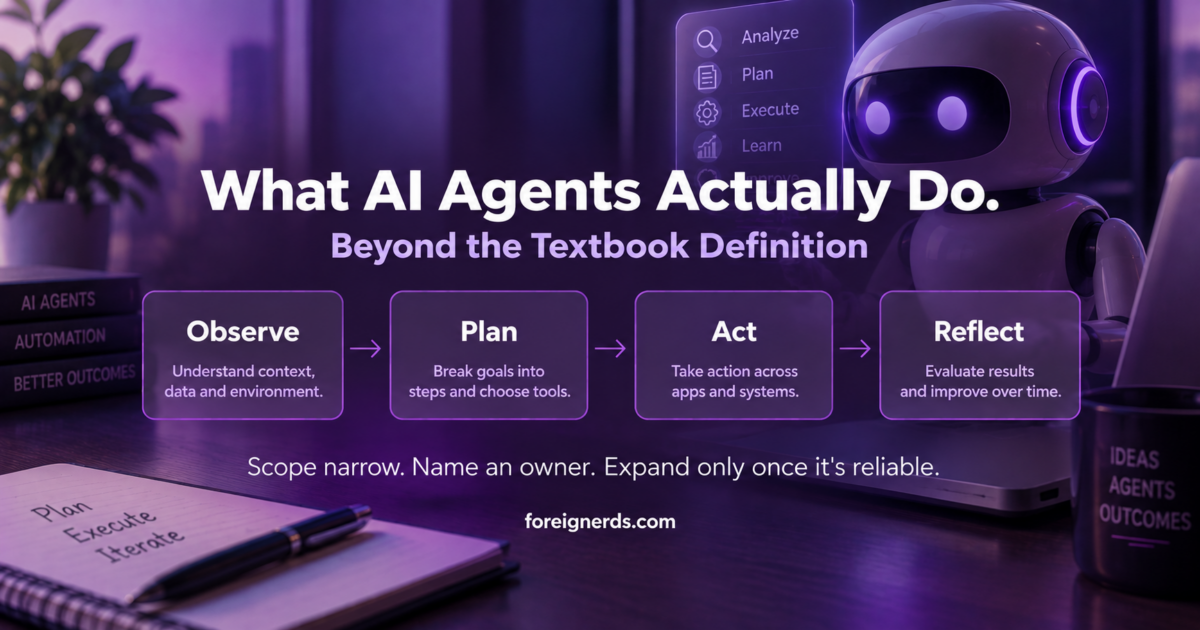
An AI agent is an autonomous software system powered by a language model that can use tools and run in a loop to accomplish multi-step goals without continuous human prompting. Unlike a chatbot that only replies with text, an agent observes its environment, plans a sequence of steps, takes action through connected tools, and reflects on the results before continuing — a cycle it repeats until the task is actually finished.

The AI agent action loop: observe, plan, act, reflect

Why the Textbook Definition Isn’t the Hard Part

IBM, Google Cloud, and AWS all publish clear, accurate explanations of what an AI agent is, and there’s no reason to repeat that ground here. The definition isn’t where businesses actually get stuck. The hard part is what happens after a team understands the concept and tries to actually deploy one — and that’s the part almost nothing written about AI agents addresses honestly.

The Four Real Components, and Where They Actually Break

Every AI agent is built from the same four pieces, and understanding where each one tends to fail in practice matters more than understanding the architecture in the abstract:

  • The foundation model — the language model handling comprehension and decisions. This is rarely where things break; current models are capable enough for most real business tasks.
  • The harness — the application wrapper connecting the model to tools, files, and systems. This is where most real failures happen — a poorly scoped harness gives an agent either too much access (a genuine risk) or too little to actually complete its job.
  • Memory — short and long-term context retention across steps. Agents that lose context mid-task produce the “it forgot what it was doing” failures that are the most common complaint from early deployments.
  • The action loop — observe, plan, act, reflect, repeat. An agent with no meaningful reflection step will confidently repeat the same mistake in a loop rather than catching and correcting it.

Most public discussion of AI agents focuses on the foundation model, since that’s the most visible and most marketed piece. Most real deployment problems live in the other three.

What “Autonomous” Actually Means in Practice — and What It Doesn’t

The word “autonomous” gets used loosely, and it’s worth being precise about what current AI agents genuinely do without supervision versus what they don’t. A well-built agent can genuinely execute a multi-step task without a human approving each individual step — searching for information, calling an API, checking the result, adjusting its approach, and repeating until done. What it generally shouldn’t do without a defined checkpoint is take an irreversible, consequential action on its own: sending a customer communication, making a purchase, deleting data, or changing a production system. The businesses getting real value from agents right now draw this line deliberately — full autonomy for reversible, low-stakes steps; a human checkpoint before anything consequential.

The Five Types Worth Knowing, Briefly

AI agents aren’t one category with uniform capability. A few distinctions genuinely matter when evaluating what to deploy:

Type What it does Typical use
Simple reflex agents Reacts to current input only, no memory of past state Basic automated responses, simple triggers
Model-based agents Maintains an internal model of its environment to inform decisions Tasks requiring context awareness across steps
Goal-based agents Plans a sequence of actions toward a defined goal Multi-step research or task completion
Utility-based agents Weighs multiple possible outcomes and picks the best one, not just any workable path Decisions with tradeoffs, not just a single correct answer
Learning agents Improves its own performance over time from feedback Long-running systems that need to adapt, not just execute a fixed process

Most business use cases today genuinely need only a goal-based agent with solid memory — the more advanced categories matter less for practical adoption than the marketing around “advanced AI agents” sometimes implies.

Is ChatGPT an AI Agent?

Not by itself, and this distinction trips up a lot of early conversations about adoption. ChatGPT, used as a chat interface, is a conversational assistant — it responds to prompts but doesn’t independently observe an environment, plan multi-step actions, or loop until a goal is complete without a person driving each turn. The same underlying model becomes part of a genuine agent once it’s placed inside a harness that gives it tools, memory, and an action loop — which is exactly why “AI agent” describes a system architecture, not a specific product. This distinction matters practically: a business asking “should we use an AI agent” is usually really asking whether their task needs that full observe-plan-act-reflect loop, or whether a simpler conversational tool already solves the actual problem at hand.

What Realistic Deployment Actually Looks Like, Month by Month

Based on how the narrow-scope-first approach described above typically plays out, a realistic timeline for a business’s first genuine agent deployment looks less dramatic than most vendor pitches suggest. The first few weeks go into defining the single narrow task precisely enough that “done” is unambiguous — this step gets rushed constantly, and rushing it is the single biggest predictor of a failed first deployment. The following few weeks are spent building and testing the harness against real data, not a clean demo scenario, since real business data is messier than whatever the agent was tested against initially. Only once that narrow version runs reliably, unsupervised, for a meaningful stretch does it make sense to either expand its scope or hand off a second narrow task to a second agent. Businesses that skip straight to an ambitious, broad deployment on their first attempt are the ones most likely to end up disillusioned with the technology within a quarter, not because the technology failed, but because the scope was wrong from the start.

Where Businesses Actually Get Value Today

Stripped of the more speculative framing common in AI agent coverage, the genuinely proven use cases right now cluster around a handful of patterns: research and information-gathering tasks that would otherwise take a person an hour of manual searching and cross-referencing; repetitive multi-step workflows with clear success criteria (data entry across systems, structured report generation, first-pass customer support triage); and monitoring tasks where an agent watches for a condition and takes a defined action when it occurs, rather than requiring someone to check manually. The common thread across all three: a clearly defined “done” state. Agents perform well when success is checkable. They perform poorly on open-ended, judgment-heavy work with no clear finish line.

The Adoption Mistake Showing Up Most Often

Starting broad instead of narrow

The most common early mistake isn’t technical — it’s scope. Teams excited about agent capability often start with an ambitious, broad goal (“manage our entire customer onboarding process”) rather than a narrow, well-defined one (“check for incomplete onboarding forms daily and send a specific reminder email”). The narrow version ships in days, works reliably, and builds real trust in the technology. The ambitious version usually stalls in development for months and, even when it ships, fails unpredictably in ways that are hard to debug because too many decisions were left to the agent’s judgment at once.

The practical fix

Consistent with how the same principle plays out in agent governance: start with the narrowest version of the task that still delivers real value, get it running reliably, and only then expand its scope — not the reverse.

Build vs. Buy: The Decision Most Teams Face First

Before writing any code, most teams should genuinely ask whether an existing agent platform already solves their specific need, rather than defaulting to a custom build. This decision deserves its own careful evaluation — the full build-vs-hire breakdown covers the actual tradeoffs in depth, including when an off-the-shelf agent platform is genuinely sufficient and when the specific integration needs justify a custom build instead.

What This Means for a Business Evaluating Agents Right Now

The technology is real and the proven use cases are genuinely valuable, but the gap between “AI agents are transformative” (true, eventually, for the right tasks) and “deploy one for your entire operation this quarter” (usually a mistake) is where most disappointment comes from. The businesses seeing real results share a pattern: they picked one narrow, checkable task, defined exactly where human judgment stays in the loop, and expanded only after the narrow version proved reliable. That’s a less exciting story than the broader promise of autonomous AI, but it’s the one that actually produces working systems rather than abandoned pilots.

Named Entities Worth Understanding If You’re Evaluating Vendors

A handful of terms come up repeatedly in agent-platform conversations and are worth knowing precisely: an orchestration layer coordinates multiple agents working on related sub-tasks, relevant once a business moves beyond a single narrow agent to several working together. A tool call is the specific mechanism by which an agent invokes an external function — a search, an API request, a code execution — and is the actual point where most security and access-scope decisions live. Grounding refers to connecting an agent’s reasoning to real, current data rather than relying solely on what a model learned during training, which matters enormously for any task involving facts that change over time. None of these terms are marketing buzzwords on their own — they describe real architectural decisions that determine whether a given agent platform fits a specific need, and a vendor conversation that never touches any of them specifically is worth treating with some skepticism.

Security and Access: The Question Most Pitches Skip

Because an agent’s harness determines what it can actually touch, the access-scoping decision is arguably the single most consequential technical choice in any deployment, and it’s the one most vendor demos gloss over entirely. A narrowly scoped agent — read access to a specific data source, write access to exactly one downstream system, nothing more — fails safely even when something goes wrong; the worst case is a task that doesn’t complete. A broadly scoped agent with wide system access can fail in ways that are much harder to contain, precisely because the same flexibility that makes it capable also makes an error more consequential. This is the practical version of the same principle covered in more depth in agent governance: access should be granted deliberately, tied to the specific task, and reviewed periodically — not granted broadly upfront because it’s more convenient during initial setup.

How to Tell If Your Team Is Actually Ready

Before evaluating specific tools or platforms, a short internal check is more useful than any vendor comparison: Is there one specific, narrow task identified, with a clear definition of “done”? Is there a named person who will own the agent once it’s live, the same way any new system needs an owner? Has someone mapped exactly what data or systems the agent needs to touch, and confirmed that scope is as narrow as it can be while still completing the task? And is there a plan for what happens when the agent gets something wrong — not if, when, since even well-built agents make mistakes on real-world edge cases? A team that can answer all four concretely is genuinely ready to move forward. A team that can’t is better served spending another week on definition before writing any code or signing any contract.

Where This Connects to a Real Deployment

Everything above is the evaluation and planning layer. Once a team has a narrow task defined, an owner named, and access scope mapped, the actual build is where AI agent development work happens — and it’s worth bringing that expertise in at the planning stage rather than after a first attempt has already gone sideways from unclear scope. The access-scoping discipline described above also connects directly to how AI security thinking applies more broadly — an agent with excessive permissions is a security question as much as an architecture one, and the same principles that govern AI-driven threat detection apply to scoping what an agent is allowed to touch.

The pattern holds across all of it: definitions are cheap to find, and every major cloud provider has written a good one. What actually determines whether an agent deployment succeeds is the unglamorous work — scoping the task narrowly, naming an owner, mapping access deliberately, and testing against real conditions before expanding. That discipline, not the underlying model, is what separates a working agent from an abandoned pilot.

Key Takeaways

  • An AI agent observes, plans, acts through tools, and reflects in a repeating loop until a task is done — different from a chatbot that only replies to prompts one turn at a time.
  • Of the four components (foundation model, harness, memory, action loop), the foundation model is rarely where things break — most real failures happen in the harness (too much or too little access) and memory (losing context mid-task).
  • “Autonomous” should mean full independence for reversible, low-stakes steps, with a human checkpoint before anything consequential — sending money, contacting a customer, changing a production system.
  • The single most common adoption mistake is starting broad instead of narrow — a narrow, well-defined task ships in days and builds real trust; an ambitious first deployment usually stalls for months.

AI Agent Governance: A Practical Guide for Real Businesses

This article is part of our complete guide: AI in Cybersecurity: The Complete Guide for Business Leaders.

AI agent governance is the set of policies and controls that define what autonomous AI agents are allowed to do, who approves their actions, and how those actions get reviewed. Search interest in this topic grew from near zero in 2024 to over 200 monthly searches by 2026. Foreignerds builds practical governance for businesses that have not bought a monitoring platform yet.

Why This Is Suddenly a Real Conversation

Three years ago, almost nobody searched for this term. Search volume for “AI agent governance” sat near zero through most of 2024, then climbed steadily through 2025 and into 2026, reaching over 200 searches a month with a $51.65 cost-per-click — a signal of genuine buyer intent behind a still-modest number. That growth curve tells the real story: businesses did not start asking this question because a vendor invented a new problem to sell against. They started asking because AI agents quietly multiplied inside their own operations — a Zapier automation here, a customer-support bot there, a coding assistant with repository access somewhere else — and at some point, someone in the room asked who actually approved all of this.

This pattern repeats across nearly every business we talk to. Agents get adopted individually, department by department, often by whichever employee was comfortable enough with the tool to set it up. A marketing coordinator connects an AI writing tool to the CMS. A support lead turns on an AI chatbot that can issue refunds up to a certain dollar amount. A developer gives a coding assistant write access to a shared repository. Each decision is reasonable in isolation. None of them were made with the others in mind, and in most cases, nobody outside that one team knows the agent exists at all.

The result is what security teams sometimes call “shadow AI” — a layer of autonomous tooling running inside the business that was never centrally reviewed, inventoried, or authorized. It is the direct AI-era descendant of “shadow IT,” the older problem of employees adopting unsanctioned software tools, except the stakes are higher: shadow IT tools mostly stored or displayed data, while shadow AI agents can take real actions — sending money, communicating with customers, modifying systems — without a human confirming each one.

The Vendor-Neutral Gap

We pulled the current top-ranking results for this exact topic and found a consistent pattern worth naming directly. Every single one is either an official platform document — Microsoft publishes its own AI agent governance guidance inside the Azure Cloud Adoption Framework — or a vendor selling a dedicated governance or monitoring product: Zenity, CloudFuze, Airia, OneTrust, and AvePoint all rank with content that leads back to their own platform. That is not a criticism of those companies; a governance platform is a legitimate, sometimes necessary product for the businesses that genuinely need one, and several of them build genuinely useful tools for exactly that audience.

But it means the entire top of the search results is written from one of two vantage points: a cloud platform explaining how to use its own tooling, or a vendor whose content exists to move a reader toward a purchase. Neither vantage point is built to answer the question a smaller business actually has first: not “which platform should I buy,” but “what should I actually be doing right now, before I spend anything.” A business with five AI agents running across two departments does not need the same governance apparatus as an enterprise running hundreds across a regulated industry, and almost none of the current top-ranking content acknowledges that distinction exists at all — every one of them moves quickly toward a platform pitch regardless of the size or maturity of the business reading it.

That gap is exactly what this guide addresses: a starting point that does not assume the reader is already a platform customer, written from the perspective of an agency that builds the agents themselves rather than a company selling a separate tool to monitor someone else’s.

A Practical Starting Framework

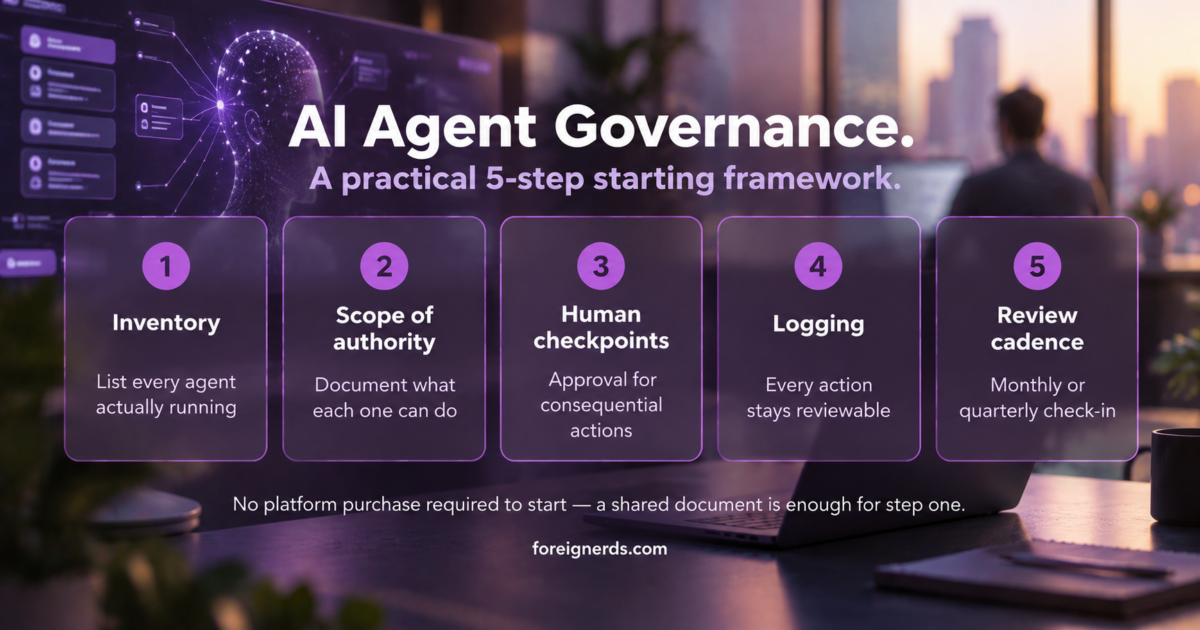
Before any business buys a dedicated governance platform, five things make up a workable AI agent governance framework using tools already on hand — a shared document, a recurring calendar invite, and an honest internal conversation are enough to start.

1. Inventory every agent actually running

Most businesses cannot answer this question accurately on the first try. List every automation, chatbot, coding assistant, and workflow tool with any degree of autonomous action — including the ones individual employees set up on their own without IT involvement. The honest way to do this is to ask every department lead directly, “what AI tools are you currently using that take actions on your behalf, not just ones that generate text or suggestions for you to review.” The distinction matters: a tool that drafts an email for a human to send is a different risk category from one that sends the email itself.

2. Document the scope of authority for each one

For every agent on that list, write down exactly what it is allowed to do: send external emails, spend money, access customer data, modify code, or take any other consequential action. If nobody can answer this for a given agent, that is the first thing to fix — an agent whose permissions nobody can describe is, by definition, ungoverned, regardless of how well it happens to be performing today.

3. Set human-in-the-loop checkpoints where the stakes justify it

Not every action needs human approval, but any action involving money, customer-facing communication, or irreversible system changes should require a sign-off until the agent has a real track record. This does not mean reviewing every single action forever — it means starting with a checkpoint and removing it deliberately once there is enough evidence to justify more autonomy, rather than granting full autonomy by default because removing a checkpoint later feels inconvenient.

4. Make sure every action gets logged somewhere reviewable

An agent that acts without leaving a trace is a liability regardless of how well it performs — logging is not optional even at small scale. This does not require a dedicated logging platform; many AI tools and automation platforms already produce activity logs that simply go unread. The immediate task is often not building new logging infrastructure, but making sure someone actually looks at what already exists on a regular basis.

5. Put a recurring review on the calendar

Governance that gets set up once and never revisited drifts out of date as fast as the agents themselves evolve. A monthly or quarterly review, even a short one, keeps the inventory and scope-of-authority documentation honest, and creates a natural checkpoint for catching new agents before they become another blind spot in next year’s audit.

AI agent governance 5-step framework: inventory, scope of authority, human checkpoints, logging, review cadence

When You Actually Need a Dedicated Governance Platform

A handful of agents doing well-defined, low-stakes tasks can usually be governed with the framework above and a shared document. The calculus changes once a business meets one or more of these conditions:

  • Multiple departments, multiple agents, no single owner. Once governance can no longer live in one person’s head or one shared spreadsheet without becoming unwieldy, a platform’s centralized visibility starts earning its cost.
  • Agents touching financial systems or sensitive customer data. The consequence of an ungoverned mistake scales directly with what the agent can access — an agent that can move money or view protected health information needs a materially higher standard of oversight than one drafting marketing copy.
  • Operating in a regulated industry. An auditor will eventually ask for documented proof of controls, not just a policy someone can describe verbally. A platform that generates that documentation automatically is often cheaper than the labor cost of manually proving compliance after the fact.
  • The agent footprint is growing faster than anyone can track manually. If new agents are appearing faster than the quarterly review can keep up with, that is itself a signal that manual tracking has reached its practical limit.

At that point, a dedicated platform earns its cost by providing the continuous monitoring, access logging, and policy enforcement that a shared spreadsheet cannot realistically sustain. Until that point, the five-step framework above is not a placeholder for “real” governance — it is a legitimate, defensible starting point that many businesses will operate on for years before outgrowing it.

What This Looks Like When It Goes Wrong

The realistic failure mode is rarely a single dramatic incident. It is usually a slow accumulation of small, undocumented decisions — an agent granted broader permissions “temporarily” that nobody ever revisited, a new automation added to an existing workflow without anyone updating the original scope-of-authority notes, a departing employee whose personal AI tool integrations were never audited before their access was revoked. None of these individually looks like a crisis while it is happening. Collectively, they are exactly what an auditor, a regulator, or a genuinely bad incident eventually surfaces all at once, at the worst possible time to discover it for the first time.

The five-step framework above is deliberately unglamorous for this reason. Governance failures are rarely caused by a sophisticated attack on a well-governed system — they are caused by the absence of a basic inventory that would have made an obvious problem visible months earlier.

Common Mistakes We See Businesses Make Here

A few patterns show up repeatedly across businesses figuring this out for the first time, and each one is avoidable once it is named directly.

Treating governance as a one-time setup instead of an ongoing habit

The inventory and scope-of-authority documentation described above are only accurate on the day they are written. Every new automation, every expanded permission, every new hire granted access to an existing AI tool changes the picture. Businesses that treat the initial setup as “done” rather than the first cycle of a recurring process are usually the ones surprised, months later, by an agent nobody remembers approving.

Assuming a low-cost tool means low-stakes authority

The price of an AI tool has no relationship to the consequences of what it is authorized to do. A free automation connecting a support inbox to a refund system can move real money just as easily as an expensive enterprise platform. Governance decisions should follow the scope of what an agent can actually do, not what it costs to set up.

Waiting for a platform to solve a documentation problem

A monitoring platform is genuinely valuable once a business has outgrown manual tracking — but it cannot retroactively tell you what an agent was supposed to be allowed to do if that scope was never documented in the first place. Platforms enforce and monitor policy; they do not invent it. Skipping the documentation step and going straight to a platform purchase often means paying for enforcement of a policy that still does not actually exist.

Only considering security risk, not operational risk

Most conversations about AI agent governance focus on security — unauthorized access, data exposure, malicious misuse. Those risks are real, but the more common failure mode in practice is operational: an agent doing exactly what it was told, at a scale or in a context nobody anticipated, because the original scope-of-authority conversation was too narrow. A refund-approval agent that works fine at ten requests a day can create a real financial exposure at ten thousand, even with zero security compromise involved anywhere in the chain.

Where This Fits Alongside Building the Agents Themselves

Whether you build AI agents in-house or bring in an outside team, governance and AI agent development are not sequential steps where one finishes before the other starts — they need to happen together. An agent built without governance in mind from the outset usually ends up retrofitted later, which is harder and less reliable than designing the scope of authority, logging, and human-in-the-loop checkpoints into the agent from its first version. When Foreignerds builds an agent for a client, the governance questions in this article — what is this allowed to do, who approves consequential actions, where does the activity log live — are part of the initial scoping conversation, not an afterthought addressed after launch.

This is also why a genuinely useful governance framework cannot be entirely generic. The right level of human oversight for an agent that drafts internal reports is different from the right level for one that can issue customer refunds, and a governance policy that treats every agent identically usually ends up either too restrictive for the low-stakes cases or too permissive for the high-stakes ones. The five-step framework in this article works precisely because it asks the scope-of-authority question per agent, not once for the whole business.

Getting Started

The five-step framework in this article is genuinely enough to begin with — none of it requires a purchase, a vendor conversation, or specialized software. What it does require is someone inside the business actually doing it, which is where most good intentions on this topic quietly stall. If the inventory step alone feels daunting, or if the honest answer to “who approves consequential agent actions here” is currently “nobody,” a structured outside review through our AI governance consulting work can get that foundation in place faster than building it internally from a standing start — sized to match where the business actually is today, not to a generic enterprise template — the same scoping conversation that happens before we design an agent in the first place, rather than a separate audit bolted on after the fact.

For a broader look at what these systems actually do beyond governance specifically — including where most first deployments go wrong — see what AI agents actually do and the adoption mistake that sinks most first attempts.

Key Takeaways

  • AI agent governance means defining what autonomous agents are allowed to do, who approves their actions, and how those actions get reviewed — demand for this is real, growing from near-zero search volume in 2024 to 200+ searches a month by 2026.
  • Most businesses don’t need a governance platform to start — a shared document covering five things (inventory, scope of authority, human checkpoints, logging, and a recurring review) is a legitimate starting point.
  • A dedicated platform earns its cost once governance spans multiple departments, touches financial or sensitive data, operates in a regulated industry, or grows faster than a manual review can track.
  • The realistic failure mode isn’t a dramatic breach — it’s a slow accumulation of undocumented decisions nobody revisits.

Should You Build Your Own AI Agent? The Complete 2026 Guide to Build vs. Hire

Building your own AI agent works well for a single, well-defined task. It stops working — often quietly, and often expensively — once the agent needs to reason across multiple systems, handle real edge cases, or run unsupervised for actual customers. The data on where that line sits is a lot more specific than most guides let on, so here it is in full.

The AI Agent Boom, in Numbers

Everyone is building one right now, and that’s not an exaggeration. 88% of organizations already use AI in at least one business function, up from 78% just a year earlier, and 79% say AI agents specifically are already being adopted somewhere inside their organization. Gartner expects 40% of enterprise applications to have a task-specific agent embedded by the end of 2026 — up from under 5% just one year prior. The global AI agent market itself is on track for $10.9–12.1 billion in 2026, growing at 44–46% a year through 2030, with some projections putting it past $50 billion by the end of the decade. By 2028, agents are projected to intermediate more than $15 trillion in B2B spending — reshaping procurement, sales, and commerce operations well beyond the customer-service use case most people picture first.

That’s the headline everyone repeats. It’s also only half the story, and the more revealing number sits right next to it: 80% of enterprise applications may have an agent embedded by the end of this year, but only around 31% of organizations are actually running one in production. Embedding is easy. Operating is hard. That gap is the real 2026 story.

The Part Nobody’s Tutorial Mentions: Most Agents Don’t Survive

Here’s the number that should matter more than the adoption rate: more than 80% of AI projects fail to deliver their intended business value, according to RAND Corporation’s analysis of over 2,400 enterprise AI initiatives — roughly twice the failure rate of a normal IT project. MIT’s Project NANDA found something even starker: 95% of generative AI pilots produce no measurable return on the P&L at all. Not a disappointing return. None.

Gartner projects that more than 40% of agentic AI projects specifically will be canceled by the end of 2027, citing escalating costs, unclear business value, and inadequate risk controls as the primary drivers. One analysis of real production deployments puts the practical number even higher, estimating that as many as 88% of enterprise AI agents never reach production at all — and most of the ones that do get rolled back shortly after, often within the first release cycle once the gap between demo performance and real-world performance becomes impossible to ignore. Put the adoption and failure numbers side by side and the real 2026 story becomes obvious: 79%+ of companies have started building an agent, but only around 23% have actually scaled one successfully. Starting is easy. Surviving contact with a real business is the hard part.

Why They Fail Isn’t What You’d Expect

If you assume this is a model-quality problem, the data says otherwise. RAND attributes 84% of AI project failures primarily to leadership decisions, not technical limitations — unclear success criteria, weak data foundations, and fading sponsorship once the demo excitement wears off. This tracks with what shows up on the ground: a customer service agent handling 10,000 conversations a month can run $200–250/month in model costs on GPT-4o, or under $30/month on Claude Haiku for the same volume — a real, current example of how much of “the AI is too expensive” is actually a model-selection problem, not an inherent cost of the category. The technology usually isn’t what breaks. The plan around it is.

What a Failed Agent Actually Looks Like in Practice

It rarely fails the way people picture it — no crash, no error message, no obvious moment where something visibly goes wrong. The pattern researchers describe is quieter and more expensive: the agent keeps running, keeps producing output that looks reasonable, and keeps being wrong in small, plausible-looking ways that nobody catches for weeks. A support agent starts giving confidently incorrect answers to a product update nobody told it about. A lead-qualification agent quietly starts misreading a new form field after a CRM update, and every lead from that point forward gets scored wrong — invisibly, until someone finally asks why the pipeline looks thin. By the time anyone notices, the fix isn’t “adjust a setting.” It’s “figure out how long this has been happening and what it’s already cost,” which is a much harder conversation to have with a board or a client than either version of “we caught it on day one.”

This is precisely why the production-monitoring gap covered later in this guide matters more than almost anything else in the build decision — an agent that’s watched catches this in a day. An agent that isn’t can run wrong for a quarter.

A Quick Organizational Readiness Check

Since the RAND data points to leadership decisions rather than technology as the dominant failure cause, it’s worth checking your own footing before either path. Four questions surface most of it: Does everyone involved agree on the one specific metric that would prove this succeeded — not “it should help,” but a real number? Is the data the agent needs actually accessible and reasonably clean today, or does someone believe it “mostly is”? Is there a named person accountable for this six months from now, or does responsibility quietly diffuse once the initial excitement fades? And critically — if the pilot shows lukewarm results in month two, is there an actual plan to fix the specific problem, or does the project just quietly stop getting mentioned in the weekly update? That last one is where a large share of the 40%+ cancellation number above actually originates — not a dramatic failure, just a slow, undocumented fade. A shaky answer to any of these predicts trouble more reliably than anything about the model or the vendor you eventually choose.

The DIY Path Is Real — Here’s Where It Actually Works

None of this means you shouldn’t build your own agent. For a genuinely large set of tasks, DIY is the right and cheaper call, and it’s worth saying plainly rather than talking you out of it for the sake of a sales pitch.

If you need something to summarize your inbox every morning, draft a first-pass reply to common support questions, or pull a scheduled report together, a no-code platform or a short script against an LLM API gets that done in an afternoon. OpenAI’s own guide to building agents walks through exactly this starting point before it gets into production considerations — because for a narrow, forgiving task, this genuinely is the right first move.

The tooling for this has matured fast. No-code platforms like n8n and Microsoft Copilot Studio let you assemble a working agent visually, with no coding at all, which is exactly why they dominate the current search results for this topic. If you’re comfortable writing code, frameworks like LangGraph, CrewAI, and AutoGen give you more control over how the agent reasons and coordinates, still without needing to build the underlying infrastructure from scratch. Both routes are legitimate starting points — the choice between them is really a choice about how much control you want over the internals, not a signal of how serious the project is.

The honest reason it works: the task is narrow, the input is predictable, and if the output is occasionally wrong, a human catches it before anything happens. That’s a completely reasonable trade-off for a personal workflow or an internal prototype.

What DIY Agent-Building Actually Costs (Even the “Free” Kind)

“Free” is relative. A survey of more than 40 real DIY agent builds put direct costs at roughly $0–500 — mostly API usage, since the platforms themselves are typically free at low volume. That’s genuinely cheap, and for the narrow use cases above, it’s the right number to pay.

Where it stops being simple: the build cost was never really the risk. Ongoing model API spend scales with usage, not with what you paid upfront — the same GPT-4o-vs-Claude-Haiku gap mentioned above can be the difference between a sustainable side project and a surprise bill. Runaway reasoning loops are a real, documented failure mode, where an agent stuck re-processing the same problem can burn through a month’s model budget in hours if nobody’s set a cost cap. And the maintenance nobody budgets for shows up fast: when a CRM changes a field name or an API bumps a version, a DIY-built agent typically breaks silently rather than loudly, and even a modest one usually needs $200–500 a month in ongoing attention just to keep pace with the systems around it changing — nobody’s watching it closely enough to catch a break before a customer does.

Where DIY Agent-Building Breaks Down for a Real Business

The ceiling shows up the moment the agent stops being something you use and starts being something your customers depend on.

No Real Error Handling or Escalation

A tutorial-built agent usually has one path: it works, or it visibly fails and someone notices right away. A production agent needs to know what to do with the cases nobody anticipated — hand off to a human, ask a clarifying question, or fail safely instead of guessing confidently and being wrong in front of a customer. This single gap is a large part of why 52% of organizations cite data quality and edge-case handling as their biggest blocker to real deployment, not model capability.

No Integration With the Systems You Actually Run On

Most DIY builds stop at a single API call. A real business workflow usually touches a CRM, a calendar, a ticketing system, and internal data that isn’t sitting in a clean, documented format waiting to be queried — which is its own specialized problem (retrieval-augmented generation exists specifically to solve it). What looks like “just connecting to the API” in a tutorial is, in a real system, a list of much less glamorous problems: handling authentication tokens that expire, respecting rate limits without silently dropping requests, adapting gracefully when a field gets renamed or a system upgrades to a new version, and recovering sensibly from a partial failure instead of leaving a record half-updated. None of these show up in a demo. All of them show up eventually in production. Getting an agent to work reliably across all of that, every time rather than in a demo, is a fundamentally different scale of problem than a weekend build, and it’s exactly where the RAND failure data shows leadership teams consistently underestimate the actual scope before they start.

Nothing Watching It Once It’s Live

A tutorial ends when the demo works. A real deployment doesn’t — you need to know when the agent starts behaving differently, when a system it depends on changes underneath it, and whether it’s actually doing what you think it’s doing at 2am on a Tuesday. Real observability tooling for this typically runs $300–1,200 a month per active agent at a serious operation, and it covers things a DIY build almost never includes on its own: a log of every decision the agent made and why, an automatic flag when its behavior drifts from its normal pattern, and a held-out set of test cases run regularly to catch a quiet regression before a customer does. That monitoring layer almost never exists in a DIY build, not because it’s hard to understand, but because building it isn’t the part anyone finds fun — and it’s precisely the gap behind the “88% never reach durable production” number above, and precisely what would have caught the quiet CRM-field failure described earlier before it ran for a full quarter.

What Custom Agent Development Actually Costs

Real, current pricing across multiple 2026 sources converges on a consistent tiered structure:

  • A single, well-scoped custom agent: roughly $2,500–$8,000, typically shipping in one to two weeks
  • A multi-agent system (several agents coordinating on a more complex workflow): roughly $8,000–$25,000, typically four to eight weeks
  • Enterprise-grade deployment with monitoring, evaluation infrastructure, and compliance review: $25,000–$150,000+, typically six months or more

These aren’t arbitrary bands — the jump in both cost and timeline between tiers tracks almost exactly with the jump in what the agent actually has to survive: a single-workflow agent only has to handle one predictable path, while an enterprise deployment has to handle everything the failure-rate data above describes, by design, before it ever reaches a real customer. Outsourcing to a specialized team also tends to land 30–50% cheaper than the equivalent in-house hire covered below, mainly because the infrastructure, evaluation tooling, and monitoring setup are already built and reused across projects rather than assembled from scratch for one. Reasoning complexity moves the number more than almost anything else within a tier — the practical gap between a simple routing agent (one that just directs a request to the right place) and a genuine reasoning agent (one that plans, checks its own work, and adapts mid-task) can be 5–10x in cost for what looks, from the outside, like a similar-sized project.

On top of the build itself, budget separately for what almost every guide buries in the fine print: ongoing model API spend ($200–$5,000+/month depending on volume and model choice), observability tooling ($300–1,200/month per active agent), evaluation infrastructure to actually measure whether the agent is still performing correctly over time ($2,000–5,000 to set up properly), and — if the agent touches PII, financial data, or healthcare records — compliance review, which typically adds $3,000–$10,000 and 2–4 weeks before launch.

The In-House Alternative, and Its Real Price Tag

The other option is hiring your own AI engineer rather than a project-based partner. A fully loaded in-house hire runs $240,000–$275,000 in salary alone, plus $52,000–$72,000 in hiring costs, plus 2–3 months of ramp time before that person ships a first reliable system — and building in-house AI capability still carries a documented failure rate in that same range as the broader industry numbers above. This path can make real sense if AI is genuinely core to your product, not a supporting workflow. For most businesses, it’s a much bigger and slower commitment than the problem in front of them actually requires.

There’s a real middle path worth naming, because it’s the one most businesses actually land on once they’ve weighed the other two: keep strategic direction and your own data in-house, where you understand the business context best, and outsource the actual execution to a team that builds these regularly. This tends to land closer to the project-based cost tiers above than the full in-house hire, while still keeping the institutional knowledge of what the agent needs to do inside your own walls rather than fully dependent on an outside relationship. It also sidesteps the slowest part of the in-house path — the 2–3 months of ramp time before a new hire ships anything reliable — since the execution partner has already been through that learning curve on someone else’s project.

What Changes With a Production-Built Agent

The difference isn’t that a professionally built agent is “smarter” — it’s that it’s built to survive contact with reality, which the data above shows most agents currently don’t. That means genuine multi-step reasoning built on the right underlying model instead of a single prompt-response loop, real tool-calling into your actual CRM or ticketing system rather than a demo API, defined escalation logic for the cases it shouldn’t handle alone, and monitoring from the day it goes live rather than bolted on after something breaks.

Concretely, that usually means a scoping phase before any code gets written — diagnosing the real need honestly, including telling a client the idea needs rethinking if that’s genuinely the finding — followed by development against real data from day one rather than a clean demo dataset, with the evaluation framework built in from the start instead of added once a problem surfaces. Then a staged rollout: a limited group first, with real output reviewed before expanding, so any quality gap gets caught while it’s still small and inexpensive to fix, rather than after it’s been running unsupervised for a quarter.

Real Examples, Not Case Studies for Show

This isn’t theoretical, and it isn’t the “88%” statistic either. Our AI Voice Outreach Platform is a real, named case study: a commercial real estate client went from roughly 500 manual calls a day to more than 4,000 AI-managed calls a day, with better lead qualification, running in production — not a pilot that quietly stalled after the demo. That gap between 500 and 4,000+ is the practical difference between a DIY prototype and a system built to actually carry real load.

A different shape of the same pattern: Jarvis Bot, an internal AI productivity assistant built for a technology consulting client, now saves each person on the team roughly 2.1 hours of admin work a day and cut missed follow-ups by 85% — a workflow-integration problem, not a call-volume one, solved with the same underlying discipline: real integrations, defined escalation, and monitoring that catches drift before it becomes a customer-facing problem.

A third: CoreliaOS, a multi-agent automation platform built for a professional services client, now handles more than 500 daily queries at 94% accuracy while cutting search time by 70% — the exact kind of multi-system, high-volume workload the DIY-ceiling section above describes, running reliably because it was built with the reasoning, integration, and monitoring layers that a demo simply doesn’t need.

How to Vet an Agency, If You Go That Route

If the decision above points toward hiring rather than building, the vetting matters as much as the decision itself — because “we do AI now” has become a common line for firms that haven’t actually changed how they work underneath it. A well-established software shop advertising a new AI practice sometimes delivers exactly what it always delivered: the same multi-month process, the same team structure, with “AI” added to the pitch deck rather than to the methodology.

A few direct questions cut through this quickly: Who specifically will build this, and can you speak with them before signing anything — not a sales rep, the actual builder? Can they show a real, named, verifiable result rather than a generic capability list, with numbers you could independently check if you asked? What does the escalation and monitoring plan look like on day one, not as an afterthought added after launch? And what happens, concretely, in the first month after go-live — is anyone actively watching it closely, or does the working relationship effectively end at handoff? It’s also worth asking directly whether the team has actually changed how it works to build with AI, or just added the phrase to its marketing while keeping the same multi-month process it always ran — the answer is usually obvious within the first real conversation. An agency confident in its own work answers all of this plainly, without redirecting back to a proposal.

The Build vs. Hire Decision Framework

A short, honest way to check where you actually land:

  • Is the task narrow and forgiving of occasional mistakes? DIY is probably the right call — don’t over-engineer a personal workflow, and don’t let anyone talk you into a $25,000 build for a job a $0–500 tool already does.
  • Does it need to touch more than one real business system reliably? That’s where DIY tools start to strain, and where the RAND data shows most underestimation happens.
  • Would a wrong answer reach a customer before a human sees it? If yes, you need real error handling and escalation, not a best-effort script — this is the single largest driver of the failure numbers above.
  • Does it need to run unsupervised, every day, indefinitely, without someone checking its work by hand? That’s a production engineering and monitoring problem, not a weekend one.
  • Is this core to what your business actually sells, or a supporting workflow? Core capability can genuinely justify the in-house hire’s cost and timeline. A supporting workflow almost never does.

If you land mostly on the DIY side, build it yourself — genuinely, that’s the right and cheaper answer, and the data above backs that up as strongly as it backs up the alternative. If you land on the other side, that’s the point where the cost of getting it wrong — rolled back, abandoned, quietly absorbed into the 88% — is higher than the cost of building it properly the first time. And if you land somewhere in between, the hybrid path above (your data and direction, someone else’s execution) is a genuine third option, not just a compromise between the other two.

Once an agent is built or a vendor is chosen, the next real question is governance — how to keep it accountable once it is running — and it is worth understanding what these systems actually do, and where most first deployments go wrong, before committing to either path above.

Key Takeaways

  • AI agent adoption is nearly universal (88% of organizations use AI somewhere), but more than 80% of AI projects fail to deliver real business value, and MIT found 95% of generative AI pilots show no measurable P&L return at all.
  • RAND traces 84% of these failures to leadership decisions — unclear success criteria, weak data, fading sponsorship — not model quality.
  • DIY agent-building is genuinely the right call for narrow, forgiving tasks (roughly $0–500 to build), but production-grade agents that touch real customers and systems run $2,500 to $150,000+ depending on complexity, plus ongoing monitoring costs most DIY builds skip.
  • The deciding questions: is the task narrow and forgiving of mistakes, does it touch more than one business system, would a wrong answer reach a customer unsupervised, and is this core to what the business sells?

AI Integration Services: The Complete 2026 Guide to Connecting AI to What You Already Run

Most businesses don’t need an AI strategy problem solved. They need AI connected to the CRM, the ERP, and the handful of older systems that already run the business day to day — and that turns out to be a meaningfully harder, more specific problem than most “AI integration” content treats it as. It’s also a genuinely different problem from choosing an implementation partner or deciding whether to build an agent yourself — this guide is about what happens technically once you’ve already decided to connect AI to what you already have. Here’s what the real technical and cost data actually shows.

The Real Starting Point: Most Business Software Is Older Than You’d Guess

Roughly 70% of the software running inside Fortune 500 companies was built more than 20 years ago. Core banking platforms, insurance systems, ERPs processing trillions of dollars a year — much of this infrastructure predates the concept of an API, let alone an AI model calling one. Replacing it outright is usually impractical: the cost, the multi-year timeline, and the risk of disrupting business continuity make a full “rip and replace” a non-starter for most organizations. Which means the real, honest starting point for almost every AI integration project isn’t “which model should we use” — it’s “how do we connect modern AI to something that was never built to be connected to anything.”

This isn’t a niche problem confined to a handful of old-economy industries either. It shows up in financial services running core systems from the 1990s, in manufacturing running factory-floor control systems installed decades before anyone considered them a usable data source, and in mid-market businesses running a CRM or ERP that was customized so heavily over the years that even the vendor’s own current documentation no longer fully describes how it actually behaves in production. The specific technology varies. The underlying shape of the problem — valuable business logic and data trapped inside a system that predates modern integration standards — is close to universal across industries.

Why AI Integration Is Harder Than It Looks

Every “top AI integration companies” list treats this as a solved, straightforward category. The actual data, drawn from real enterprise deployments rather than vendor marketing, tells a considerably less tidy story.

The Data Silo Problem

84.3% of organizations encounter real data silo challenges when attempting AI integration, and the average enterprise maintains 6.5 disparate data storage systems — a customer ID in one, an account number in another, an email address in a third, none of them reliably matching. These silos aren’t a minor inconvenience; they’re linked to a measured 31.2% decrease in overall operational efficiency, and separately estimated to cost teams roughly 5.8 hours a week in manual reconciliation work — someone exporting files, renaming columns, resolving duplicate customer names, and explaining why yesterday’s dashboard doesn’t match this morning’s spreadsheet. An AI system layered on top of fragmented, inconsistent data doesn’t fail loudly — it produces confidently wrong outputs, because “garbage in, garbage out” applies just as much to a large language model as it did to every data system before it.

The deeper issue isn’t just that the data lives in different places — it’s that nobody typically owns the question of what a given field actually means across systems, which system should be treated as the source of truth when two disagree, and how fresh each piece of data needs to be for the AI layer depending on it to behave reliably day to day. A pipeline can run successfully and still deliver unusable data if a downstream system interprets a value differently than the source intended — an operational failure that often surfaces only much later, when an automated workflow acts on a conflicting or stale value with real business consequences.

The Missing API Problem

Legacy systems frequently lack the modern API architecture that real-time AI interaction depends on. Where a modern SaaS product exposes a clean, documented API by default, a system built two decades ago often exposes nothing — meaning every integration has to be custom-built, one connector at a time, often against undocumented behavior and fragile dependencies that break in ways nobody predicted. This is precisely why 82% of organizations report struggling with data standardization and system compatibility specifically during the early phases of an integration project — this isn’t a late-stage surprise, it’s the first real obstacle almost everyone hits.

The Security Question Nobody Wants to Own

Opening up a closed legacy system to a new AI tool creates a new attack surface that didn’t exist before, on infrastructure that was often never designed with modern security assumptions in mind. Every new connector is a new potential entry point, and a system that has run unmonitored and largely unchanged for a decade rarely has the access logging or anomaly detection that a newer platform would have by default. This isn’t a reason to avoid integration — it’s a reason to treat access monitoring and permission scoping as part of the integration work itself, not an afterthought bolted on once something goes wrong. Continuous monitoring of access patterns, and deliberately narrow permission scoping for whatever new connector gets built, costs far less than discovering a data exfiltration path after the fact, and it’s a meaningfully cheaper insurance policy than most businesses assume before they ask the question directly.

The Timeline Nobody Quotes Upfront

73.4% of enterprises are actively pursuing AI integration with their ERP systems specifically — and the average implementation timeline for that work runs 26–32 months. That number rarely appears in a sales pitch, because it undercuts the “AI transformation in weeks” framing most marketing leans on. It’s also a direct, predictable consequence of the two problems above: you cannot reliably connect AI to data you haven’t first untangled, and untangling multiple legacy data silos is genuinely slow, careful work.

Worth being explicit about: 26–32 months is an average across a genuinely wide range of starting conditions, not a fixed number every project should expect. A business with a smaller number of systems, cleaner existing data, and a narrower initial scope can realistically move meaningfully faster than that average. A business with more fragmented data, more legacy platforms, and a broader initial ambition should expect to land on the longer end of that range, or beyond it — and a vendor who quotes a fixed, short timeline without first assessing which end of that range your specific situation falls on is quoting a number they can’t actually back.

What AI Integration Actually Costs

Real integration work — connecting AI capabilities into an existing product or system, as distinct from building a new AI feature from scratch — typically runs in a wide range depending on the state of the underlying systems. A single, well-defined integration (one legacy system, one clear data source, a scoped connector) can run $15,000–$50,000 and take four to eight weeks once the data foundation is already reasonably clean. A multi-system integration spanning several legacy platforms, with real data unification work required first, runs considerably higher — often $75,000–$300,000+ — precisely because the bulk of the cost and time isn’t the AI layer itself, it’s the data plumbing underneath it. Enterprises pursuing a full ERP-level integration should expect the 26–32 month timeline noted above to carry a correspondingly larger, multi-phase budget, not a single fixed quote.

The honest way to think about this pricing structure: you’re not really paying for “AI integration” as a single line item. You’re paying for data assessment and mapping, for the connector or middleware layer that lets two systems that were never designed to talk to each other exchange information reliably, for the AI capability itself layered on top of that connection, and for the ongoing monitoring that catches a quiet data-quality regression before it compounds into something expensive. Providers that quote a single flat number without breaking out these components are usually underestimating one of them — most often the data foundation work, since it’s the least visible part of the deliverable and the easiest to shortchange in a competitive proposal.

Integration Architecture: The Three Common Patterns

Most real integration work falls into one of three architectural patterns, and knowing which one fits your situation changes both the cost and the realistic timeline. A direct API integration works when the legacy system already exposes a usable, if imperfect, API — the fastest and cheapest pattern, but only available when the underlying system was built recently enough to have one. A middleware or connector layer sits between the AI capability and a system with no usable API at all, translating between the two — more work to build, and the pattern behind most of the custom, one-off integration work described above, but often the only realistic option for genuinely old infrastructure that predates the concept of a documented interface entirely. A RAG-based approach treats the legacy system’s data as a knowledge source to retrieve from, rather than a live system to transact with directly — often the right fit when the goal is answering questions from existing data rather than triggering actions inside the old system itself, and a natural complement to the data-unification work covered in the phased approach below. This is the same underlying technique behind retrieval-augmented generation as a standalone capability, applied here specifically to legacy data rather than a general knowledge base.

None of these three patterns is inherently better than the others — the right choice depends entirely on what the legacy system actually exposes and what the business goal actually requires, which is precisely why a vendor proposing the same pattern regardless of the system involved is a signal worth noticing rather than dismissing.

Why “Rip and Replace” Is Usually the Wrong Answer

The instinct to solve the legacy-system problem by simply replacing the legacy system is understandable and usually wrong. A full replacement carries its own multi-year timeline, its own high failure risk, and — critically — doesn’t actually solve the underlying data-silo problem unless the migration itself includes real data unification work, which most replacement projects underinvest in for the same reason integration projects do: it’s not the visible, exciting part of the work. The more reliable pattern across real integration work is incremental — connect AI to the systems you have, through a real data and API layer built specifically for that purpose, rather than betting an entire modernization program on a multi-year replacement succeeding on schedule.

This pattern shows up clearly in industries where the cost of delay is easiest to measure directly. In manufacturing specifically, legacy factory and MES (manufacturing execution system) platforms introduce real delays, data gaps, and blind spots that directly affect throughput, quality, and cost — and as agentic AI moves from experimentation into actual factory operations, those weaknesses become far more visible, and far more expensive, than they were when the system was only being used for basic record-keeping. The businesses that get ahead of this don’t wait for a full system replacement — they layer real-time data access onto the existing factory floor systems incrementally, proving value on one production line or one workflow before expanding, which is the same phased pattern that works everywhere else this problem shows up, and it’s a pattern that transfers cleanly to core banking, insurance, and any other industry running critical infrastructure that predates modern integration standards.

The Phased Approach That Actually Works

The pattern that shows up consistently across real, successful integration work is a deliberate sequence, not a single leap:

  • Phase one — data foundation and governance (typically 3–6 months): build a unified data model, a data catalog, and clear lineage mapping legacy sources into a coherent structure, before any AI capability gets layered on top. This means deciding, system by system, what each field actually means, which system is the source of truth when two disagree, and how fresh each piece of data needs to be for whatever gets built on top of it. This is unglamorous and it is the actual foundation everything else depends on.
  • Phase two — a scoped, real connector (typically 4–8 weeks per system): integrate AI against one well-defined data source or workflow at a time, rather than attempting a single sweeping connection across every system simultaneously. Choosing the pattern (direct API, middleware, or RAG) deliberately for this specific system, rather than defaulting to whatever the last integration used, matters more than it sounds like it should.
  • Phase three — expand deliberately: once the first integration is proven in production, extend the same pattern to additional systems, carrying forward the data foundation work from phase one rather than repeating it from scratch each time. Each subsequent system should get faster to integrate than the last, precisely because the foundational data work doesn’t need re-doing — if it isn’t getting faster, that’s a signal the foundation wasn’t built solidly enough the first time.

Skipping phase one is the single most common reason integration projects run over the 26–32 month enterprise average rather than under it — the AI layer gets built against data that turns out to be far messier than assumed, and the resulting rework costs more time than doing the foundation properly would have in the first place. It’s a genuinely tempting shortcut, because phase one produces no visible AI capability on its own — no demo, no headline feature, just cleaner data underneath everything else — which makes it the easiest phase to underfund when a business is eager to show progress.

What Good Integration Looks Like in Practice

A well-executed integration doesn’t try to modernize everything at once. It identifies the single highest-value, most clearly-scoped connection first — the one place where connecting AI to existing data would create real, measurable value — and proves that end to end before expanding. It treats the data layer as the actual deliverable in the early phases, not a footnote to the AI capability. It picks the right architectural pattern deliberately for the specific system involved, rather than forcing every integration through the same template regardless of fit. And it builds monitoring into the connection from day one, since a silent data-quality regression in an integrated system is exactly the kind of failure that goes unnoticed until it’s expensive, the same pattern that shows up in poorly-monitored AI agents generally.

What separates this from the failure pattern isn’t sophistication — it’s sequencing. The same technical components (a data model, a connector, an AI capability, monitoring) show up in both a successful integration and a stalled one. The difference is almost always which order they got built in, and whether the unglamorous data work happened before or after the AI layer was already built on top of an assumption about the underlying data that turned out to be wrong.

A Real Example

Our Email Deliverability Automation Platform is a real, concrete case of exactly this kind of integration: connecting real-time monitoring into a client’s existing marketing infrastructure, rather than replacing it. The result was a 90% reduction in monitoring time (from roughly 15 hours down to 1.5), a shift from a 2–3 day detection delay to real-time issue detection, and zero deliverability-related client churn afterward. Nothing about that engagement required replacing the client’s existing systems — it required connecting real-time intelligence into what was already there, which is the actual shape of most integration work that succeeds.

A different shape of the same discipline: our CoreliaOS engagement connected a multi-agent automation layer across a professional services client’s existing tools rather than replacing them, and now handles more than 500 daily queries at 94% accuracy while cutting search time by 70%. Two different industries, two different integration patterns — one built around real-time monitoring, one around multi-system query routing — but both proved a single, well-scoped connection first rather than attempting to modernize every system simultaneously.

What Makes an Integration Specialist Different From a General AI Vendor

Choosing a partner for integration work specifically is a narrower question than the broader vendor-evaluation criteria that apply to any AI engagement. Two things matter more here than almost anywhere else in AI services: a real, demonstrated track record working with legacy, undocumented systems rather than only modern, API-first platforms, and a concrete data-mapping methodology they can walk through in detail rather than describe in the abstract. Ask a candidate specifically to describe how they’d approach mapping your data landscape in the first two weeks of an engagement — a vendor with real integration experience answers this with specifics (which tools, what a data catalog deliverable actually looks like, how source-of-truth conflicts get resolved when two systems disagree). A vendor without that experience tends to answer in generalities about “AI transformation” instead, which is itself the signal worth noticing more than anything in their capability slide.

It’s also worth asking directly how a candidate handles connector maintenance after launch, since this is where integration work diverges most from a typical software project: a connector built against a legacy system’s undocumented behavior is inherently more fragile than code built against a stable, versioned modern API, and it will need real attention when the underlying system changes. A vendor who hasn’t thought about this, or treats it as out of scope entirely once the initial build ships, is setting up the same kind of quiet, expensive failure described throughout this guide.

This guide has focused specifically on the technical reality of connecting AI to what you already run. If the underlying question is instead whether to build a narrower AI capability yourself versus hiring it out, or how to evaluate a full implementation partner for a broader program, those are related but distinct decisions — see our companion guides on build vs. hire for AI agents and choosing an enterprise AI implementation partner for those adjacent questions.

Questions to Ask Before Any Integration Project Starts

A short, practical list, specific to integration rather than general vendor selection:

  • How many separate systems does the data we need actually live in, and does anyone have a current map of that? If the honest answer is “we’re not sure,” that’s phase one of the work, not a detail to skip.
  • Does the proposal include real data foundation and governance work, or does it jump straight to the AI layer? A proposal that skips straight to the exciting part is a reliable predictor of the rework described above.
  • Which integration pattern is actually being proposed — direct API, middleware, or RAG — and why that one specifically for our systems? A vendor who defaults to the same pattern regardless of what you described is applying a template, not assessing your actual infrastructure.
  • What’s the realistic timeline given the actual state of our systems, not a generic industry estimate? 26–32 months is an average across genuinely different starting conditions — a business with cleaner existing data should expect meaningfully faster, and one with more fragmented systems should plan for longer, not the average blindly.
  • Is this being scoped as one well-defined connection first, or an attempt to integrate everything simultaneously? The phased pattern above is what separates integrations that ship from ones that stall.
  • Who is responsible for monitoring the integrated system once it’s live, and what does that monitoring actually check? A silent data regression in an integrated system is precisely the failure mode that goes unnoticed longest.
  • What happens to the connector when the underlying legacy system gets patched, upgraded, or changes a field name? Custom connectors against undocumented legacy behavior break when the system underneath them changes — asking who owns fixing that, and how quickly, matters more once the integration is live than it does during the sales conversation.
  • What’s the security and access-scoping plan for the new connection? Every new integration point is a new potential attack surface on infrastructure that may never have been designed with modern security assumptions — this deserves a specific answer, not a general assurance.

Ready to see what this looks like for your own systems? Explore our AI Integration Services.

Key Takeaways

  • Most AI integration challenges aren’t about the AI model — they’re about connecting it to legacy systems: 70% of Fortune 500 software is more than 20 years old, and 84.3% of organizations hit real data silo problems, averaging 6.5 disparate data systems.
  • Data silos alone are linked to a measured 31.2% drop in operational efficiency, and enterprise ERP integration projects average 26–32 months precisely because untangling the data comes before any AI capability can work reliably.
  • Costs range from $15,000–$50,000 for a single, well-scoped connector to $75,000–$300,000+ for multi-system integrations requiring real data unification first.
  • The pattern that actually works is phased: build the data foundation first (3–6 months), prove one scoped connector, then expand deliberately — skipping the data foundation is the single most common reason integration projects run over timeline.