Category: Guides

AI Visibility Audit: What It Should Include and How to Compare Agencies That Offer One

Several agencies and software vendors now offer a free AI visibility audit, and they are not the same product. Some are self-serve tools that return a preview in seconds. Some are manual reviews run by a strategist. Some are checklists built around a local business. Foreignerds offers one too, and we describe it below. Because the offers differ so much in scope, speed, and who they suit, the most useful thing we can do is explain what a good audit should measure and how to compare the ones you find.

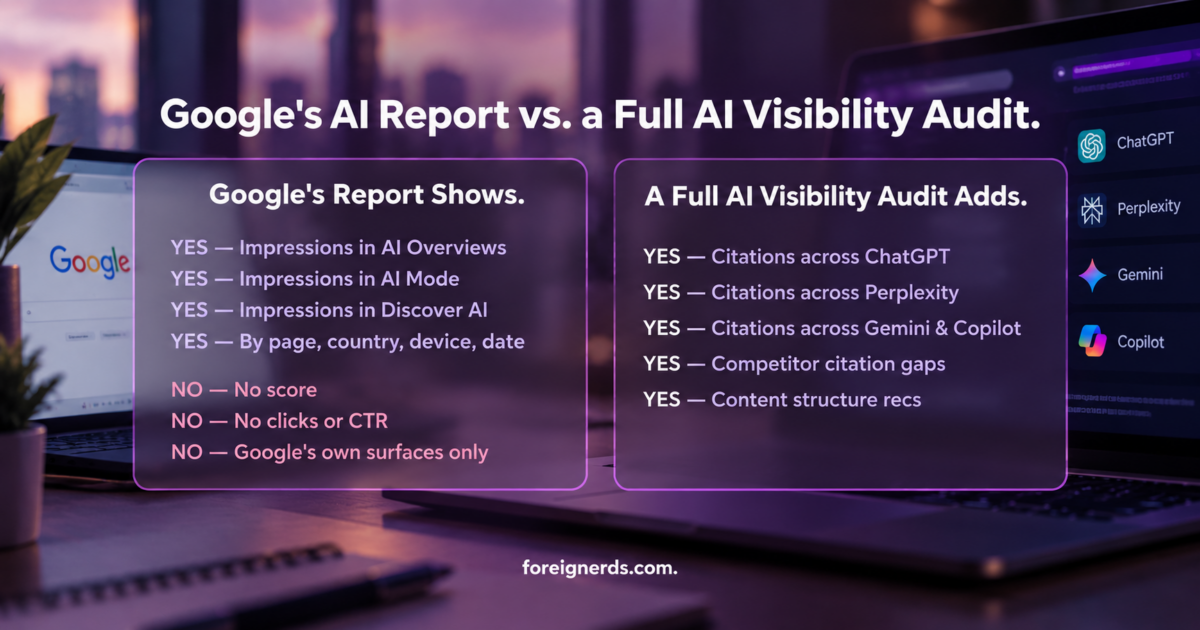
An AI visibility audit tests whether AI answer engines such as ChatGPT, Claude, Perplexity, Google AI Overviews, and Microsoft Copilot mention, cite, and describe your business accurately when someone asks a question you would want to answer. It is different from a traditional search engine optimization audit, which checks how you rank in a list of links. A site can rank well on Google and still be absent from the answers people read in an AI assistant.

What a free AI visibility audit is, and what it is not

An audit is a snapshot. It records how AI systems treat your business for a defined set of questions at a defined moment. It is useful for finding gaps, prioritizing work, and setting a baseline. It is not a ranking guarantee, and it is not a substitute for ongoing measurement.

Free audits are also a way for a provider to start a conversation. That is a fair exchange, provided you know what you are receiving. Before you request one, it helps to know what the findings should contain and whether you keep them regardless of whether you hire the provider.

One caution applies to any audit, free or paid. AI answers can differ from one run to the next and from one platform to the next. A single screenshot of one prompt is weak evidence. A credible audit uses a set of prompts, tests each platform separately, and reports patterns.

What a useful audit should measure

Whatever the provider, a useful audit covers a handful of things.

Citations and mentions. A citation is a link to your site inside an AI answer. A mention is your business name appearing without a link. They are different signals, and a business can have one without the other.

Share of voice against competitors. Knowing that you appear is less useful than knowing who appears instead of you for the same question.

Accuracy. AI systems sometimes state wrong facts about a business, such as outdated services, incorrect locations, or invented details. An audit should check what is being said, not only whether you are named.

Content structure. Pages that answer questions clearly, with direct answers, headings, and lists, are easier for AI systems to extract from. An audit should review the pages that matter most to revenue.

Structured data. Schema markup helps machines understand who you are and what you offer, so gaps here are worth listing.

Third-party footprint. Reviews, directories, press coverage, and community discussion shape what AI systems say about you. This is often the most overlooked part, and the research below explains why it matters.

Why each platform has to be tested separately

If one provider tells you that you are visible in AI search, ask which platforms they tested. The evidence suggests platforms behave differently enough that a single result does not transfer.

Averi’s benchmark report, citing a Profound analysis of 680 million citations collected between August 2024 and June 2025, states that only 11% of domains are cited by both ChatGPT and Perplexity. That is a domain-level figure across the whole citation landscape, not a statement about your own brand, and different studies define overlap differently. The direction is consistent, though: the two platforms draw on different sources.

Ahrefs found a similar divergence from another angle. In an analysis of 15,000 long-tail queries published on August 11, 2025, only 12% of URLs cited by ChatGPT, Gemini, and Copilot also ranked in Google’s top 10 for the same prompt. Perplexity was the exception, with 28.6% overlap. Ranking on Google is not the same as being cited in an AI answer.

Slate HQ’s 90-day study of six B2B software brands shows the same spread at brand level. For one email security client, brand-owned citation share ranged from 4.5% on ChatGPT to 10.2% on Google AI Mode. That is a single client’s result and not an average, but the gap between platforms for the same brand is the point.

The practical consequence is simple. An audit that tests only one platform, or blends all platforms into a single score, hides the variation you most need to see.

Why third-party sources belong in the audit

A research paper by Chen, Wang, Chen, and Koudas, submitted in September 2025, classified the sources AI systems cite as earned media, brand-owned, or social. In its consumer electronics tests, about 93.6% of ChatGPT’s citations and 93.7% of Claude’s came from earned media, meaning third-party sources. Perplexity and Gemini drew a smaller share from earned media and more from brand-owned and social sources. The paper is a preprint and covers consumer product queries, so it does not guarantee the same mix for a services business.

Slate HQ’s study adds context: it found that 76.3% of citations across its tracked brands went to domains that were neither the brand nor its direct competitors. Together, these findings mean an audit that reviews only your own website misses a large part of the picture. What others publish about you matters, which is why generative engine optimization work reaches beyond your own site, and an audit should say where you appear, where you do not, and which third-party sources AI systems already trust in your category.

Three kinds of free audit you will find

Descriptions below come from each provider’s own website at the time of writing. Offers change, so confirm the details before you request one.

Self-serve tools. Ahrefs offers a free AI visibility checker that needs no signup. It queries ChatGPT, Gemini, Perplexity, Copilot, and Google AI Overviews and returns total mentions, a platform breakdown, top associated topics, and top cited domains. The free version is a limited preview, with results capped at five items per section, and historical tracking and competitor benchmarking sit in a paid product. It is a quick way to see whether you register at all.

Manual agency audits. DerivateX runs a free audit by hand through a senior strategist, covering ChatGPT, Perplexity, Gemini, Claude, Google AI Overviews, and AI Mode. It says results arrive within 48 business hours of confirming fit, and that findings remain with you whether or not you hire the agency. It states the audit suits B2B software companies with roughly $5 million to $50 million in annual recurring revenue and is not suited to e-commerce, local, or consumer businesses.

Business-type checklists. LocalFi offers a free audit built around local search signals. It reviews website structure, service pages, location pages, Google Business Profile, content clarity, entity signals, reputation markers, and search presence across ChatGPT, Gemini, Perplexity, and Google AI Overviews. It describes timing as dependent on the website and scope.

These are different tools for different jobs. A quick self-serve check tells you whether to worry. A manual audit tells you what is being said and who is being recommended instead. A local checklist focuses on the signals local searchers rely on.

What the Foreignerds free AI Visibility Audit covers

Our free AI Visibility Audit tests five platforms individually: ChatGPT, Claude, Google AI Overviews and AI Mode, Perplexity, and Microsoft Copilot. It measures seven things: citation rate, brand mention rate, AI share of voice against named competitors, sentiment and accuracy of what AI says about you, content extractability, structured data coverage, and third-party brand footprint.

The deliverables are an overall visibility score benchmarked against three to five competitors, a custom test set of 20 to 30 buyer prompts, a platform-by-platform breakdown, a check for inaccurate statements, a schema and structured data gap report, a prioritized 90-day action plan ranked by revenue impact, and a live dashboard for tracking citation rate and share of voice over time.

It runs over four weeks. In week one we set the baseline and map the prompts. In week two we audit five to ten of your highest-priority revenue pages. In week three we review schema, entity consistency, and third-party footprint. In week four we deliver the report and a live walkthrough. It is free with no obligation.

The trade-off is time against depth. Four weeks is slower than a tool that answers in seconds or a review that returns in two days. It covers more dimensions than a quick preview, and it is built around your own buyer questions and competitors. Which fits depends on how much detail you need and how soon.

How to compare offers

Whichever provider you consider, these questions separate a useful audit from a sales form.

Who chooses the prompts? Strong prompts come from real buyer questions in your market, not generic ones.

How many platforms are tested, and are they reported separately? Blended scores hide the differences described above.

Are competitors benchmarked? Visibility is relative.

Does the audit check accuracy? Being mentioned incorrectly can be worse than not being mentioned.

Does it look beyond your website? Third-party footprint should be part of the review.

What do you keep? Confirm that you receive the findings without a commitment.

Who runs it, and how long does it take? Automated, manual, and hybrid audits differ in speed and judgment.

Is there a sample or a clear description of the report? If a provider cannot describe what you will receive, treat that as a warning.

Where this leaves you

A free AI visibility audit is a reasonable first step if you treat it as a baseline. Pick one that tests platforms separately, uses your own buyer questions, benchmarks competitors, checks accuracy, and looks past your own site. Then use the results to decide where to invest, whether that is content structure, third-party coverage, or wider generative engine optimization and answer engine optimization work. Repeat the check on a schedule, because the answers change.

Frequently Asked Questions

1. Which agencies offer a free AI visibility audit?
Answer: Several do, along with software vendors. They differ in scope: some are self-serve tools, some are manual reviews, and some are aimed at specific business types. Foreignerds offers a free AI Visibility Audit covering five platforms and seven measures over four weeks.

2. What does an AI visibility audit measure?
Answer: A useful audit measures citations, brand mentions, share of voice against competitors, accuracy of what AI says about you, content structure, structured data, and your third-party footprint.

3. How is it different from an SEO audit?
Answer: A traditional search engine optimization audit checks how you rank and perform in search results. An AI visibility audit checks whether AI systems mention, cite, and accurately describe you in their answers, which makes it a core input to answer engine optimization.

4. Why test each AI platform separately?
Answer: Platforms cite different sources. One study found only 11% of domains were cited by both ChatGPT and Perplexity, so a result on one platform does not predict another.

5. Is a free audit really free?
Answer: Offers vary, so confirm what you keep and whether there is any obligation. Foreignerds’ audit is free with no obligation.

6. How often should I repeat an audit?
Answer: AI answers change, so a periodic check against your original baseline is sensible. A quarterly review is a reasonable starting cadence, and a tracking dashboard can help between audits.

If you want to see how ChatGPT, Claude, Perplexity, and Google describe your business today, request your free AI Visibility Audit from Foreignerds.
PPC & Paid Media: The Complete Guide

PPC (pay-per-click) and paid media are the practice of buying visibility — on Google, Meta, LinkedIn, Amazon, or elsewhere — instead of waiting to earn it organically, paying only when someone clicks, views, or takes an action you define. Where SEO and content compound over months, paid media is the lever that produces leads and revenue on a schedule you control, starting the day a campaign goes live. That immediacy is also why it’s the easiest channel to waste money in: the platforms are built to spend your budget efficiently for the platform, not necessarily for your business, unless someone is actively managing the account. This guide covers what paid media actually costs and returns right now, the platform-by-platform decision, where budgets get wasted, and a practical framework for running it well.

What Counts as Paid Media

Paid media isn’t one channel — it’s a category, and each platform serves a different intent:

  • Search ads (Google Ads, Microsoft Ads): capture people already searching for what you sell. Highest intent, highest cost per click.
  • Paid social (Meta, Instagram): reach people based on interests and behavior before they’re actively searching. Lower cost per click, but requires a stronger creative hook since the audience isn’t already looking.
  • LinkedIn ads: the only platform with reliable B2B firmographic and job-title targeting — expensive per click, but the only place to reach “VP of Operations at a 50-person accounting firm” directly.
  • Amazon and marketplace ads: capture purchase-intent search traffic inside the marketplace itself, for businesses selling physical products.
  • Display and programmatic: broad-reach retargeting and brand awareness, usually the smallest and last-added piece of a paid media mix, not the first.

Most businesses don’t need all five — they need the one or two that match where their buyer actually is, layered with retargeting once there’s enough traffic to retarget.

The Real Numbers (2026 Benchmarks)

Current Google Ads benchmark data, based on an analysis of over 13,000 campaigns across 23 industries, gives an honest baseline before anyone quotes you a number:

  • Average click-through rate: 6.64% across industries
  • Average cost per click: $5.42 (more than doubled from $2.32 in 2016, but stable year-over-year for the first time in five years)
  • Average conversion rate: 8.18%, with 87% of industries seeing conversion rates improve year-over-year — the second straight year of gains
  • Average cost per lead: $66.69 — and for the first time in five years, this actually went down rather than up
  • Highest-cost vertical: Attorneys & Legal Services, at $9.87 CPC and $131.63 cost per lead — a useful reference point for professional-services budgeting

These are averages, not promises — a well-run HVAC campaign and a poorly-run law firm campaign can each land far from the mean. But they’re the right numbers to benchmark against before accepting any agency’s promised cost-per-lead.

Platform-by-Platform: What Fits Which Business

Business type Primary platform Why
Home services (HVAC, plumbing, roofing) Google Search + Local Services Ads Buyers search with emergency or near-term intent — “AC repair near me” — the exact moment search ads capture
Small B2B professional services (CPAs, law firms, consultants) Google Search + LinkedIn Search for active demand (deadline-driven searches), LinkedIn for outbound-style targeting by title/company size
E-commerce / physical products Meta + Amazon Ads Visual discovery drives impulse and considered purchases; Amazon captures in-marketplace purchase intent directly
Agencies/white-label Whatever the end client’s buyers use Platform choice inherits from the client’s ICP, not the agency’s preference

Foreignerds runs all of these as distinct services rather than one generic “paid ads” offering: AI-powered PPC for search, Meta ads management, LinkedIn ads management, and Amazon marketplace ads — because the skill set, bidding logic, and creative requirements genuinely differ platform to platform.

Where Paid Media Budgets Actually Get Wasted

  • No conversion tracking, or broken tracking. A campaign optimizing toward the wrong goal (or no goal) will spend efficiently toward the wrong outcome. This is the single most common issue found in account audits.
  • Sending paid traffic to a generic homepage instead of a matched landing page. A click that cost $5.42 landing on a page that doesn’t answer the exact search intent is a wasted click regardless of how good the ad was.
  • Fragmenting budget across too many campaigns. Ad platforms need enough conversion volume per campaign to exit the learning phase and optimize properly — splitting a small budget across five campaigns means none of them ever learn.
  • Ignoring negative keywords (search) or audience exclusions (social). Without them, budget leaks to searches and audiences that were never going to convert.
  • No connection between paid media and CRO. Driving more traffic to a page that converts at half the rate it should is buying clicks to compensate for a fixable landing-page problem instead of fixing it.
  • Treating campaign launch as the finish line. Accounts that aren’t reviewed weekly for search-term reports, bid adjustments, and creative fatigue decay in performance within a month or two.

A Practical Implementation Framework

  1. Fix tracking before spending a dollar. Confirm conversion actions (form fills, calls, purchases) are firing correctly and connected to the ad platform, not just Google Analytics.
  2. Start with one platform, matched to buyer intent — search for active-demand businesses, social for visual/considered purchases, LinkedIn for named-account B2B — rather than spreading a first budget across three platforms at once.
  3. Build a landing page matched to the ad’s specific offer, not a link to the general site. This is where CRO work pays back the paid spend.
  4. Let campaigns exit the learning phase before judging them. Most platforms need meaningful conversion volume in the first 1–2 weeks before performance stabilizes — judging a campaign at day 3 is judging noise.
  5. Layer in retargeting once there’s enough traffic to build a meaningful audience — retargeting consistently converts cheaper than cold traffic, but needs volume to work.
  6. Route qualified leads into marketing automation immediately so a paid lead gets an instant response rather than waiting for a rep to notice a form fill — the gap between click and follow-up is where paid spend gets wasted after the click, not before it.
  7. Review weekly, restructure monthly. Search-term reports, audience performance, and creative fatigue all need a standing weekly check — not a “set it up once” mentality.

How to Measure Whether It’s Working

  • Cost per qualified lead — not cost per lead. A cheap lead that never converts to revenue is not a win.
  • Return on ad spend (ROAS) or cost per acquisition, tied to actual closed revenue, not platform-reported conversions alone.
  • Conversion rate by landing page — benchmark against the 8.18% average conversion rate figure above to see if a specific page is underperforming.
  • Search term quality — what people actually typed before your ad showed, reviewed monthly to catch wasted spend on irrelevant queries.
  • Lead-to-close rate by channel — Google Search leads, Meta leads, and LinkedIn leads typically close at different rates and deserve separate tracking, not one blended number.

Paid Media by Business Type

  • Home services: Google Search plus Local Services Ads for emergency and near-term intent, with tight geo-targeting and call tracking since phone calls, not form fills, are usually the primary conversion.
  • Small B2B professional services: Google Search for deadline-driven and problem-aware searches (tax season, “need a lawyer for…”), LinkedIn for proactively targeting decision-makers who aren’t searching yet.
  • Agencies and white-label partners: paid media is frequently the fastest-to-prove-value service to offer a new client, since results are visible within weeks rather than the months SEO takes — making it a common first engagement in a broader growth marketing relationship.

Key Takeaways

  • 2026 Google Ads benchmarks: 6.64% average CTR, $5.42 average CPC, 8.18% average conversion rate, $66.69 average cost per lead — the first year-over-year decline in CPL in five years.
  • Match the platform to buyer intent first: search for active-demand businesses (home services, deadline-driven B2B), social/LinkedIn for considered or named-account buying, Amazon for marketplace purchase intent.
  • Broken conversion tracking and mismatched landing pages waste more budget than bad targeting does — fix those before touching bids.
  • Judge campaigns after they exit the platform’s learning phase, not on day 3.
  • Route every paid lead into an automated follow-up sequence immediately — the gap between click and response is where spend gets wasted after the click.

Marketing Automation: The Complete Guide

Marketing automation is the use of software to trigger, sequence, and personalize marketing actions — emails, SMS, ad audiences, lead scoring, CRM updates — based on a contact’s behavior, without a human manually sending each one. Done well, it turns a static list of leads into a system that nurtures every contact on its own schedule, hands sales only the leads worth calling, and keeps customers engaged after the sale closes. Done poorly, it’s an expensive email tool nobody customized past the default templates. This guide covers what marketing automation actually does, what it’s worth, where most implementations go wrong, and how to build one that pays for itself.

What Marketing Automation Actually Does

At its core, marketing automation replaces three manual jobs with rules: deciding who gets contacted, deciding when, and deciding what they see. A platform sits on top of your website, CRM, and ad accounts, watches for triggers — a form fill, a pricing-page visit, a cart abandonment, an inactive 90 days — and fires a pre-built sequence in response. The categories that matter for most businesses are:

  • Lead nurturing: multi-step email/SMS sequences that move a new lead from “just downloaded a guide” to “booked a call,” without a rep touching it until it’s warm.
  • Lead scoring and routing: assigning points for behavior (page visits, email opens, form fills) so sales only gets pinged when a lead crosses a real threshold, instead of every form submission.
  • Lifecycle and retention marketing: onboarding sequences, renewal reminders, win-back campaigns for lapsed customers, review requests after a job completes.
  • Ad audience automation: syncing your CRM segments (past customers, high-intent leads, churned accounts) into Meta and Google as living audiences instead of manually uploaded lists.
  • Internal workflow automation: auto-creating CRM tasks, notifying a rep by Slack or SMS, updating a deal stage — the operational glue most people don’t think of as “marketing” but is where automation saves the most staff hours.

If you already have a lead generation engine bringing in volume, automation is what decides whether those leads convert or go cold in an inbox nobody’s watching.

What It’s Actually Worth: The Real Numbers

Marketing automation is one of the more evidence-backed categories in digital marketing — the data isn’t hype, and it doesn’t require guessing:

  • Forrester Research has found that B2B organizations using marketing automation to nurture leads generate $5.44 to $6.10 in ROI for every $1 spent on the platform.
  • Companies that nurture leads with automated sequences see a 451% increase in qualified leads compared to sending a single generic follow-up.
  • Automated, behavior-triggered emails generate 320% more revenue than one-off broadcast emails sent to an entire list at once.

Those numbers hold up because automation fixes the specific failure mode most small and mid-sized businesses have: leads come in, get one follow-up email or call, and then nothing happens unless someone remembers to circle back. Automation removes the “remembering” step entirely.

The Platform Landscape

Marketing automation platforms fall into three tiers, and picking the wrong tier is the single most common expensive mistake:

Tier Examples Best fit Typical monthly cost
All-in-one CRM + automation HubSpot, GoHighLevel, ActiveCampaign Home services, small B2B, agencies managing multiple clients $50–$800+
E-commerce-focused Klaviyo, Omnisend DTC and e-commerce brands running abandoned-cart and post-purchase flows $45–$1,000+ (scales with contacts)
Enterprise marketing clouds Marketo, Salesforce Marketing Cloud, Pardot Larger orgs with dedicated marketing ops staff $1,000–$15,000+

Most home services businesses, CPAs, law firms, and consultants are correctly served by an all-in-one platform — they need automation bundled with a CRM and pipeline, not a standalone email tool that requires a separate system for everything else. Agencies managing several client accounts often standardize on one all-in-one platform (commonly GoHighLevel) specifically because it supports white-labeling and sub-account management.

The Mistakes That Waste the Investment

Most failed marketing automation projects don’t fail because of the software — they fail because of how it was implemented:

  • Automating a broken process. If your sales follow-up is inconsistent, automation just makes the inconsistency happen faster and at scale. Fix the process, then automate it.
  • No lead scoring, so sales drowns in noise. Every form fill hitting a rep’s phone trains them to ignore the automation entirely within a month.
  • Set-and-forget sequences. A nurture sequence built once and never revisited decays as your offers, pricing, and messaging change. Automation still needs a quarterly review.
  • Buying enterprise software for a five-person team. Marketo and Salesforce Marketing Cloud are built for dedicated marketing ops departments — a small business buying one usually uses 10% of the platform and pays for the other 90%.
  • Treating automation as “set it and it replaces marketing.” Automation amplifies content and offers that already work. It does not generate demand on its own — that’s the job of content marketing, paid media, and SEO feeding the top of the funnel.

A Practical Implementation Framework

The businesses that get the Forrester-level returns follow roughly the same build order:

  1. Map the actual customer journey first. Write down every stage a real lead goes through — first touch, quote/consultation, decision, onboarding, renewal or repeat purchase — before opening any software.
  2. Start with the highest-leverage sequence, not the whole system. For most businesses that’s new-lead nurture (the gap between form-fill and first contact) or cart/quote abandonment. Build one sequence well, measure it, then expand.
  3. Build lead scoring around actual buying signals — pricing page visits, demo requests, repeat site visits — not vanity engagement like email opens alone.
  4. Connect the CRM and ad platforms so segments sync automatically. A “closed-won” list that updates your Meta and LinkedIn exclusion audiences in real time stops you from paying to re-target people who already bought.
  5. Set a review cadence. Sequences, scoring thresholds, and copy get revisited quarterly — automation is infrastructure, not a one-time project.
  6. Measure against revenue, not opens. Open rate and click rate are diagnostic metrics. The metric that matters is leads converted to booked calls/quotes and dollars closed per sequence.

Build, Buy, or Managed?

Three ways to get a marketing automation system running:

  • DIY inside an existing tool. Works if you already have marketing staff with time to build and maintain sequences. Most small teams underestimate the ongoing maintenance and let it decay after month two.
  • Buy and configure with an agency. An agency sets up the platform, builds the initial sequences and scoring model, and hands over a working system with documentation — the most common path for businesses without a dedicated marketing ops person.
  • Fully managed. The agency owns ongoing sequence updates, A/B testing, and reporting as part of a retainer — best for businesses that want the ROI without building internal automation expertise. This is how Foreignerds runs marketing automation and growth marketing engagements: platform setup, sequence build, and ongoing optimization bundled together rather than sold as a one-time configuration.

How to Measure Whether It’s Working

Track these, in this order of importance:

  • Lead-to-qualified-lead rate before and after implementing scoring — this is where the 451% figure shows up in practice.
  • Sequence-attributed revenue — dollars closed from contacts who went through an automated nurture path versus those who didn’t.
  • Response time to new leads — automation should cut the gap between form-fill and first meaningful contact from hours/days to minutes.
  • Sequence completion and drop-off — where in a nurture flow people unsubscribe or stop engaging, which tells you where the messaging is off.
  • Customer lifetime value for automated vs. manual onboarding/retention cohorts, once you have enough volume to compare.

These should tie back into the same reporting used for conversion rate optimization — automation and CRO are solving the same problem (more revenue from the same traffic) from different ends of the funnel.

Marketing Automation by Business Type

The right sequences differ meaningfully by vertical:

  • Home services (HVAC, plumbing, roofing): the highest-value automation is missed-call and quote-follow-up sequences — a lead who doesn’t get a callback within minutes typically calls a competitor next. Seasonal maintenance reminders and review-request sequences after job completion are the next highest-leverage builds.
  • Small B2B professional services (CPAs, law firms, consultants): automation centers on intake-to-consultation nurture, deadline-driven campaigns (tax season, renewal periods), and client onboarding sequences that reduce the manual admin load on a small team.
  • Agencies and white-label partners: automation is the product as much as the marketing — a platform like GoHighLevel with sub-accounts lets an agency deliver automation as a packaged service to its own clients while managing dozens of accounts from one system.

Key Takeaways

  • Marketing automation returns $5.44–$6.10 per $1 spent when built around real buying signals, per Forrester — but only when the underlying process being automated already works.
  • Automated nurture sequences produce a 451% increase in qualified leads and automated triggered emails generate 320% more revenue than one-off broadcasts.
  • Match the platform tier to team size: all-in-one CRM platforms fit most home services and small B2B businesses; enterprise marketing clouds are usually overkill below a dedicated marketing ops team.
  • Start with one high-leverage sequence (new-lead nurture or abandonment recovery), measure it, then expand — building the whole system at once is how most implementations stall.
  • Measure sequence-attributed revenue and lead-to-qualified-lead rate, not email opens, to know if it’s actually working.

What AI Agents Actually Do — and Where Businesses Get the Adoption Wrong

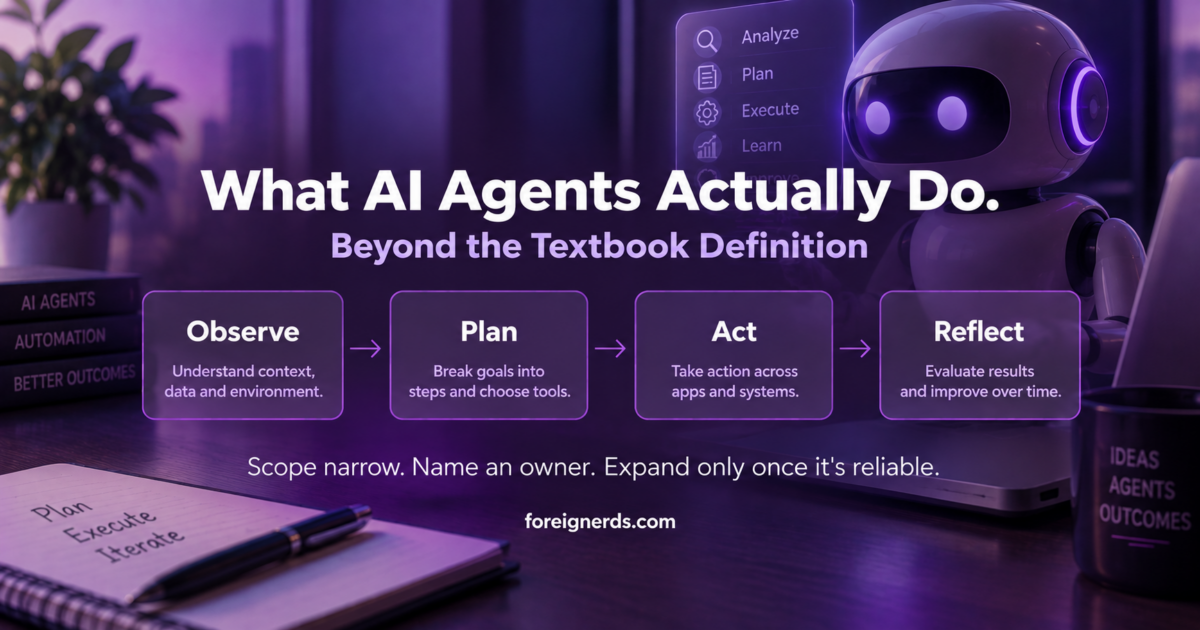
An AI agent is an autonomous software system powered by a language model that can use tools and run in a loop to accomplish multi-step goals without continuous human prompting. Unlike a chatbot that only replies with text, an agent observes its environment, plans a sequence of steps, takes action through connected tools, and reflects on the results before continuing — a cycle it repeats until the task is actually finished.

The AI agent action loop: observe, plan, act, reflect

Why the Textbook Definition Isn’t the Hard Part

IBM, Google Cloud, and AWS all publish clear, accurate explanations of what an AI agent is, and there’s no reason to repeat that ground here. The definition isn’t where businesses actually get stuck. The hard part is what happens after a team understands the concept and tries to actually deploy one — and that’s the part almost nothing written about AI agents addresses honestly.

The Four Real Components, and Where They Actually Break

Every AI agent is built from the same four pieces, and understanding where each one tends to fail in practice matters more than understanding the architecture in the abstract:

  • The foundation model — the language model handling comprehension and decisions. This is rarely where things break; current models are capable enough for most real business tasks.
  • The harness — the application wrapper connecting the model to tools, files, and systems. This is where most real failures happen — a poorly scoped harness gives an agent either too much access (a genuine risk) or too little to actually complete its job.
  • Memory — short and long-term context retention across steps. Agents that lose context mid-task produce the “it forgot what it was doing” failures that are the most common complaint from early deployments.
  • The action loop — observe, plan, act, reflect, repeat. An agent with no meaningful reflection step will confidently repeat the same mistake in a loop rather than catching and correcting it.

Most public discussion of AI agents focuses on the foundation model, since that’s the most visible and most marketed piece. Most real deployment problems live in the other three.

What “Autonomous” Actually Means in Practice — and What It Doesn’t

The word “autonomous” gets used loosely, and it’s worth being precise about what current AI agents genuinely do without supervision versus what they don’t. A well-built agent can genuinely execute a multi-step task without a human approving each individual step — searching for information, calling an API, checking the result, adjusting its approach, and repeating until done. What it generally shouldn’t do without a defined checkpoint is take an irreversible, consequential action on its own: sending a customer communication, making a purchase, deleting data, or changing a production system. The businesses getting real value from agents right now draw this line deliberately — full autonomy for reversible, low-stakes steps; a human checkpoint before anything consequential.

The Five Types Worth Knowing, Briefly

AI agents aren’t one category with uniform capability. A few distinctions genuinely matter when evaluating what to deploy:

Type What it does Typical use
Simple reflex agents Reacts to current input only, no memory of past state Basic automated responses, simple triggers
Model-based agents Maintains an internal model of its environment to inform decisions Tasks requiring context awareness across steps
Goal-based agents Plans a sequence of actions toward a defined goal Multi-step research or task completion
Utility-based agents Weighs multiple possible outcomes and picks the best one, not just any workable path Decisions with tradeoffs, not just a single correct answer
Learning agents Improves its own performance over time from feedback Long-running systems that need to adapt, not just execute a fixed process

Most business use cases today genuinely need only a goal-based agent with solid memory — the more advanced categories matter less for practical adoption than the marketing around “advanced AI agents” sometimes implies.

Is ChatGPT an AI Agent?

Not by itself, and this distinction trips up a lot of early conversations about adoption. ChatGPT, used as a chat interface, is a conversational assistant — it responds to prompts but doesn’t independently observe an environment, plan multi-step actions, or loop until a goal is complete without a person driving each turn. The same underlying model becomes part of a genuine agent once it’s placed inside a harness that gives it tools, memory, and an action loop — which is exactly why “AI agent” describes a system architecture, not a specific product. This distinction matters practically: a business asking “should we use an AI agent” is usually really asking whether their task needs that full observe-plan-act-reflect loop, or whether a simpler conversational tool already solves the actual problem at hand.

What Realistic Deployment Actually Looks Like, Month by Month

Based on how the narrow-scope-first approach described above typically plays out, a realistic timeline for a business’s first genuine agent deployment looks less dramatic than most vendor pitches suggest. The first few weeks go into defining the single narrow task precisely enough that “done” is unambiguous — this step gets rushed constantly, and rushing it is the single biggest predictor of a failed first deployment. The following few weeks are spent building and testing the harness against real data, not a clean demo scenario, since real business data is messier than whatever the agent was tested against initially. Only once that narrow version runs reliably, unsupervised, for a meaningful stretch does it make sense to either expand its scope or hand off a second narrow task to a second agent. Businesses that skip straight to an ambitious, broad deployment on their first attempt are the ones most likely to end up disillusioned with the technology within a quarter, not because the technology failed, but because the scope was wrong from the start.

Where Businesses Actually Get Value Today

Stripped of the more speculative framing common in AI agent coverage, the genuinely proven use cases right now cluster around a handful of patterns: research and information-gathering tasks that would otherwise take a person an hour of manual searching and cross-referencing; repetitive multi-step workflows with clear success criteria (data entry across systems, structured report generation, first-pass customer support triage); and monitoring tasks where an agent watches for a condition and takes a defined action when it occurs, rather than requiring someone to check manually. The common thread across all three: a clearly defined “done” state. Agents perform well when success is checkable. They perform poorly on open-ended, judgment-heavy work with no clear finish line.

The Adoption Mistake Showing Up Most Often

Starting broad instead of narrow

The most common early mistake isn’t technical — it’s scope. Teams excited about agent capability often start with an ambitious, broad goal (“manage our entire customer onboarding process”) rather than a narrow, well-defined one (“check for incomplete onboarding forms daily and send a specific reminder email”). The narrow version ships in days, works reliably, and builds real trust in the technology. The ambitious version usually stalls in development for months and, even when it ships, fails unpredictably in ways that are hard to debug because too many decisions were left to the agent’s judgment at once.

The practical fix

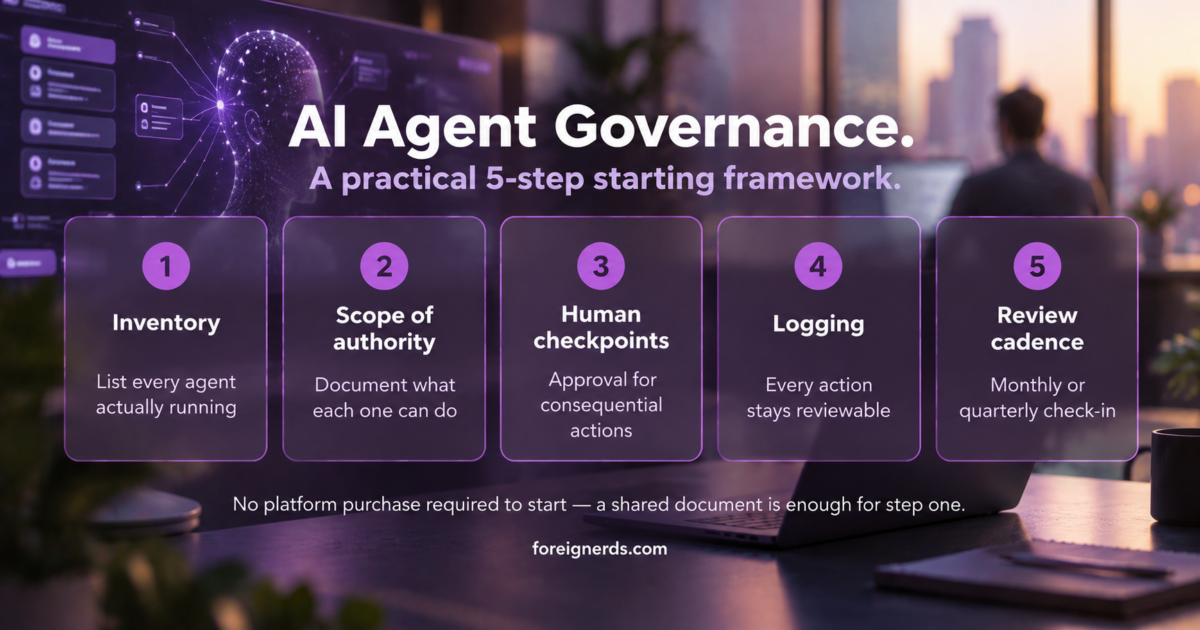
Consistent with how the same principle plays out in agent governance: start with the narrowest version of the task that still delivers real value, get it running reliably, and only then expand its scope — not the reverse.

Build vs. Buy: The Decision Most Teams Face First

Before writing any code, most teams should genuinely ask whether an existing agent platform already solves their specific need, rather than defaulting to a custom build. This decision deserves its own careful evaluation — the full build-vs-hire breakdown covers the actual tradeoffs in depth, including when an off-the-shelf agent platform is genuinely sufficient and when the specific integration needs justify a custom build instead.

What This Means for a Business Evaluating Agents Right Now

The technology is real and the proven use cases are genuinely valuable, but the gap between “AI agents are transformative” (true, eventually, for the right tasks) and “deploy one for your entire operation this quarter” (usually a mistake) is where most disappointment comes from. The businesses seeing real results share a pattern: they picked one narrow, checkable task, defined exactly where human judgment stays in the loop, and expanded only after the narrow version proved reliable. That’s a less exciting story than the broader promise of autonomous AI, but it’s the one that actually produces working systems rather than abandoned pilots.

Named Entities Worth Understanding If You’re Evaluating Vendors

A handful of terms come up repeatedly in agent-platform conversations and are worth knowing precisely: an orchestration layer coordinates multiple agents working on related sub-tasks, relevant once a business moves beyond a single narrow agent to several working together. A tool call is the specific mechanism by which an agent invokes an external function — a search, an API request, a code execution — and is the actual point where most security and access-scope decisions live. Grounding refers to connecting an agent’s reasoning to real, current data rather than relying solely on what a model learned during training, which matters enormously for any task involving facts that change over time. None of these terms are marketing buzzwords on their own — they describe real architectural decisions that determine whether a given agent platform fits a specific need, and a vendor conversation that never touches any of them specifically is worth treating with some skepticism.

Security and Access: The Question Most Pitches Skip

Because an agent’s harness determines what it can actually touch, the access-scoping decision is arguably the single most consequential technical choice in any deployment, and it’s the one most vendor demos gloss over entirely. A narrowly scoped agent — read access to a specific data source, write access to exactly one downstream system, nothing more — fails safely even when something goes wrong; the worst case is a task that doesn’t complete. A broadly scoped agent with wide system access can fail in ways that are much harder to contain, precisely because the same flexibility that makes it capable also makes an error more consequential. This is the practical version of the same principle covered in more depth in agent governance: access should be granted deliberately, tied to the specific task, and reviewed periodically — not granted broadly upfront because it’s more convenient during initial setup.

How to Tell If Your Team Is Actually Ready

Before evaluating specific tools or platforms, a short internal check is more useful than any vendor comparison: Is there one specific, narrow task identified, with a clear definition of “done”? Is there a named person who will own the agent once it’s live, the same way any new system needs an owner? Has someone mapped exactly what data or systems the agent needs to touch, and confirmed that scope is as narrow as it can be while still completing the task? And is there a plan for what happens when the agent gets something wrong — not if, when, since even well-built agents make mistakes on real-world edge cases? A team that can answer all four concretely is genuinely ready to move forward. A team that can’t is better served spending another week on definition before writing any code or signing any contract.

Where This Connects to a Real Deployment

Everything above is the evaluation and planning layer. Once a team has a narrow task defined, an owner named, and access scope mapped, the actual build is where AI agent development work happens — and it’s worth bringing that expertise in at the planning stage rather than after a first attempt has already gone sideways from unclear scope. The access-scoping discipline described above also connects directly to how AI security thinking applies more broadly — an agent with excessive permissions is a security question as much as an architecture one, and the same principles that govern AI-driven threat detection apply to scoping what an agent is allowed to touch.

The pattern holds across all of it: definitions are cheap to find, and every major cloud provider has written a good one. What actually determines whether an agent deployment succeeds is the unglamorous work — scoping the task narrowly, naming an owner, mapping access deliberately, and testing against real conditions before expanding. That discipline, not the underlying model, is what separates a working agent from an abandoned pilot.

Key Takeaways

  • An AI agent observes, plans, acts through tools, and reflects in a repeating loop until a task is done — different from a chatbot that only replies to prompts one turn at a time.
  • Of the four components (foundation model, harness, memory, action loop), the foundation model is rarely where things break — most real failures happen in the harness (too much or too little access) and memory (losing context mid-task).
  • “Autonomous” should mean full independence for reversible, low-stakes steps, with a human checkpoint before anything consequential — sending money, contacting a customer, changing a production system.
  • The single most common adoption mistake is starting broad instead of narrow — a narrow, well-defined task ships in days and builds real trust; an ambitious first deployment usually stalls for months.

How to Choose an AI Marketing Agency: Pricing, Red Flags, and What to Ask

An AI marketing agency uses machine learning, automated workflows, and data-driven systems to run, optimize, and personalize marketing campaigns faster than a traditional agency working manually. Pricing, actual capability, and genuine AI usage vary enormously between firms using this label, which makes evaluating one harder than the marketing copy on most agency websites suggests.

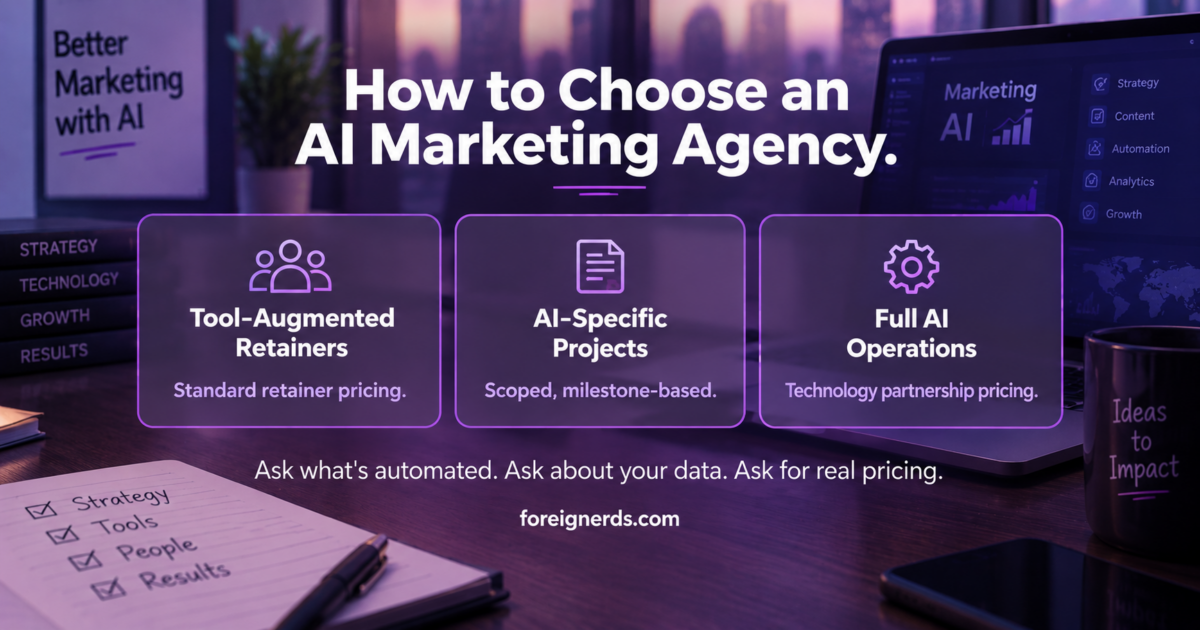
Three pricing tiers for choosing an AI marketing agency: tool-augmented retainers, AI-specific projects, full AI operations

Why This Is Harder to Evaluate Than It Looks

Search for “AI marketing agency” and most of what ranks is either another AI marketing agency describing itself in the best possible terms, or a listicle ranking ten agencies with no disclosed methodology. Neither is a neutral source. The honest starting point is this: “AI marketing agency” is not a regulated or standardized term. Some firms genuinely run AI-driven optimization across live campaigns. Others have simply added the phrase to their homepage after adopting ChatGPT for first drafts, the same as thousands of traditional agencies now do. The label alone tells you very little.

What a Genuinely AI-Driven Agency Actually Does Differently

Based on how the capability is described across the firms actually building it, three things separate a real AI-driven marketing operation from a traditional agency with an AI-adjacent tagline:

  • Real-time optimization — adjusting live ad campaigns automatically based on live performance data, rather than a person reviewing dashboards weekly and manually reallocating budget.
  • Genuine personalization at the individual level — tailoring messaging to an individual user’s behavior rather than broad audience segments, which requires actual data infrastructure, not just a smarter copywriting tool.
  • Workflow automation across repetitive tasks — using AI agents to handle data gathering, first-draft copy, basic design generation, and lead response, freeing human strategists for judgment calls machines genuinely can’t make yet.

A firm doing all three is meaningfully different from a traditional agency. A firm doing none of these but using the phrase in its branding is not — and it’s a completely fair question to ask directly in a first conversation.

What It Actually Costs

This is the question every buyer has and almost no agency website answers directly. Based on how AI-augmented marketing services are typically structured, most engagements fall into one of three tiers:

  • Tool-augmented retainers — a traditional marketing retainer where the agency uses AI tools internally to work faster. Pricing here is usually similar to a standard marketing retainer, since the AI is an efficiency layer for the agency, not a separately billed capability.
  • AI-specific project work — building a specific AI-driven system (a personalization engine, an automated campaign optimization pipeline) as a defined project with its own scope and price, separate from ongoing marketing spend.
  • Full AI-driven marketing operations — an agency running the actual campaign infrastructure with AI at the center, typically priced closer to a technology partnership than a traditional marketing retainer, reflecting the deeper technical build involved.

Any agency unwilling to explain which of these three actually describes their offering, in plain terms, in a first conversation, is a signal worth taking seriously.

A Practical Framework for the Actual Decision

Rather than starting from “which AI marketing agency is best,” a more useful starting question is what specific bottleneck is driving the search in the first place. Three common starting points lead to three different right answers:

Your actual situation What to look for
Campaigns work but take too long to launch and adjust An agency with genuine real-time optimization capability — ask specifically how campaign adjustments happen without a human reviewing dashboards manually
Messaging feels generic, conversion rates are flat An agency with true individual-level personalization infrastructure, not just audience segmentation with an AI label attached
Internal team is overwhelmed by repetitive production work An agency or partner focused on workflow automation for first-draft content, data gathering, and lead response — the mechanical layer, not the strategic one

Naming the actual bottleneck before evaluating any specific agency makes the four-question conversation above far more productive, because it turns a generic capability pitch into a direct answer to a specific problem.

How Agency Pricing Actually Breaks Down in Practice

Beyond the three broad tiers above, a few specific patterns show up consistently across how AI-augmented marketing engagements are actually structured. Tool-augmented retainers tend to track closely with traditional marketing retainer pricing in the same market and vertical, since the AI layer here is an efficiency gain for the agency’s own team rather than a separately built system. AI-specific project work is priced more like a software or data engineering project — scoped deliverables, defined timelines, and a fixed or milestone-based cost — because building an actual personalization or optimization system genuinely resembles a technical build more than a marketing engagement. Full AI-driven marketing operations sit closest to a technology partnership in both pricing structure and the depth of onboarding required, often including a genuine data integration phase before any campaign work begins — which is also why unrealistically fast timelines from a firm offering this tier are worth treating skeptically.

None of these tiers is inherently better — the right one depends entirely on which specific bottleneck from the table above is actually driving the search, and a competent agency in any tier should be able to explain, specifically, which of the three describes their own offering without hedging.

Red Flags Worth Naming Directly

No willingness to show the actual system, only the results

Case studies showing before/after metrics are useful, but a firm that can’t or won’t describe the actual mechanism producing those results — which tools, what data, what’s automated versus human-reviewed — is asking for trust without transparency. A legitimate AI-driven operation can explain its own system.

Every capability is “powered by AI” with no specifics

“AI-powered” attached to every service on a page, with no named tool, model, or specific workflow behind any of them, is usually a branding decision more than a technical one. This isn’t necessarily dishonest — the underlying work might still be good — but it means the AI framing isn’t carrying real information, and that’s worth knowing before evaluating the agency on that basis.

No discussion of what still requires a human

Every genuinely AI-augmented marketing operation still has human strategists making judgment calls current AI can’t reliably make — brand voice decisions, crisis response, creative direction. An agency that implies AI has replaced strategic thinking entirely, rather than accelerated the mechanical parts of it, is overselling.

Questions Worth Asking in a First Call

These four questions, asked directly, surface more real information than most agency sales pages:

  1. “Walk me through exactly what’s automated versus human-reviewed in a typical campaign.” A specific answer, not a general capability list, is the signal to look for.
  2. “What happens to our data, specifically?” — where it’s stored, whether it trains any shared model, who else can see it.
  3. “Can I see an example of the actual output before it was edited by a human?” This surfaces whether the AI layer is doing real work or mostly marketing language.
  4. “What’s your pricing model for this specifically, not your general retainer rate?” A clear, direct answer here is a genuinely good sign.

When a Traditional Agency Is Actually the Better Fit

Not every business benefits more from an AI-first agency than a traditional one. If the marketing need is primarily creative and brand-building — a campaign that depends on a genuinely original creative concept rather than data-driven optimization at scale — a traditional creative agency with strong strategists may outperform an AI-first operation that’s better suited to performance marketing at volume. The honest answer to “should I hire an AI marketing agency” is usually “it depends on whether your bottleneck is creative judgment or optimization at scale,” not a blanket yes.

How This Connects to a Broader AI Adoption Decision

Choosing an AI marketing agency is really a narrower version of a broader question many businesses are working through right now: how to evaluate any AI implementation partner, not just a marketing-specific one. The same evaluation discipline — asking what’s actually automated, what happens to your data, and what the real pricing model is — applies whether you’re hiring for marketing specifically or a broader AI initiative. It’s also worth understanding which specific AI marketing tools actually sit behind an agency’s claims, since a firm’s tool stack is often the most concrete, checkable thing behind an “AI marketing agency” label.

What Good Looks Like Once You’ve Chosen One

The agencies genuinely delivering value here share a pattern: they can explain their own system in plain language without deflecting to case studies, they’re specific about pricing rather than vague, they’re honest about what still requires human judgment, and they treat data handling as a real conversation rather than a line in a contract nobody reads. None of this requires picking the flashiest AI branding — it requires the same due diligence you’d apply to any vendor relationship where the actual mechanism matters more than the marketing language describing it.

How This Differs From Choosing a Traditional Digital Marketing Agency

Traditional agency evaluation focuses heavily on portfolio work, creative sensibility, and cultural fit with the strategist team you’ll work with directly. Those factors still matter with an AI-driven agency, but they sit alongside a second, more technical layer of diligence that traditional agency selection rarely requires: understanding what’s actually automated, what data infrastructure exists behind the personalization claims, and whether the pricing model reflects a technology build or a standard retainer with an AI label attached. Skipping this second layer and evaluating an AI marketing agency purely on the same criteria as a traditional one is the most common mistake buyers make in this specific decision — the portfolio can look identical between a firm doing genuine AI-driven work and one that isn’t, because the difference lives in the mechanism, not the output.

This is also why case studies alone are an incomplete evaluation tool here in a way they aren’t for traditional agency selection. A strong result achieved through genuine automation and a strong result achieved through a talented human team using ChatGPT for first drafts can look identical in a case study. The mechanism behind the result is what determines whether that result is repeatable at the scale and speed an “AI-driven” positioning implies — which is exactly why the four direct questions above matter more than the portfolio review that would normally come first in a traditional agency search.

A Short Glossary for This Space

A few terms come up repeatedly in agency conversations and are worth understanding precisely rather than nodding along to: real-time optimization refers to automated, live adjustments to active campaigns rather than scheduled manual reviews. Hyper-personalization means messaging tailored to an individual user’s behavior, not a broad demographic segment. Workflow automation covers the mechanical, repetitive tasks — data gathering, first-draft copy, lead routing — that AI agents handle so human strategists can focus on judgment calls. None of these terms guarantee quality on their own; they describe capability categories, and the actual evaluation still comes down to whether a specific agency can demonstrate each one concretely rather than simply naming it.

Where the Tool Question Fits Alongside the Agency Question

Part of evaluating any AI marketing agency honestly is understanding what’s actually behind their claims — and a firm’s own tool stack is often the most concrete, checkable evidence available. A practical framework for evaluating AI marketing tools directly is worth reviewing before any agency conversation, since it gives you the vocabulary to ask sharper questions about what’s actually automated versus what’s a person using ChatGPT behind the scenes. The same applies if the specific bottleneck is social content specifically rather than marketing broadly — the tool-selection discipline for social media management runs into nearly identical evaluation traps.

If what you actually need is a genuine marketing automation partner rather than a full agency relationship, that’s worth naming explicitly in a first conversation — the two are related but distinct engagements, and a firm that can’t clearly distinguish which one it’s offering is exhibiting the same vagueness problem described throughout this piece.

None of these distinctions require picking a side before the first conversation — they exist to make that first conversation sharper, so the agency you eventually choose ends up answering the actual question you meant to ask, not the one their pitch deck was built to answer.

Key Takeaways

  • “AI marketing agency” isn’t a regulated term — some firms genuinely run AI-driven optimization across live campaigns, others have simply added the phrase after adopting ChatGPT for first drafts.
  • Three things separate a genuinely AI-driven agency from a traditional one with an AI-adjacent tagline: real-time campaign optimization, individual-level personalization, and real workflow automation.
  • Pricing falls into three tiers — tool-augmented retainers (priced like standard retainers), AI-specific project work (priced like a technical build), and full AI-driven operations (priced like a technology partnership).
  • Four questions surface more real information than any sales page: what’s actually automated versus human-reviewed, what happens to your data, can you see unedited output, and what’s the specific pricing model.

AI Marketing Tools: A Practical Framework for Choosing and Actually Using Them

See also our related guide: AI Integration Services: The Complete Guide.

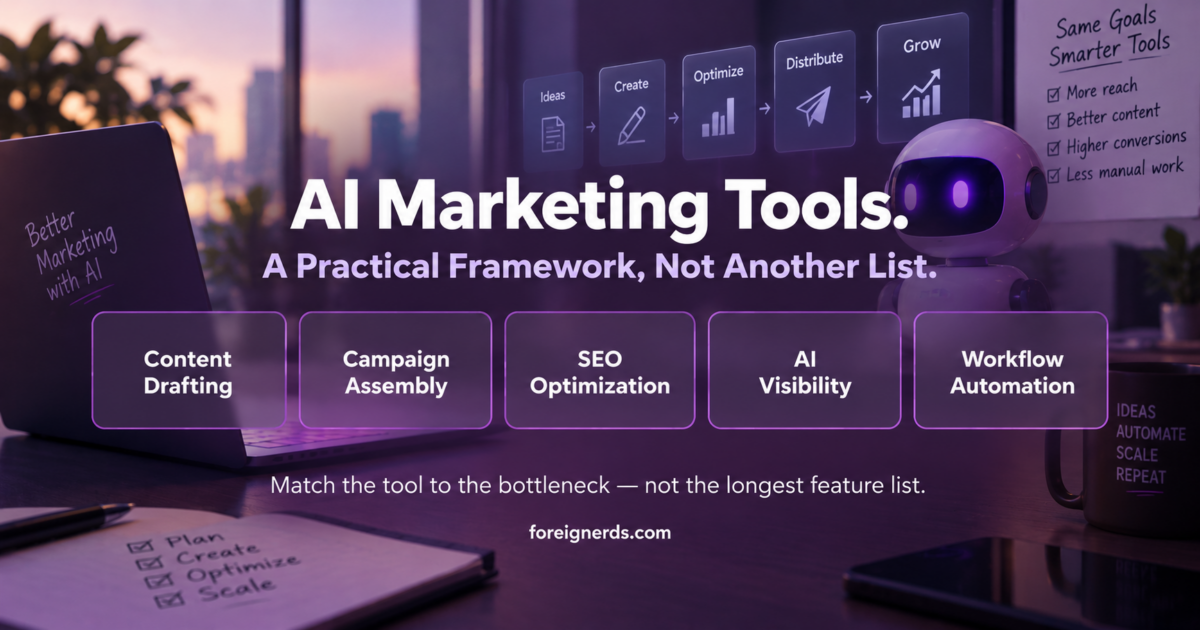
AI marketing tools framework: content drafting, campaign assembly, SEO optimization, AI visibility, workflow automation

AI marketing tools are software products that use machine learning to automate marketing tasks — writing copy, analyzing audience data, optimizing ad spend, and generating creative assets — rather than doing them manually. Dozens of new tools launch every month, and by mid-2026 most marketing teams use at least five of them without a coordinated strategy connecting them.

The Problem With Every “Best AI Marketing Tools” List You’ve Already Read

Search for this exact topic and you’ll find the same article eight different ways: a numbered list of 17, 25, 30, or 36 tools, usually grouped by category, usually including the same five or six names — ChatGPT, Jasper, Canva, HubSpot’s Campaign Assistant, Surfer SEO. Every one of these lists is accurate. None of them answer the question that actually matters once you’ve read the list: which of these should your specific business actually use, in what order, and how do they work together instead of creating five disconnected subscriptions nobody remembers to check?

That’s the real gap. A list of tools is not a strategy. Most businesses that “adopt AI marketing tools” end up with a pile of underused software licenses and no measurable change in output, because nobody thought through integration before signing up for the free trial.

What These Tools Actually Do, Grouped by the Job, Not the Brand Name

Rather than another tool-by-tool rundown, it’s more useful to think in terms of the actual jobs AI marketing tools handle, since that’s the decision that matters before any specific product gets chosen:

  • Content drafting and copy generation — tools like ChatGPT, Claude, and Jasper turn a rough brief into a first draft across blog posts, ad copy, and email. The realistic value here is speed on the first 70% of a draft, not a finished, publish-ready asset.
  • Multi-channel campaign assembly — tools like HubSpot’s Campaign Assistant take one input and generate matching assets across email, social, and landing pages simultaneously, which matters more for consistency than for any single asset’s quality.
  • SEO and content optimization — tools like Surfer SEO analyze what’s already ranking and suggest structural changes, which is genuinely useful but assumes someone is still making the actual editorial judgment calls.
  • AI visibility and brand monitoring — a newer category (Similarweb’s AI Brand Visibility feature is a recent example) that tracks how often a brand gets mentioned inside AI-generated chat responses, not just traditional search results.
  • Marketing automation and workflow orchestration — platforms that connect the other categories together so a lead’s behavior actually triggers the right next action, rather than living in five separate dashboards.

Most businesses only ever adopt tools from the first two categories, because they’re the most visible and the easiest to demo. The last category — actual orchestration — is where the real return sits, and it’s the one most listicles skip entirely because it’s harder to screenshot.

The Real Decision: Point Tools vs. an Integrated Stack

Every business adopting AI marketing tools eventually hits the same fork: keep adding individual point tools as needs arise, or invest in a smaller number of tools that are actually wired together. Both are legitimate, and the right answer depends on scale, not preference.

Point tools make sense when: the team is small, the use case is narrow (one person needs faster first-draft copy), and there’s no one dedicated to managing integrations. This is the right starting point for most businesses under 20 people, and it’s genuinely fine to stay there.

An integrated stack makes sense when: multiple people touch the same campaigns, data needs to flow between tools without manual re-entry, and the business has enough volume that a 10% efficiency gain across the whole funnel is worth more than a faster first draft on any single piece of content. This is where marketing automation platforms genuinely earn their cost — not by writing better copy than ChatGPT, but by making sure the right message reaches the right person at the right moment without someone manually checking five dashboards.

What Every Listicle Gets Wrong: Tool Sprawl Is the Actual Failure Mode

The pattern that shows up repeatedly in real implementations, not in vendor marketing: a business adopts three or four AI marketing tools independently, over a period of months, each solving one immediate problem. Six months later, nobody can say definitively which tool is actually driving results, because none of them talk to each other and the data lives in separate silos. The tools aren’t the problem — the lack of a decision about how they connect is.

This is a genuinely common and avoidable failure. Before adding a third or fourth AI tool to an existing stack, the more valuable question is usually not “which tool is best” but “does this tool need to talk to the tools I already have, and if so, does it actually do that, or will I be manually copying data between them in three months.”

A Practical Starting Framework

Before evaluating any specific product, four questions genuinely change the outcome:

  1. What’s the one bottleneck this needs to solve? Not “we want to use AI” — a specific, named bottleneck (slow first drafts, inconsistent campaign assets, no visibility into AI-search brand mentions).
  2. Who owns it once it’s live? A tool with no clear owner becomes the unused subscription six months later. This should be a named person, not “the marketing team.”
  3. Does it need to connect to anything you already use? If yes, verify the actual integration exists and works before buying — a listed “integration” on a pricing page is not the same as a tested, working connection.
  4. What does success look like in 90 days, specifically? A measurable outcome, not “see how it goes.”

Answering these four honestly before evaluating any specific tool eliminates most of the tool-sprawl problem before it starts.

How to Actually Evaluate a Specific Tool Before Buying

Once the four questions above point toward a genuine need, the actual evaluation of a specific product benefits from a short, consistent checklist rather than a fresh judgment call each time:

  • Ask for the actual output on your own content, not the demo example. Every AI marketing tool demo is tuned to look impressive on a curated sample. Run it on a real, slightly awkward piece of your own brand’s content before deciding anything.
  • Check what happens to your data. Marketing content often includes customer information, pricing details, or unreleased campaign plans. Understand explicitly whether the tool trains on your inputs, and whether that’s acceptable for your specific content.
  • Test the free tier or trial with a real deadline, not a sandbox exercise. Tools behave differently under real time pressure than in a leisurely evaluation — that’s often where genuine gaps between the marketing pitch and daily reality show up.
  • Confirm the integration claim with the tool actually connected, not just listed. “Integrates with HubSpot” on a pricing page and a working, tested connection between your specific accounts are two different things — verify the second before committing budget.

Common Mistakes Worth Naming Directly

Buying the tool before defining the workflow

The most common failure pattern: a business sees a demo, gets excited, buys the tool, and only then tries to figure out how it fits into existing work. The fix is genuinely simple — write down the current workflow first, then look for the specific step an AI tool would improve, rather than starting from the tool.

Treating AI-generated output as finished, not a first draft

Every current AI marketing tool, including the well-known ones, produces output that needs a human editorial pass before it goes out under a real brand’s name. Skipping that step is the single most common cause of AI-generated content reading as generic — not because the tool is bad, but because the editing step got skipped.

Ignoring where AI search visibility fits

Most businesses still measure marketing tool success purely by traditional search and social metrics, missing the newer AI Brand Visibility category entirely — a genuine blind spot given how much research now happens inside AI chat assistants before it ever reaches a traditional search engine.

The Honest Timeline for Seeing Real Value

A realistic expectation matters here, because AI marketing tool vendors routinely imply immediate transformation. In practice, the pattern that shows up across real implementations looks more like this: the first month is mostly setup and workflow adjustment, with output quality often lower than the pre-AI baseline while the team learns what the tool is actually good at. Months two and three typically show the first genuine efficiency gains, once the team has learned which tasks to hand to the tool and which still need a human starting point. Meaningful, measurable time savings usually don’t show up clearly until month three or four — not because the tools are slow, but because the human workflow around them takes that long to actually change.

Any vendor or case study promising a dramatically faster timeline than this is either describing an unusually simple use case, or measuring something narrower than genuine team-wide output. Setting this expectation upfront — with whoever owns the tool internally, per the framework above — avoids the common outcome where a genuinely useful tool gets abandoned in month two because it hasn’t yet delivered results that were never realistic to expect that early.

Where This Fits Alongside a Broader Marketing Automation Strategy

Individual AI marketing tools solve individual problems well. The businesses getting compounding value from this moment aren’t the ones with the most tools — they’re the ones who’ve connected a smaller number of tools into one working system, which is exactly what a genuine marketing automation strategy is built to do. If the four-question framework above surfaces a real integration need rather than just a single-task fix, that’s the point where point tools stop being sufficient on their own.

This also connects directly to how AI integration actually works in practice — the same principles apply just as directly to marketing tools specifically. If the agency side of this decision is also on the table, choosing an AI marketing agency runs into the exact same evaluation problem: too many self-promotional rankings, not enough vendor-neutral criteria.

What “Good” Actually Looks Like Six Months In

The businesses that get this right share a specific, recognizable pattern. There are usually two to four AI marketing tools in active use, not eight or ten — each one tied to a specific bottleneck someone identified before buying, not adopted because a competitor mentioned it. Someone can name, without checking a spreadsheet, exactly which tool handles which job and who owns it. When a tool stops earning its subscription cost, it gets cancelled rather than quietly forgotten, because someone is actually accountable for it. And critically, the tools that need to share data actually do, tested and confirmed, not just claimed on a pricing page.

None of this requires picking the single best tool from any list. It requires treating tool adoption as a decision with an owner and a measurable outcome, rather than a purchase made because a demo looked impressive. That discipline, more than any specific product choice, is what separates businesses seeing genuine efficiency gains from AI marketing tools six months in from the ones still paying for licenses nobody opens.

Point Tools vs. Integrated Stack: A Quick Comparison

Factor Point Tools Integrated Stack
Team size Under 20 people 20+ people, multiple hands on the same campaigns
Setup effort Low — sign up and start using Higher — requires actual integration work upfront
Data flow Manual, tool-to-tool Automated, shared across the stack
Best for One narrow, specific bottleneck Coordinated, multi-channel campaigns at volume
Ongoing management Minimal — mostly self-serve Needs a named owner tracking the whole system
Risk if unmanaged One underused subscription Multiple disconnected tools and siloed data

Most businesses starting out should default to the left column and only move right once the specific triggers described earlier — multiple people, real data-sharing needs, meaningful volume — actually show up.

Worth noting too: if the bottleneck your team is actually facing looks more like disorganized social content than disorganized marketing copy generally, choosing a social media management tool is a narrower, related version of this exact same evaluation problem — different tools, same underlying discipline.

Key Takeaways

  • By mid-2026 most marketing teams already use five or more AI marketing tools without a coordinated strategy connecting them — tool sprawl, not lack of tools, is the actual failure mode.
  • Before evaluating any specific product, four questions matter more than any feature list: what specific bottleneck this solves, who owns it once it’s live, whether it actually needs to connect to existing tools, and what success looks like in 90 days.
  • Real value takes longer than vendors imply — month one is mostly setup, months two and three bring the first genuine efficiency gains, and measurable time savings typically don’t show up until month three or four.
  • Point tools (under 20 people, one narrow bottleneck) and an integrated stack (multiple people, shared data, real volume) solve different problems — the right choice depends on scale, not preference.

Choosing a Social Media Management Tool: Pricing Models, Not Just Feature Lists

Social media management tools are software platforms that let a business plan, schedule, publish, and analyze content across multiple social networks from one dashboard, rather than logging into each platform separately. Pricing models vary significantly — some charge per social channel, others per team seat — and the right tool depends more on team structure and workflow than on which platform tops any given best-of list.

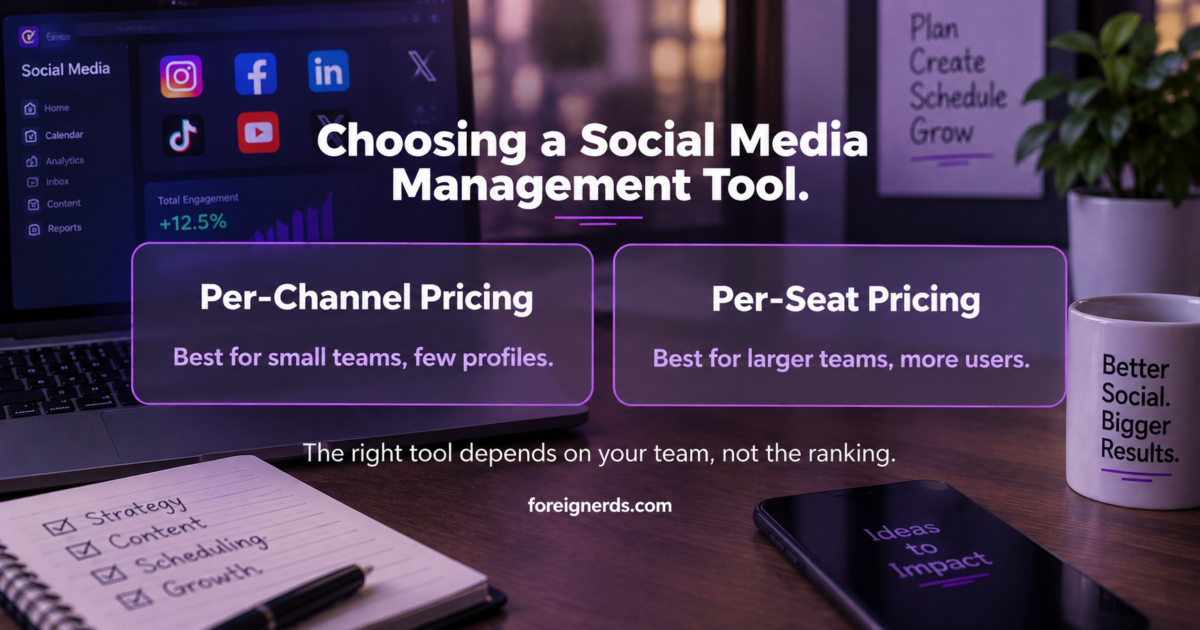
Social media management tool pricing comparison: per-channel versus per-seat

Why Every “Best Tools” List Says Something Different

Search this topic and the top results all rank the same handful of names — Buffer, Hootsuite, Sprout Social, SocialPilot, Zoho Social — in a different order depending on which site is publishing the list, often with an affiliate relationship to the tools ranked highest. None of this makes the individual reviews dishonest, but it does mean the actual decision — which tool fits a specific team’s actual workflow — gets buried under generic feature comparisons that read the same regardless of team size or structure.

The Real Question: Per-Channel or Per-Seat Pricing

This is the single most consequential and least-discussed decision in choosing a social media management tool, because it determines how cost scales as the business grows. Tools priced per social channel (Buffer’s model, starting around $6/month per channel) become expensive as a business adds more platforms and profiles, but stay cheap with a small team managing few channels. Tools priced per team seat (Hootsuite and Sprout Social both use this model, often $99-$199/month per user) scale the opposite way — cheap with few users regardless of channel count, expensive as more people need access. A five-person team managing three social profiles should be evaluating completely different tools than a solo marketer managing fifteen client accounts, and most comparison articles present both categories side by side as if the pricing model doesn’t matter.

Matching the Tool to the Actual Team Structure

Your situation What actually fits
Solo marketer or very small team, few channels Per-channel pricing (Buffer-style) — cost stays low, feature depth beyond scheduling matters less
Agency managing many client accounts Tools with client approval workflows and white-label reporting (SocialPilot-style) — the agency-specific features matter more than raw scheduling capability
Larger internal team, several people posting Per-seat pricing with a unified inbox (Hootsuite/Sprout-style) — worth the higher cost once coordination between people becomes the actual bottleneck
Business already inside another platform’s ecosystem (e.g., Zoho CRM) The ecosystem-native tool (Zoho Social) — the CRM integration often outweighs marginal feature differences elsewhere

What “AI-Assisted” Actually Means Across These Tools

Most current social media management platforms now market some AI capability, and the term covers a wide range of actual functionality worth distinguishing. At the simpler end, AI handles caption suggestions and basic hashtag recommendations — genuinely useful but a modest time-saver, not a strategic capability. Further along, some platforms use AI for posting-time optimization, analyzing when a specific account’s audience is actually most active rather than relying on generic best-practice timing. The most substantial current AI capability sits in automated first-pass comment and direct-message triage — flagging which incoming messages need a human response versus which are routine enough for an automated reply. None of these capabilities replace a genuine content strategy, and a tool’s AI features are worth evaluating as a modest efficiency layer, not a reason to select one platform over another on their own.

The Unified Inbox: More Important Than It Sounds

Scheduling posts is the visible, marketed feature, but for any team beyond a solo operator, the unified inbox — one feed showing all comments and direct messages across every connected platform — is usually the feature that determines whether the tool actually gets used daily or gets abandoned after the first month. Teams that skip evaluating this feature carefully, focusing instead on scheduling capability and pricing alone, often discover months in that they’re still checking each platform’s native inbox separately because the tool’s unified inbox was clunky or incomplete. This is worth testing directly during any trial period, with real accounts, rather than taking a features list at face value.

Free vs. Paid: When the Free Tier Is Actually Enough

Nearly every major social media management platform offers some free tier, typically capped at a small number of connected channels and a basic scheduling calendar with no unified inbox or advanced analytics. For a genuinely small operation — one or two people, three or fewer channels, no client-facing reporting requirement — the free tier of a tool like Buffer or Zoho Social is often genuinely sufficient, and upgrading before that need actually exists is a common and avoidable expense. The signal to actually upgrade is specific and checkable: channels exceed the free limit, more than one person needs to post or approve content, or someone needs to produce a real performance report for a boss or client. Upgrading in anticipation of future growth that hasn’t materialized yet is a subtler version of the same tool-sprawl problem that shows up elsewhere in AI-adjacent software adoption — paying for capacity a team isn’t yet using.

Common Mistakes in Choosing a Tool

Optimizing for the longest feature list

The tool with the most listed features is not automatically the right fit — many of those features go unused by any given team, while the pricing tier required to access them scales with the full feature set regardless of actual usage. Matching the tool to the specific workflow bottleneck, per the table above, produces a better outcome than comparing raw feature counts.

Ignoring the migration cost of switching later

Switching social media management tools means rebuilding saved content calendars, reconnecting every social profile, and retraining the team on a new interface. This makes the upfront decision more consequential than the monthly price difference alone suggests — a tool that’s 20% more expensive but genuinely fits the team’s actual workflow is usually the better long-term choice over a cheaper tool likely to be replaced within a year.

Underestimating analytics needs until reporting time

Scheduling and publishing get most of the attention during evaluation, but the analytics and reporting capability — especially for agencies needing to show clients real results — often matters more in practice. This is worth testing with a real reporting cycle during any trial, not assumed from a features page.

Where an Agency Relationship Changes the Calculation

Everything above assumes a business managing its own social accounts directly. When social media management is handled by an outside agency instead, the tool decision often isn’t the business’s to make at all — the agency’s existing stack, reporting format, and client workflow usually determine which platform gets used, and that’s a reasonable division of responsibility. What’s worth asking in that relationship isn’t which specific tool the agency uses, but whether their reporting genuinely reflects real account performance rather than vanity metrics, and whether the business retains actual ownership and access to its own social accounts and historical content independent of the agency relationship — a detail worth confirming explicitly before any tool or workflow decision, since losing access to your own account history when an agency relationship ends is a real and avoidable risk.

How This Fits a Broader Social Media Strategy

A management tool is the mechanism, not the strategy. Choosing the right tool solves a real operational problem — coordination, scheduling consistency, unified reporting — but doesn’t substitute for a genuine content strategy, which is where actual audience growth and engagement outcomes come from. Businesses that invest heavily in tool selection while treating content strategy as an afterthought typically see the operational efficiency gains they expected without the audience growth they actually wanted. The tool decision and the strategy decision are separate, and both matter, but they’re solving different problems.

A Short Evaluation Checklist

  1. Count your actual channels and team members — this determines whether per-channel or per-seat pricing favors you, before looking at any specific tool.
  2. Test the unified inbox with real accounts during a trial — this feature’s quality varies more between tools than the marketing copy suggests.
  3. Run one real reporting cycle before committing — especially if client-facing reporting is a genuine requirement, not a nice-to-have.
  4. Treat AI features as a minor efficiency layer, not a deciding factor — the underlying scheduling, inbox, and reporting capability matters more than which platform has the flashiest AI marketing.

None of this requires picking whichever tool tops this month’s ranking article. It requires matching a specific tool’s actual pricing model and feature depth to your team’s specific structure — a decision no generic listicle can make for you, because it depends entirely on facts about your own team the article’s author never had.

What to Actually Check During a Trial, Step by Step

Most trials get used to click through a features tour rather than genuinely stress-test the tool against real work, which is why so many businesses discover gaps only after committing to a paid plan. A more useful approach during any trial period: connect every social account you’d actually use in production, not a test account, since some platform integrations behave differently with accounts that have real history and follower counts. Schedule a genuine week of planned content rather than a handful of test posts, to see how the calendar view actually holds up under real volume. Have every team member who would use the tool daily log in and attempt their actual role — the person approving content, the person responding to comments, the person pulling reports — rather than one person evaluating the entire tool alone. And specifically try to break the unified inbox: reply to a comment, then check whether that reply actually appears correctly on the native platform, since sync issues between a management tool and the underlying social network are a common, hard-to-spot problem that only shows up under real use.

This is a meaningfully more thorough evaluation than most businesses run before committing to an annual plan, and it takes a few extra days relative to a rushed decision based on a features comparison page — a small cost against the real expense of migrating to a different tool six months later because the trial evaluation missed something a real workflow test would have caught immediately.

How This Relates to Broader AI Marketing Tool Choices

A social media management platform is really a specialized category within the broader world of AI marketing tools, and the same evaluation discipline applies: match the tool to a specific, named bottleneck rather than the longest feature list, confirm real integrations rather than claimed ones, and give someone specific ownership once it’s live. If social media management is being handled by an outside partner rather than in-house, the same due diligence that applies to choosing any AI-driven marketing agency applies here too — ask what’s actually automated versus manually managed, and get specific about reporting before signing anything. And if the actual need is connecting several of these tools into one coordinated system rather than picking a single platform, that’s the specific problem a genuine marketing automation engagement is built to solve.

Where AI Visibility Fits Into Social Strategy Now

One newer wrinkle worth naming directly: a growing share of research and discovery now happens inside AI chat assistants rather than traditional search or social feeds, which means brand visibility inside those AI responses is becoming a genuine, separate metric from social engagement numbers. This connects to the broader discipline covered in generative engine optimization — a business investing heavily in social scheduling tools while ignoring how it shows up in AI-generated answers is optimizing for only half of where its actual audience is now looking for it. The two are related but genuinely distinct workstreams, and treating them as the same thing is an increasingly common and avoidable gap.

A Final Word on Team Buy-In

The best-fitting tool on paper still fails if the team using it daily resents the workflow it imposes. Before finalizing any decision from the framework above, it’s worth a short, honest check with whoever will actually log in every day: does the interface feel like it fits how they already think about content, or does it feel like fighting the tool to do something it should make easy? A slightly less feature-rich tool that the team genuinely likes using consistently will outperform a more powerful one that gets opened reluctantly once a week. This is a soft factor that rarely shows up in a spec comparison, and it’s worth weighting more heavily than most evaluation frameworks, including the checklist above, would suggest on their own.

Key Takeaways

  • The most consequential, least-discussed decision is pricing model: per-channel pricing (like Buffer, from ~$6/month/channel) scales differently than per-seat pricing (like Hootsuite or Sprout, often $99–$199/month/user) — the right fit depends on team size and channel count, not which tool ranks highest on a listicle.
  • The unified inbox — not the scheduling calendar — is usually what determines whether a tool actually gets used daily.
  • AI features across these tools (caption suggestions, posting-time optimization, message triage) are a modest efficiency layer, not a reason to choose one platform over another.
  • The free tier is often genuinely sufficient for one or two people managing three or fewer channels — upgrade only when channels exceed the limit, more than one person needs access, or real client reporting is required.

Google’s AI Report vs. a Full AI Visibility Audit

This article is part of our complete guide: Generative Engine Optimization (GEO): The Complete Guide.

Google’s new Generative AI performance report in Search Console shows how often your pages appear in AI Overviews, AI Mode, and Discover — impressions only, with no score, clicks, or CTR data. Google rolled this out worldwide by August 31, 2026. It is useful, but not the same as the cross-platform “AI visibility audit” most vendors sell.

What Google Actually Launched

On June 3, 2026, Google added a dedicated Generative AI performance report inside Search Console — its own official name for the feature, confirmed directly on Google’s developer blog and its own help documentation. The report isolates how often your site’s pages appeared inside Google’s generative AI features on Search and Discover, breaking that data down by page, country, device, and date, with granularity from hourly to monthly. By August 31, 2026, Google confirmed the rollout had reached every website worldwide, not just the initial test group that saw it first.

The data itself was not new — Google confirmed these AI impressions were already counted inside your overall Search Console performance totals, mixed in with your regular organic search numbers. What changed is visibility: for the first time, that number is broken out into its own dedicated view instead of being buried inside an aggregate figure you could not isolate or act on separately. Before this launch, a site could be earning a meaningful share of its total impressions from AI Overviews and have no way to know it, because that traffic looked identical to a regular search impression in every report Search Console offered.

For the fuller picture of how AI search itself works, see our breakdown of how AI search actually works and what it means for SEO. This new report is also part of a broader shift industry-wide, not a Google-only move. The same week Google’s report rolled out more broadly, Microsoft’s Search team publicly confirmed similar AI performance reporting was coming to Bing Webmaster Tools — a signal that isolating AI-driven visibility from traditional organic visibility is becoming a baseline expectation for search platforms generally, not a one-off Google experiment.

What It Does Not Do

This is the part that gets lost in translation, and it matters more than the launch itself. The report shows impressions only. There is no click data, no click-through rate, and no query-level data in the current version — you can see that your page appeared inside an AI feature, but not whether anyone actually engaged with it once it did, and not which specific search query triggered that appearance. That is a real, meaningful gap for anyone trying to judge whether AI visibility is actually translating into business value.

There is also no score of any kind, despite how this feature gets described informally in some coverage. A business searching for “did Google give my site an AI visibility score” will not find one inside Search Console, because Google has not built one — what exists is a raw count of appearances, not a graded assessment of how well-optimized your content is for AI surfaces.

The report is also scoped narrowly by design: it covers only Google’s own generative AI surfaces — AI Overviews, AI Mode, and generative AI features inside Discover. It says nothing about whether your brand appears when someone asks ChatGPT, Claude, Perplexity, or Gemini the same question, because those are entirely separate systems Google has no visibility into and no reason to report on. Google also introduced a toggle letting site owners opt their content out of appearing in these AI features entirely. Opting out has no effect on standard Search rankings — it only affects eligibility for the AI-specific surfaces this report tracks, which is worth knowing before treating that toggle as a bigger decision than it actually is.

Comparison of Google AI visibility report versus a full AI visibility audit

Why This Gets Confused With a Full AI Visibility Audit

Search interest in “AI visibility audit” grew from essentially zero in early 2025 to 390 searches a month by July 2026 — genuine, fast-growing demand for a term that barely existed eighteen months earlier. We checked the current top-ranking results for that exact term, and every one of them — Semrush, Ahrefs, SE Ranking, Amplitude, WhiteLabelIQ — is a vendor selling a tool that tracks brand visibility across ChatGPT, Perplexity, and Gemini, not just Google’s own surfaces. That is a genuinely useful and different thing from what Google’s new report measures, but none of the current top results draw a clear line between the two ideas for a reader encountering both terms in the same week.

A reader searching either term could easily walk away with one of two wrong conclusions: either that Google’s report is the same thing as a full AI visibility audit, or that a paid audit tool is simply repackaging data Google already gives away for free. Neither assumption holds up under scrutiny. Google’s report tells you about Google’s own AI surfaces only, and only in impression-count form. A genuine AI visibility audit checks whether your brand gets cited by name across every major AI assistant a customer might actually ask — a materially broader question Google’s own tooling was never built to answer, because it was built to report on Google Search, not to audit the entire AI assistant landscape a customer might use instead.

What a Real AI Visibility Audit Adds on Top

A proper AI visibility audit picks up exactly where Google’s report stops, and the difference is not incremental — it is a different question entirely. It checks whether your brand is actually named when someone asks ChatGPT, Perplexity, Gemini, or Copilot a question in your category, not just whether Google’s crawler included your page in an AI Overview response. It identifies which competitors are getting cited instead of you, and on which specific questions your category’s buyers are actually asking these assistants — detail no Google-facing tool could ever surface, since Google has no access to what a competitor’s brand looks like inside a ChatGPT conversation.

It also looks at whether your content is structured in a way that makes it easy for any AI system to extract and cite accurately — clear entity naming, direct answers near the top of a page, genuine factual claims an AI model can quote with confidence — rather than optimizing purely for how Google’s own crawler happens to parse a page. None of that visibility exists anywhere inside Search Console, because Search Console is fundamentally a Google product reporting on Google’s own systems. It was never going to cover competitors’ AI systems, and expecting it to is asking a tool to do a job it was never built for.

What To Actually Do With This Data This Month

If the new Search Console report is available on your property, start with something simple: establish a real baseline. Note your current AI impression count by page, and revisit it monthly rather than treating the number as a one-time curiosity to check once and forget. A page with zero AI impressions is itself a genuine signal worth investigating — either the topic isn’t structured in a way AI Overviews can easily extract an answer from, or Google simply isn’t surfacing an AI answer for that particular query yet, which is useful to know either way.

Once that baseline exists, the honest next question is whether Google’s surfaces are actually the only ones that matter to your specific customers. If your buyers are just as likely to ask ChatGPT or Perplexity a question as they are to type it into Google, Google’s report alone will never reveal that gap to you — it structurally cannot, since it only measures what happens on Google’s own systems. That is exactly the point where a full AI visibility audit becomes the genuinely necessary next step rather than a redundant one, because it answers the specific question Google’s own report was never designed to address.

Common Misconceptions Worth Correcting

A few assumptions show up repeatedly once businesses start looking at this new report, and each one is worth addressing directly before it leads to a wasted decision.

“My AI impressions dropped, so my AI visibility is getting worse”

Not necessarily. Because this data was always counted inside your existing performance totals and has simply been broken out separately for the first time, a change in the isolated number can reflect a change in how Google is categorizing existing traffic, not necessarily a real change in how often you’re actually appearing. Compare the isolated AI number against your overall performance trend before drawing a conclusion from either alone.

“Opting out of AI features will protect my traffic”

Google has confirmed the opt-out toggle affects eligibility for AI Overviews, AI Mode, and Discover AI specifically — it does not restore or protect standard organic ranking traffic, because that traffic was never affected by inclusion in AI features in the first place. Opting out trades away the impressions and potential exposure those AI experiences provide, without changing your regular search position at all.

“If Google shows zero AI clicks, AI search isn’t sending me any traffic”

The current report doesn’t measure clicks at all, in either direction — its absence from the report is not evidence of zero AI-driven traffic, it’s simply a metric Google hasn’t built yet. Treating the absence of click data as proof of zero AI traffic value is reading more into the report than it currently supports.

Where This Sits Inside a Broader GEO Strategy

Google’s new report is best understood as one instrument on a dashboard, not the whole dashboard. It is a genuinely useful, free, first-party signal for the narrow question it answers — and it should be checked regularly precisely because it costs nothing to monitor and reflects real, verified Google data rather than a third party’s estimate of what Google might be doing. But treating it as a complete answer to “how visible is my brand in AI search” mistakes one instrument for the whole picture.

The businesses getting genuine value from this moment are the ones using Google’s report as the free baseline it actually is, then layering a proper cross-platform audit on top once that baseline raises real questions — a page with strong traditional rankings but zero AI impressions, a category where competitors are visibly better cited on ChatGPT than the same competitors rank on Google, a customer base that increasingly starts its research inside an AI assistant rather than a search box. Each of those signals points toward a genuine need for broader visibility work, not toward more time spent staring at Google’s own isolated number waiting for it to change on its own.

This is also why the underlying discipline matters more than any single report a platform happens to ship. Structuring content so an AI system — any AI system, Google’s or otherwise — can extract a clear, accurate, citable answer is the actual skill being measured here, whether that gets surfaced through Google’s Search Console report, a third-party audit tool, or simply asking ChatGPT the question yourself and seeing what comes back. The report is useful. The underlying content discipline it’s measuring is what actually matters.

How to Actually Check This on Your Own Site

If you have not looked yet, the report sits inside Search Console under the Search Results section, in its own dedicated panel rather than mixed into the standard performance report. Compare the isolated AI figure against the total impressions figure for the same date range, since neither number means much read entirely on its own — that ratio is a more honest starting metric than either number in isolation, since it tells you what share of your existing visibility is coming specifically from Google’s AI features rather than traditional blue-link results.

Worth checking specifically: which pages show meaningful AI impressions and which show none at all, even among pages with comparable traditional search performance. A page ranking well in standard search but earning zero AI impressions is a genuine, specific signal — often it means the page’s content isn’t structured with a clear, extractable, direct answer near the top, the exact structural pattern AI Overviews tend to favor when selecting which page to summarize from — a fixable, specific gap once it is actually made visible, which is precisely what this new report finally makes possible for any site owner willing to look.

Key Takeaways

  • Google’s Generative AI performance report (rolled out worldwide by August 31, 2026) shows only how often your pages appear in AI Overviews, AI Mode, and Discover — impressions only, with no clicks, CTR, query data, or “score” of any kind.
  • It’s scoped narrowly to Google’s own AI surfaces — it says nothing about whether your brand appears when someone asks ChatGPT, Claude, Perplexity, or Gemini the same question.
  • A full AI visibility audit answers the broader question Google’s report structurally can’t: whether your brand gets cited by name across every major AI assistant, and which competitors are getting cited instead of you.
  • The two aren’t competing tools — Google’s report is a useful free baseline; a cross-platform audit is the next step once that baseline raises real questions.

AI Agent Governance: A Practical Guide for Real Businesses

This article is part of our complete guide: AI in Cybersecurity: The Complete Guide for Business Leaders.

AI agent governance is the set of policies and controls that define what autonomous AI agents are allowed to do, who approves their actions, and how those actions get reviewed. Search interest in this topic grew from near zero in 2024 to over 200 monthly searches by 2026. Foreignerds builds practical governance for businesses that have not bought a monitoring platform yet.

Why This Is Suddenly a Real Conversation

Three years ago, almost nobody searched for this term. Search volume for “AI agent governance” sat near zero through most of 2024, then climbed steadily through 2025 and into 2026, reaching over 200 searches a month with a $51.65 cost-per-click — a signal of genuine buyer intent behind a still-modest number. That growth curve tells the real story: businesses did not start asking this question because a vendor invented a new problem to sell against. They started asking because AI agents quietly multiplied inside their own operations — a Zapier automation here, a customer-support bot there, a coding assistant with repository access somewhere else — and at some point, someone in the room asked who actually approved all of this.

This pattern repeats across nearly every business we talk to. Agents get adopted individually, department by department, often by whichever employee was comfortable enough with the tool to set it up. A marketing coordinator connects an AI writing tool to the CMS. A support lead turns on an AI chatbot that can issue refunds up to a certain dollar amount. A developer gives a coding assistant write access to a shared repository. Each decision is reasonable in isolation. None of them were made with the others in mind, and in most cases, nobody outside that one team knows the agent exists at all.

The result is what security teams sometimes call “shadow AI” — a layer of autonomous tooling running inside the business that was never centrally reviewed, inventoried, or authorized. It is the direct AI-era descendant of “shadow IT,” the older problem of employees adopting unsanctioned software tools, except the stakes are higher: shadow IT tools mostly stored or displayed data, while shadow AI agents can take real actions — sending money, communicating with customers, modifying systems — without a human confirming each one.

The Vendor-Neutral Gap

We pulled the current top-ranking results for this exact topic and found a consistent pattern worth naming directly. Every single one is either an official platform document — Microsoft publishes its own AI agent governance guidance inside the Azure Cloud Adoption Framework — or a vendor selling a dedicated governance or monitoring product: Zenity, CloudFuze, Airia, OneTrust, and AvePoint all rank with content that leads back to their own platform. That is not a criticism of those companies; a governance platform is a legitimate, sometimes necessary product for the businesses that genuinely need one, and several of them build genuinely useful tools for exactly that audience.

But it means the entire top of the search results is written from one of two vantage points: a cloud platform explaining how to use its own tooling, or a vendor whose content exists to move a reader toward a purchase. Neither vantage point is built to answer the question a smaller business actually has first: not “which platform should I buy,” but “what should I actually be doing right now, before I spend anything.” A business with five AI agents running across two departments does not need the same governance apparatus as an enterprise running hundreds across a regulated industry, and almost none of the current top-ranking content acknowledges that distinction exists at all — every one of them moves quickly toward a platform pitch regardless of the size or maturity of the business reading it.

That gap is exactly what this guide addresses: a starting point that does not assume the reader is already a platform customer, written from the perspective of an agency that builds the agents themselves rather than a company selling a separate tool to monitor someone else’s.

A Practical Starting Framework

Before any business buys a dedicated governance platform, five things make up a workable AI agent governance framework using tools already on hand — a shared document, a recurring calendar invite, and an honest internal conversation are enough to start.

1. Inventory every agent actually running

Most businesses cannot answer this question accurately on the first try. List every automation, chatbot, coding assistant, and workflow tool with any degree of autonomous action — including the ones individual employees set up on their own without IT involvement. The honest way to do this is to ask every department lead directly, “what AI tools are you currently using that take actions on your behalf, not just ones that generate text or suggestions for you to review.” The distinction matters: a tool that drafts an email for a human to send is a different risk category from one that sends the email itself.

2. Document the scope of authority for each one

For every agent on that list, write down exactly what it is allowed to do: send external emails, spend money, access customer data, modify code, or take any other consequential action. If nobody can answer this for a given agent, that is the first thing to fix — an agent whose permissions nobody can describe is, by definition, ungoverned, regardless of how well it happens to be performing today.

3. Set human-in-the-loop checkpoints where the stakes justify it

Not every action needs human approval, but any action involving money, customer-facing communication, or irreversible system changes should require a sign-off until the agent has a real track record. This does not mean reviewing every single action forever — it means starting with a checkpoint and removing it deliberately once there is enough evidence to justify more autonomy, rather than granting full autonomy by default because removing a checkpoint later feels inconvenient.

4. Make sure every action gets logged somewhere reviewable

An agent that acts without leaving a trace is a liability regardless of how well it performs — logging is not optional even at small scale. This does not require a dedicated logging platform; many AI tools and automation platforms already produce activity logs that simply go unread. The immediate task is often not building new logging infrastructure, but making sure someone actually looks at what already exists on a regular basis.

5. Put a recurring review on the calendar

Governance that gets set up once and never revisited drifts out of date as fast as the agents themselves evolve. A monthly or quarterly review, even a short one, keeps the inventory and scope-of-authority documentation honest, and creates a natural checkpoint for catching new agents before they become another blind spot in next year’s audit.

AI agent governance 5-step framework: inventory, scope of authority, human checkpoints, logging, review cadence

When You Actually Need a Dedicated Governance Platform

A handful of agents doing well-defined, low-stakes tasks can usually be governed with the framework above and a shared document. The calculus changes once a business meets one or more of these conditions:

  • Multiple departments, multiple agents, no single owner. Once governance can no longer live in one person’s head or one shared spreadsheet without becoming unwieldy, a platform’s centralized visibility starts earning its cost.
  • Agents touching financial systems or sensitive customer data. The consequence of an ungoverned mistake scales directly with what the agent can access — an agent that can move money or view protected health information needs a materially higher standard of oversight than one drafting marketing copy.
  • Operating in a regulated industry. An auditor will eventually ask for documented proof of controls, not just a policy someone can describe verbally. A platform that generates that documentation automatically is often cheaper than the labor cost of manually proving compliance after the fact.
  • The agent footprint is growing faster than anyone can track manually. If new agents are appearing faster than the quarterly review can keep up with, that is itself a signal that manual tracking has reached its practical limit.

At that point, a dedicated platform earns its cost by providing the continuous monitoring, access logging, and policy enforcement that a shared spreadsheet cannot realistically sustain. Until that point, the five-step framework above is not a placeholder for “real” governance — it is a legitimate, defensible starting point that many businesses will operate on for years before outgrowing it.

What This Looks Like When It Goes Wrong

The realistic failure mode is rarely a single dramatic incident. It is usually a slow accumulation of small, undocumented decisions — an agent granted broader permissions “temporarily” that nobody ever revisited, a new automation added to an existing workflow without anyone updating the original scope-of-authority notes, a departing employee whose personal AI tool integrations were never audited before their access was revoked. None of these individually looks like a crisis while it is happening. Collectively, they are exactly what an auditor, a regulator, or a genuinely bad incident eventually surfaces all at once, at the worst possible time to discover it for the first time.

The five-step framework above is deliberately unglamorous for this reason. Governance failures are rarely caused by a sophisticated attack on a well-governed system — they are caused by the absence of a basic inventory that would have made an obvious problem visible months earlier.

Common Mistakes We See Businesses Make Here

A few patterns show up repeatedly across businesses figuring this out for the first time, and each one is avoidable once it is named directly.

Treating governance as a one-time setup instead of an ongoing habit

The inventory and scope-of-authority documentation described above are only accurate on the day they are written. Every new automation, every expanded permission, every new hire granted access to an existing AI tool changes the picture. Businesses that treat the initial setup as “done” rather than the first cycle of a recurring process are usually the ones surprised, months later, by an agent nobody remembers approving.

Assuming a low-cost tool means low-stakes authority

The price of an AI tool has no relationship to the consequences of what it is authorized to do. A free automation connecting a support inbox to a refund system can move real money just as easily as an expensive enterprise platform. Governance decisions should follow the scope of what an agent can actually do, not what it costs to set up.

Waiting for a platform to solve a documentation problem

A monitoring platform is genuinely valuable once a business has outgrown manual tracking — but it cannot retroactively tell you what an agent was supposed to be allowed to do if that scope was never documented in the first place. Platforms enforce and monitor policy; they do not invent it. Skipping the documentation step and going straight to a platform purchase often means paying for enforcement of a policy that still does not actually exist.

Only considering security risk, not operational risk

Most conversations about AI agent governance focus on security — unauthorized access, data exposure, malicious misuse. Those risks are real, but the more common failure mode in practice is operational: an agent doing exactly what it was told, at a scale or in a context nobody anticipated, because the original scope-of-authority conversation was too narrow. A refund-approval agent that works fine at ten requests a day can create a real financial exposure at ten thousand, even with zero security compromise involved anywhere in the chain.

Where This Fits Alongside Building the Agents Themselves

Whether you build AI agents in-house or bring in an outside team, governance and AI agent development are not sequential steps where one finishes before the other starts — they need to happen together. An agent built without governance in mind from the outset usually ends up retrofitted later, which is harder and less reliable than designing the scope of authority, logging, and human-in-the-loop checkpoints into the agent from its first version. When Foreignerds builds an agent for a client, the governance questions in this article — what is this allowed to do, who approves consequential actions, where does the activity log live — are part of the initial scoping conversation, not an afterthought addressed after launch.

This is also why a genuinely useful governance framework cannot be entirely generic. The right level of human oversight for an agent that drafts internal reports is different from the right level for one that can issue customer refunds, and a governance policy that treats every agent identically usually ends up either too restrictive for the low-stakes cases or too permissive for the high-stakes ones. The five-step framework in this article works precisely because it asks the scope-of-authority question per agent, not once for the whole business.

Getting Started

The five-step framework in this article is genuinely enough to begin with — none of it requires a purchase, a vendor conversation, or specialized software. What it does require is someone inside the business actually doing it, which is where most good intentions on this topic quietly stall. If the inventory step alone feels daunting, or if the honest answer to “who approves consequential agent actions here” is currently “nobody,” a structured outside review through our AI governance consulting work can get that foundation in place faster than building it internally from a standing start — sized to match where the business actually is today, not to a generic enterprise template — the same scoping conversation that happens before we design an agent in the first place, rather than a separate audit bolted on after the fact.

For a broader look at what these systems actually do beyond governance specifically — including where most first deployments go wrong — see what AI agents actually do and the adoption mistake that sinks most first attempts.

Key Takeaways

  • AI agent governance means defining what autonomous agents are allowed to do, who approves their actions, and how those actions get reviewed — demand for this is real, growing from near-zero search volume in 2024 to 200+ searches a month by 2026.
  • Most businesses don’t need a governance platform to start — a shared document covering five things (inventory, scope of authority, human checkpoints, logging, and a recurring review) is a legitimate starting point.
  • A dedicated platform earns its cost once governance spans multiple departments, touches financial or sensitive data, operates in a regulated industry, or grows faster than a manual review can track.
  • The realistic failure mode isn’t a dramatic breach — it’s a slow accumulation of undocumented decisions nobody revisits.