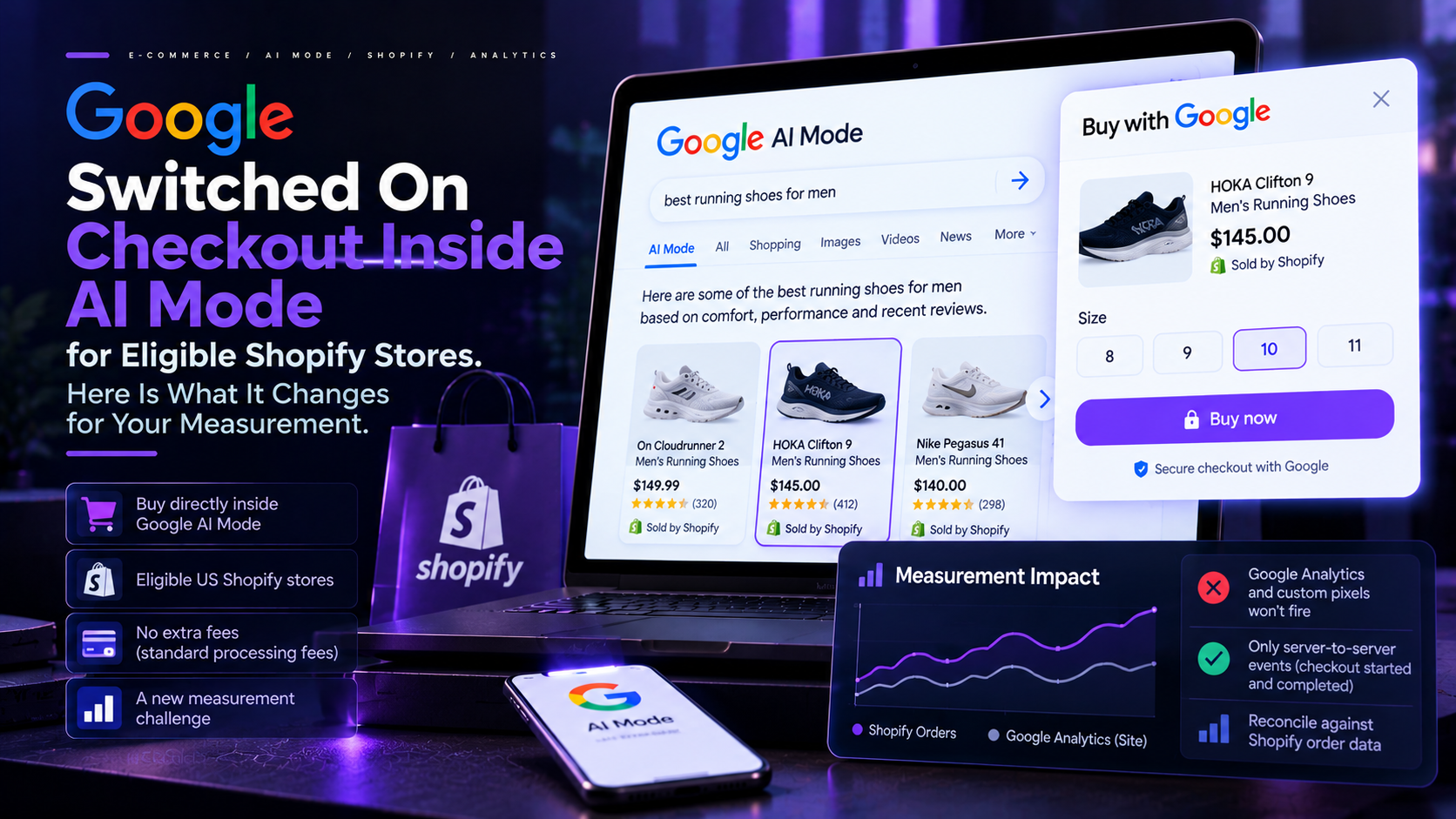
For years, shopping on Google followed a familiar path: a search, a click, a visit to your store, a purchase. Your analytics were built around it. In late September 2026, part of that path moved. Eligible US Shopify merchants can now sell directly inside Google’s AI Mode and the Gemini app, where a shopper taps Buy and pays without ever opening the merchant’s website.
For merchants, the change is both an opportunity and a measurement problem. Sales can arrive from a surface where your tracking does not run. This piece sets out what was announced, who is affected, how to opt out, what the checkout supports and what it does not, and a decision framework for whether to leave it switched on. We have kept to what documentation and reputable reporting confirm, and flagged what is unclear.
What changed
On September 22, 2026, Search Engine Land reported that Google is notifying eligible Shopify merchants that their products can be bought directly in AI Mode in Google Search and in the Gemini app. The checkout runs on the Universal Commerce Protocol, an open standard Google developed with other companies, including Shopify, that lets AI agents interact with merchants and payment systems during shopping.
Two details deserve attention. First, merchants did not have to apply. Search Engine Land reports that eligible products are included automatically once a Shopify store is matched with its Google Merchant Center account, and Shopify’s help center confirms that direct checkout is on by default for eligible stores. Second, the rollout is gradual. Shopify says direct checkout is still rolling out to Google users and may not yet be available in every store, and Google’s own documentation, as quoted by ContentGrip, describes the program as “a phased program for select participating merchants”.
Who is eligible
Shopify’s help center lists the requirements. Your store must be based in the United States and sell to US customers. You need a valid Google Merchant Center account and must meet Google’s requirements, including its free listing eligibility and return policy rules. Your products must be available in Merchant Center, either through Shopify’s Google and YouTube sales channel with product and shipping sync turned on, or through a third-party feed provider or manual upload. Products must also be eligible for Shopify Catalog, you must agree to the Shopify Agentic Storefronts Supplemental Terms of Service, and your terms of service, privacy policy and refund policy must be completed in your Shopify settings.
Direct checkout is shown only to US-based shoppers.
There is no extra fee. Shopify states that you pay only your standard payment processing fees. Merchants also keep the underlying customer and order relationship, according to Search Engine Land, and the retailer remains the seller of record, according to Google’s documentation as cited by ContentGrip.
How to opt out
If you want shoppers to complete purchases on your own site, Shopify’s help center gives these steps. In the Shopify admin, go to Sales channels, then Agentic. Deactivate the setting called Allow Shopify to manage for me. Click Google AI Mode and Gemini. Switch Direct checkout off, then click Save.
Opting out does not remove you from AI Mode. Your products can still appear in results, but shoppers are redirected to your online store to complete the purchase.
What direct checkout supports, and what it does not
The in-AI checkout is not an exact copy of your store’s checkout. Shopify’s documentation sets out the gaps.
Supported: automatic discounts and discount codes, and Shopify Functions for shipping, discounts and cart and checkout validation.
Not supported: subscriptions, product bundles, customizable products and B2B-only products. Local delivery, in-store pickup and pickup points. Requiring customers to sign in before checkout. Only a subset of accelerated checkout options. Many checkout blocks, including upsells, loyalty and rewards blocks, consent collection blocks, chat blocks and trust badges, may not display, so the checkout can look different from your own. Shopify also asks that required legal disclosures appear within the first 6,000 characters of a product description.
Why this is a measurement problem
Shopify’s help page states plainly that “Google Analytics and custom pixels won’t fire” in direct checkout. Only server-to-server pixel events fire, and only two of them: checkout started and checkout completed.
Your analytics tag, ad platform pixels and attribution tools all depend on code running in the shopper’s browser on your site. When the purchase happens inside Google’s surface, that code never loads. The sale is real, but the session your tools normally record does not exist on your side.
Three practical consequences follow.
Revenue can be undercounted in tools that rely on client-side tracking. If you compare Google Analytics revenue with Shopify order totals, a widening gap may be this checkout, not a tracking bug.
Channel reporting can shift. Because the journey no longer includes a visit to your site, orders may not be credited the way you expect. Shopify’s page does not describe how these orders are labeled in your admin or reports, and we found no authoritative source that does, so treat any confident claim about it with caution.
Funnel analysis loses steps. These buyers generate no product page views, add-to-cart events or checkout steps on your site, so a shift in conversion rate could reflect where people buy, not how well your pages convert.
The practical answer is to reconcile against Shopify’s own order data, which records the purchase wherever it happens, and to stop treating the browser-side analytics tag as the only source of truth for revenue.
What is still unclear
Some claims in circulation should stay out of your planning until they are confirmed. Some coverage repeats specific review thresholds, such as a minimum number of reviews and a minimum star rating. Those figures relate to Merchant Center’s store ratings rules for showing ratings with ads, and we could not confirm that they are conditions for this checkout. Shopify’s eligibility list above does not include them.
Reports of a separate, wider default-on rollout of agent checkout across Shopify, including a figure of about one million merchants, rest on thin sourcing, so we have not relied on them.
Finally, there are open questions on reporting: how these orders are labeled, what Google will offer in Merchant Center for AI surface performance, and how consent settings apply. Recheck the documentation before committing.
Opt in or opt out: a decision framework
There is no single right answer. It depends on what you sell and how you measure it. Use these questions.
Do you sell subscriptions, bundles, customizable items or B2B-only products? If these make up a large share of revenue, the AI checkout cannot handle them, and keeping the feature on mainly matters for your simpler products.
How much of your profit comes from checkout upsells or loyalty features? If the answer is a lot, redirecting shoppers to your own checkout protects that revenue.
How dependent is your reporting on client-side tracking? If your team, or your agency, cannot trust revenue numbers without it, you may prefer to opt out until your reporting is ready.
Do you want to learn? Some merchants will reasonably leave it on for a few weeks and compare Shopify order data with previous periods, as long as they set a review date.
For most stores, a good default is to keep the feature on for a defined trial period if your product mix is mostly simple, one-time purchases, and to switch it off if subscriptions, bundles or upsells drive revenue.
What to do this week
Open the Agentic section in Shopify and see whether direct checkout is on for your store.
Review your Merchant Center feed and your Shopify policies. Product discovery in AI Mode is powered by Merchant Center, so missing attributes, mismatched prices or incomplete return policies can limit what shows up.
Check product descriptions for legal disclosures in the first 6,000 characters.
Place a test order if possible and see how it appears in Shopify and in your analytics.
Reconcile weekly. Compare Shopify order totals with analytics revenue.
Why this matters for visibility
This checkout sits at the end of a discovery path, and the path begins with product data. Shopify’s documentation says product discovery in AI Mode is powered by Google Merchant Center, so a store whose data is complete and consistent has a better chance of being shown. That is where search engine optimization, generative engine optimization and answer engine optimization meet ecommerce: accurate titles, complete attributes, clear policies, authentic reviews and consistent information across your site and your feed.
The checkout does not change the basics. It raises the stakes on them, because a recommendation in an AI answer can now turn into a sale without a visit to your site. For brands that want to understand how they appear in these answers before deciding how to respond, an AI Visibility Audit is a sensible starting point, because you cannot manage what you have not measured.
Where this leaves you
The confirmed facts are these. Google and Shopify have enabled a native checkout in AI Mode and the Gemini app for eligible US Shopify merchants, powered by the Universal Commerce Protocol. It is on by default for eligible stores and can be turned off in the Agentic settings. Merchants keep the customer and order relationship. Google Analytics and custom pixels do not fire, and only server-to-server started and completed events are sent. Several features, including subscriptions and bundles, are unsupported.
The response is a decision, not a panic. Check your setting, choose deliberately, protect what depends on your own checkout, and measure through Shopify’s order data while your reporting catches up. Strong search engine optimization, generative engine optimization and answer engine optimization all start with clean product data, either way.
Frequently Asked Questions
1. Is Google’s AI Mode checkout turned on for my Shopify store?
If your store is based in the US, sells to US customers and is matched with a valid Merchant Center account, it is likely eligible, and Shopify says direct checkout is on by default for eligible stores. The rollout is gradual, so check Sales channels, then Agentic, in your Shopify admin.
2. How do I opt out of direct checkout in AI Mode?
In Shopify admin, go to Sales channels, then Agentic. Deactivate Allow Shopify to manage for me, click Google AI Mode and Gemini, switch Direct checkout off and save. Your products can still appear, but shoppers are sent to your online store to buy.
3. Do I still own the customer and the order?
Search Engine Land reports that merchants keep the underlying customer and order relationship, and Google’s documentation, as cited by ContentGrip, says the retailer remains the seller of record. Shopify charges no extra fee beyond standard payment processing.
4. Will Google Analytics track these purchases?
No. Shopify’s help page says Google Analytics and custom pixels do not fire in direct checkout. Only server-to-server started and completed events are sent. Use Shopify’s order data to reconcile revenue.
5. Which products and features does the AI checkout not support?
Subscriptions, bundles, customizable products and B2B-only products are not supported, nor are local delivery, pickup or required sign-in. Many checkout blocks, such as upsells, loyalty and consent blocks, may not display.
6. Do I need 100 reviews and a 3.5 star rating?
We could not confirm that. Those figures relate to Merchant Center store ratings for ads and are not on Shopify’s eligibility list.
7. Should I leave it on or switch it off?
It depends on your product mix and your reporting. Stores with mostly simple, one-time purchases may reasonably test it for a defined period. Stores that rely on subscriptions, bundles, upsells or client-side tracking may prefer to opt out.
If you want to know how your brand and products show up across Google and AI answer engines, that is exactly what we look at in a free AI Visibility Audit.

Related Reading
 Google Is Testing AI Overviews Inside Local Business Profiles. What Local Businesses Should Check Now.
 Google’s September Spam Update Has a Two-Week Rollout Window, the Longest of 2026. Here Is What to Do While It Rolls Out.
 Salesforce Just Gave Its AI Agents Names, Job Titles and Goals That Run for Weeks